

Logitech MX Vertical mouse review: vertical comfort
09.09.25
The history of computer mice is quite long. The first model was developed in the 60s, and they became widespread in the 80s thanks to the first Macintosh and Windows computers. It all started with cubic shapes, gradually smoothing out and acquiring streamlined shapes. The popular option today with the palm placed along the surface was the main one. Nobody thought about physiology, and they didn’t spend too much time at computers.
In the 2000s, a variant of the vertical layout of the mouse body was proposed. The palm was placed with the edge down, and the entire surface of the body with buttons was turned by 50-60 °. The idea of a vertical mouse is to hold the brush in a position similar to a handshake. The forearm and hand remain on the same line, preventing compression of the nerves.
Indeed, when working at a computer with a mouse for a long time, fatigue in the hand may occur. And even numbness of the fingers and pain in the palm. It should be understood that 99% of mice are standard and are the most common. Therefore, all observations of discomfort during use, of course, relate to conventional models. In fairness, it is also worth noting that often the cause of pain in the hand or arm is an incorrect fit, rather than the mouse itself. However, the factor of inappropriate ergonomics does exist. It is not that carpal tunnel syndrome has affected us, but it became interesting to see how the sensations would change when using a vertical mouse. We decided to check this with the Logitech MX Vertical.
Design and ergonomics

At first glance, the Logitech MX Vertical has an extraordinary appearance and design. However, it fits into your hand from the first time no less comfortably than a classic horizontal mouse. And this is probably the main discovery – a vertical mouse is no less natural in its shape and in the process of operation than a regular one. Take your regular mouse and turn it on its right edge in the air, resting it on the edge of your palm. You will get the same position as with a vertical mouse.

There are two main and additional buttons. Between the two main ones there is a scroll wheel with the ability to press. The buttons with the standard functions “forward” and “back” are located near the thumb. The button on top changes the cursor speed.

The base has a power button slider, an optical sensor, and a button for switching between three devices. A Teflon layer is applied around the entire perimeter for good glide on the surface.

The MX Vertical is heavier than the average gaming mouse, which is good for stability and control. For example, the rather large Logitech G502 X Plus gaming mouse weighs 105 g, while the Logitech MX Vertical weighs 135 g.

Hardware
The Logitech MX Vertical has an optical sensor that supports a range of 400-4000 pixels per inch. It can be adjusted in 50 DPI increments. The sensor is sensitive enough to move the mouse minimally and still comfortably reach all the necessary areas of the interface.
The mouse can be connected in one of three ways – via a USB Type-C cable, a Logitech Unifying Receiver or Bluetooth. The mouse uses version 4.2.
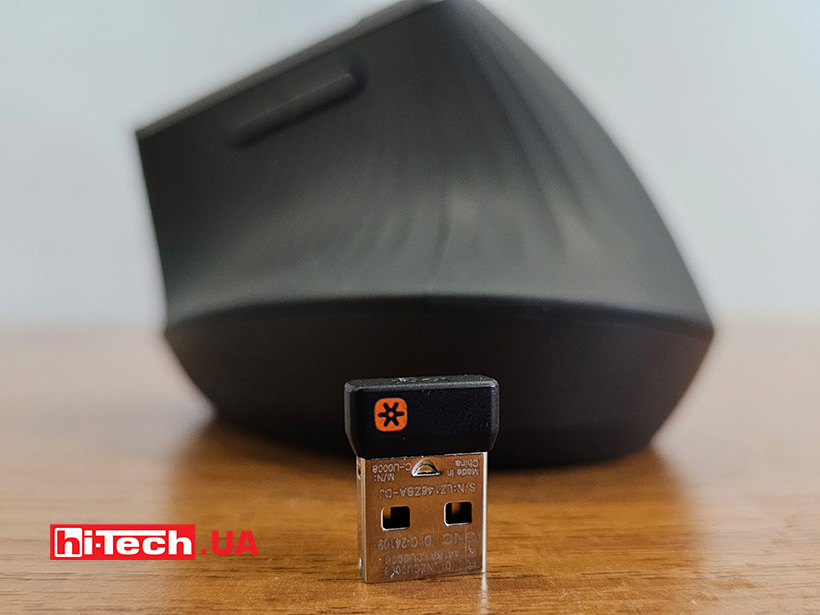
A Li-Po battery is installed. It is built-in, it cannot be replaced. The nominal capacity is 240 mAh.
The battery life is usually close to that declared by the manufacturer. In a month of use, the proprietary utility showed 30% of the battery used. At the same time, in a minute of charging, it gets enough to work for an hour. Logitech has always been fine with this. Energy-efficient sensors and components are used. Add to this an automatic sleep mode, from which the mouse can quickly wake up.
Usage experience
How can we describe the impressions of working with the Logitech MX Vertical? They are close to the usual, without revelations and turning the world upside down. Yes, sometimes some clicks or movements are performed differently, but no more. There is no paradigm shift. This is still the same computer rodent that chases the cursor arrow on the screen.
The fingers are located on the buttons only in the vertical plane, the thumb rests on the body. In horizontal mice, the weight of the hand is distributed over a larger area – the palm and four fingers. Here, the hand is held on the mouse only by the thumb and the friction force of the others, which lie on the buttons on the side. It is for MX Vertical that it is specified that this is an “engineered angle of 57°”. The coating is textured and contributes to a better grip. The hand does not slip off the body, and the fingers do not have to reach for the buttons – everything is just as convenient as with classic mice.

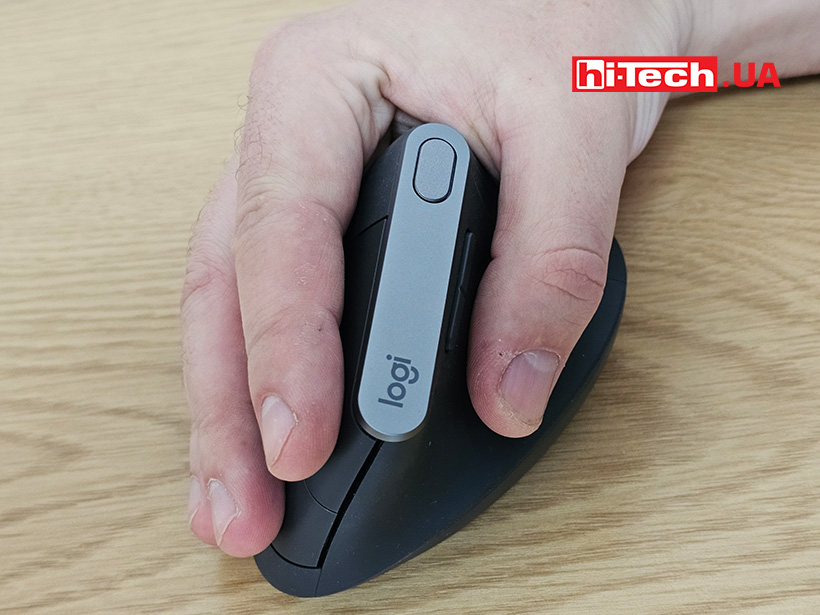

All buttons are set for this hand position. The main ones are shifted up. Between them is a scroll wheel, also with a button. Two additional ones are conveniently pressed with a raised thumb. There is another one that changes the cursor speed – it is on a silver pad on top. The switches of the main buttons are sensitive, they are easy to press. This is important, because the weight of the hand now does not help the fingers to press them.
The only inconvenience will be moving the mouse over the table. When lifting the case, the fingers can accidentally press one of the main buttons. But you can get used to it and hold the mouse with your ring finger or little finger, by the part of the case under the buttons. It is good that you need to move the mouse more often in games and this is practically not in demand during office work. And that is what the mouse was created for. Of course, you can play some turn-based strategy with it, but shooters or RPGs are definitely not for it.
The manufacturer specifically emphasizes that everything in the mouse is designed to reduce the need to move your hand. For example, it is stated that you will have to move this vertical mouse 4 times less than a traditional one.


Impressions
The Logitech MX Vertical vertical mouse perfectly combines a non-standard shape with excellent ergonomics. It takes almost no getting used to. Working with editors, texts, and a browser is just as convenient as with a classic mouse. On the one hand, we cannot say for sure which muscles of the hand have become less tired. This most likely requires more time. On the other hand, there was no discomfort during prolonged use, and fewer hand movements can be made. Productivity does not decrease with the new form factor. So, if you or your physiotherapist have come to the conclusion that it is worth trying a new version of the mouse, perhaps this is true.

Logitech MX Vertical specifications
| Sensor type: | optical |
| Resolution: | 4000 – 4000 DPI |
| Polling rate: | 1000 Hz |
| Number of keys: | 6+1 scroll wheel |
| Backlight: | no |
| Connection: | USB Type-C |
| Dimensions: | 120×78.5×79 mm |
| Weight: | 135 g |
| Battery: | 240 mAh |
| Price: | $140 |
Rating:
+ no need to get used to it for a long time
+ autonomy
+ sensor accuracy
Read also:
- Keyboard review Logitech G PRO X TKL RAPID: fine tuning
- Review of the wireless charging mat Logitech G Power
- Gaming mouse review Logitech G502 X Plus: age-old or eternal?


Don't miss interesting news
Subscribe to our channels and read announcements of high-tech news, tes





Oppo A6 Pro smartphone review: ambitious

 0
0 
Creating new mid-range smartphones is no easy task. Manufacturers have to balance performance, camera capabilities, displays, and the overall cost impact of each component. How the new Oppo A6 Pro balances these factors is discussed in our review.
Logitech G G325 headphones review: reliable and long-lasting
0 
Logitech G has released a new gaming headset that offers good ergonomics, stable connectivity, and high battery life at a very affordable price. Let’s talk about the Logitech G G325 in more detail
Enthusiasts have found a way to use YouTube as cloud storage for any files YouTube

A project has appeared on the GitHub platform that offers a way to store files on YouTube as videos without losing data. The development, called yt-media-storage, actually turns video hosting into storage, using the features of processing and uploading content to the service.
Norwegian electronics store will give GTA 6 to those who give birth on the day the game is released games GTA

Norwegian electronics retailer Komplett has announced an unusual promotion dedicated to the release of Grand Theft Auto VI. The company has promised to give a free copy of the game to all families whose children are born on the official release date – November 19, 2026.