

Acer Nitro V 14 ANV14-61 (N9.QTFWW.001) gaming laptop review: ice and power
09.12.24
Acer has released a new gaming laptop module in white. It is characterized by its comparative compactness, fast screen matrix and processor with graphics card, which will allow to get decent performance thanks to optimization by artificial intelligence algorithms.
Design and layout
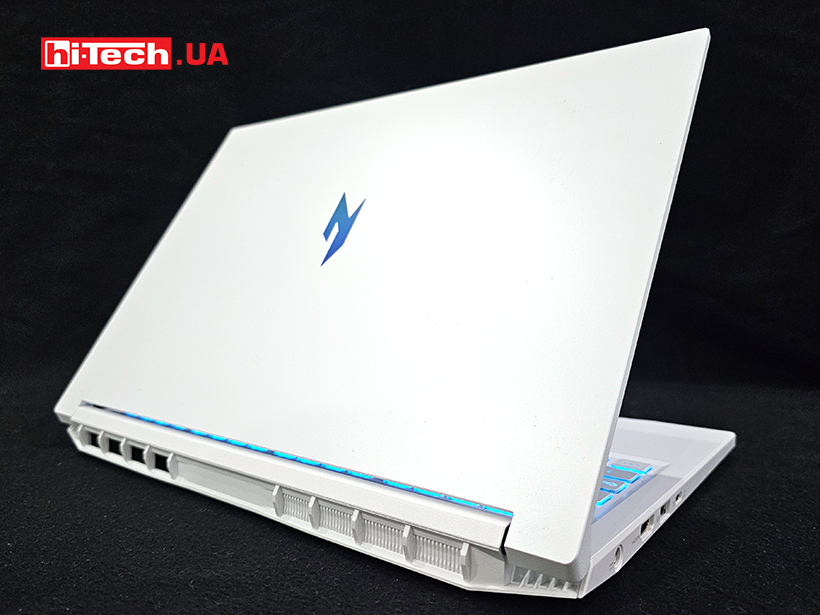
The Acer Nitro V 14 ANV14-61 can be called elegant despite its gaming credentials. It has an advanced microphone array above the display and a variety of interfaces for connecting devices.
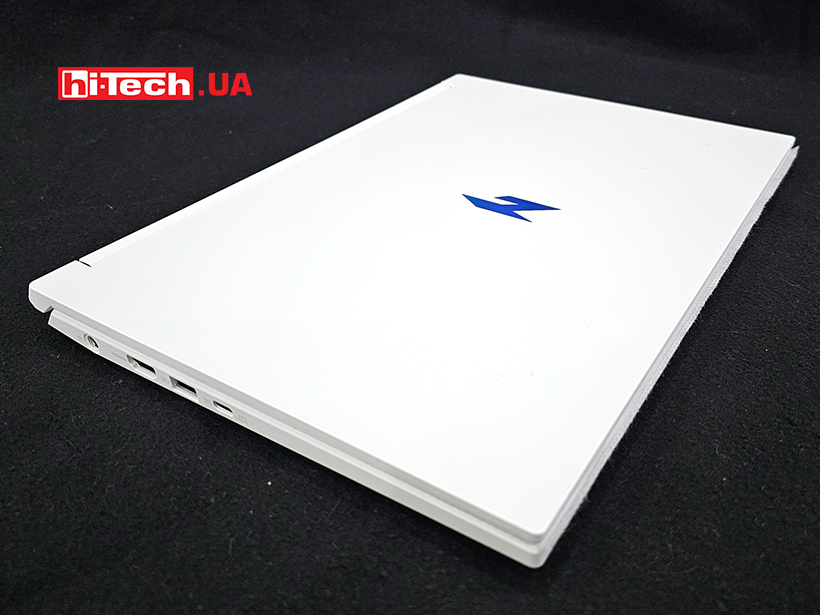
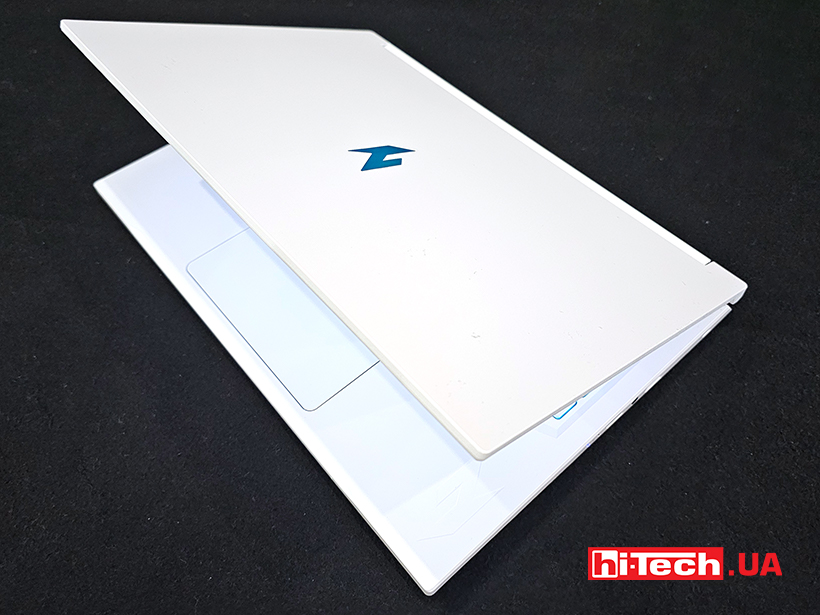
The plastic body has decorations on almost every surface. On the lid we see the Nitro series logo in a chameleon-like color. It shimmers beautifully in the light, emphasizing the white color.
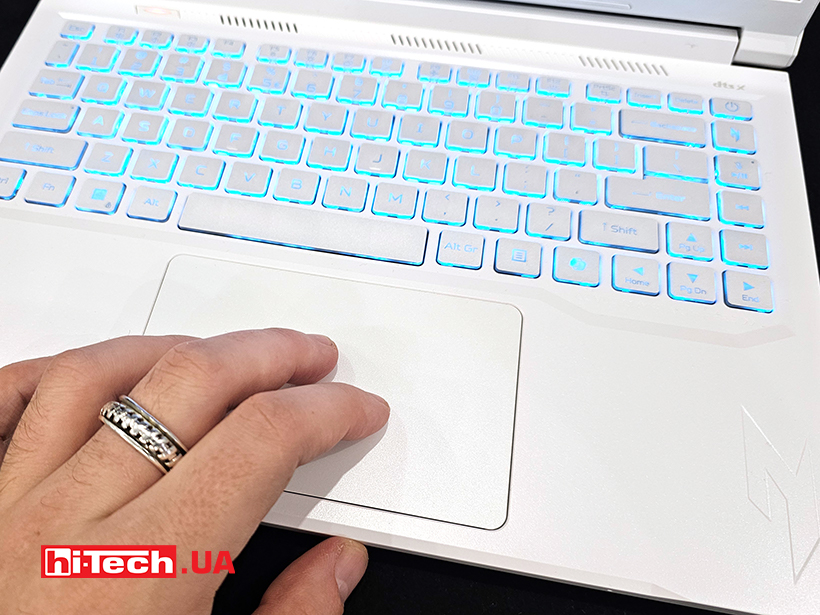
There is also such a logo near the keyboard in the lower right corner under it. A series of air holes are made above the buttons. On the bottom there are two speakers, spaced along beveled edges. The sound reflects off the surface. They have a nice, loud and fairly high-quality sound for a laptop.
The end near the touchpad has a massive cutout, which allows you to conveniently open the lid with one hand. It will come in handy when you use the device on the go, holding it on a scale, for example. The frames around the display are thin, the upper and lower ones have a pair of spacers so that the matrix does not touch the keyboard when closed. Although the lid bends noticeably, which with a certain pressure can still lead to the appearance of button marks on the screen surface.
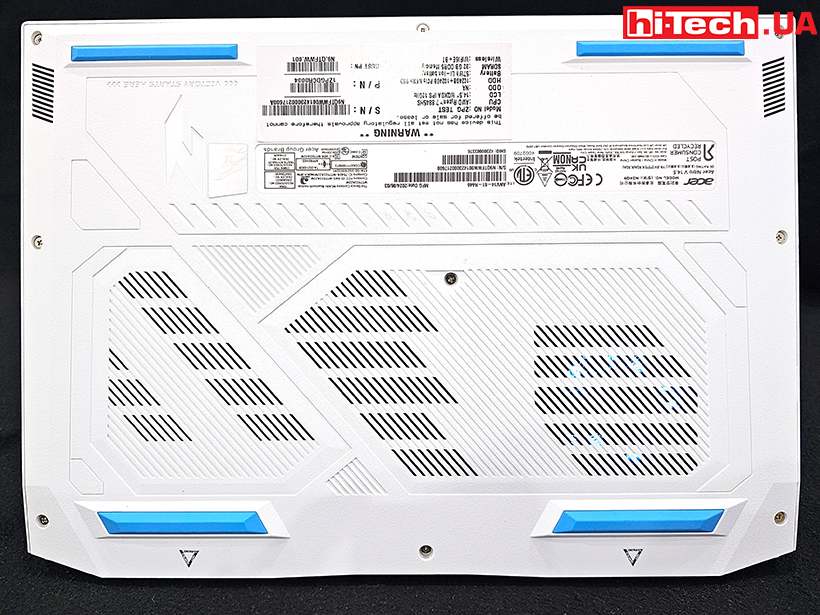
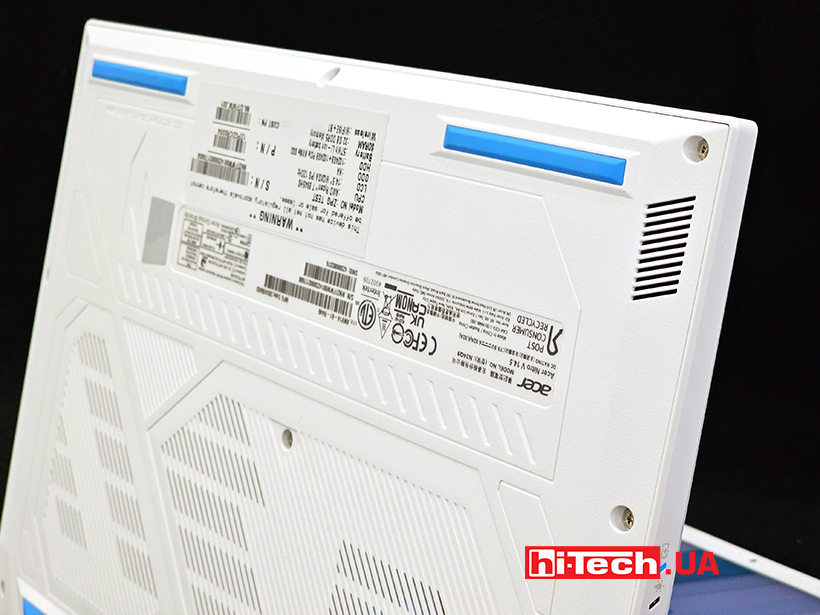
Interestingly, the bottom of the case is very diverse from a design point of view. The panel itself has relief prints that suggest the shape of a discrete graphics card. In addition to technical stickers, there is also a logo of this series of laptops. The cooling cooler is backlit. Four fairly high legs have a favorable effect on cooling and air circulation. The back has two large diffusers with decorative meshes. But only one is through – in the half where, in fact, the fan is installed.
In general, the Acer Nitro V 14 ANV14-61 laptop will appeal to those who want to get a device with compact dimensions, without losing a fast matrix and more powerful components. If the gaming forms are not embarrassing – the device can definitely be called beautiful.
Ergonomics of the Acer Nitro V 14 ANV14-61
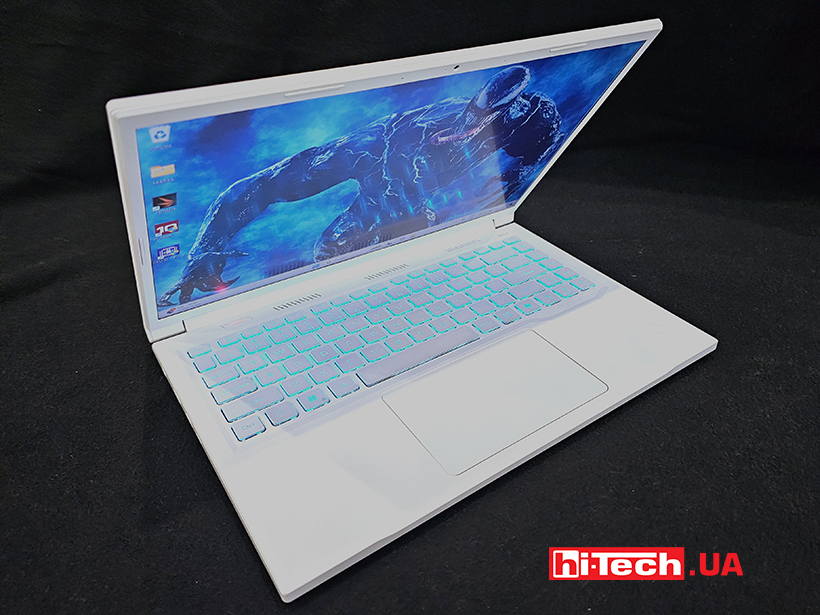
The keyboard does not have a numeric keypad, but there are no cut-down keys. The backlight is only one shade – light blue. All letter buttons are square in shape and large enough for comfortable typing.
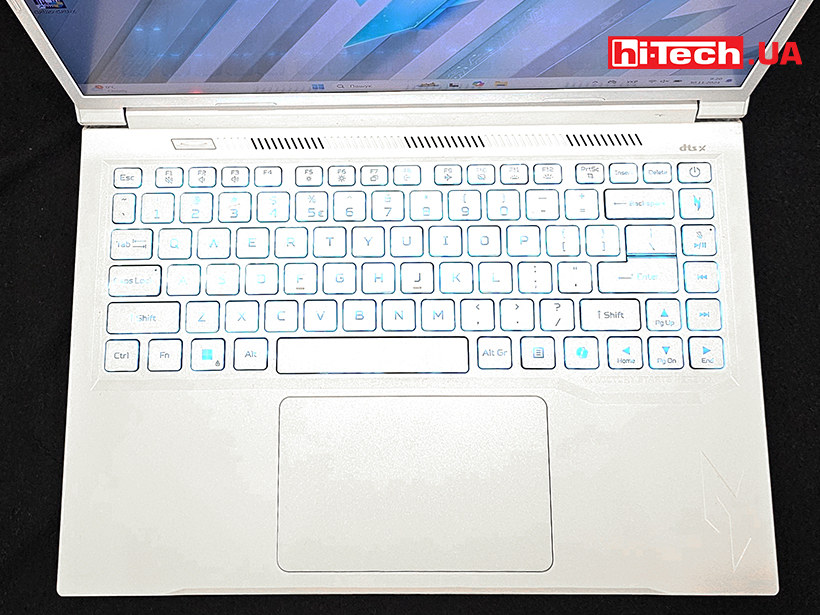
Shift, Backspace, Enter are medium-sized, but more than large enough for this form factor. The power button is embedded in the keyboard field – in the upper right corner. Below it is the Nitro Sense utility launch button.
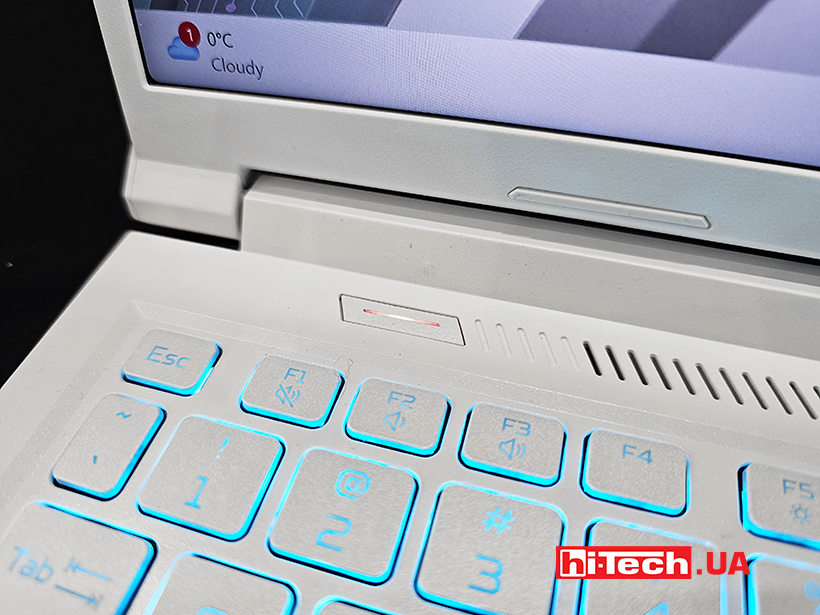
But a separate button switches performance modes. It is installed in a row of grilles above the keyboard – oblong and with a separate backlight. Why not make it a power button for the device? A somewhat strange decision.
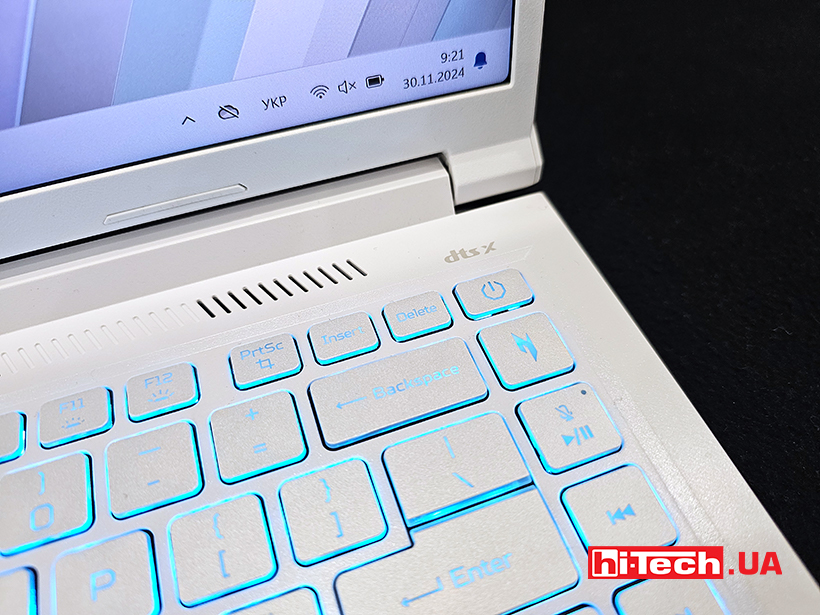
In light of the AI boom, we find the Microsoft Copilot launch button. The software corporation promised that it could be assigned to other commands. And so it is, although the choice is still small – you can launch a search or an office suite.
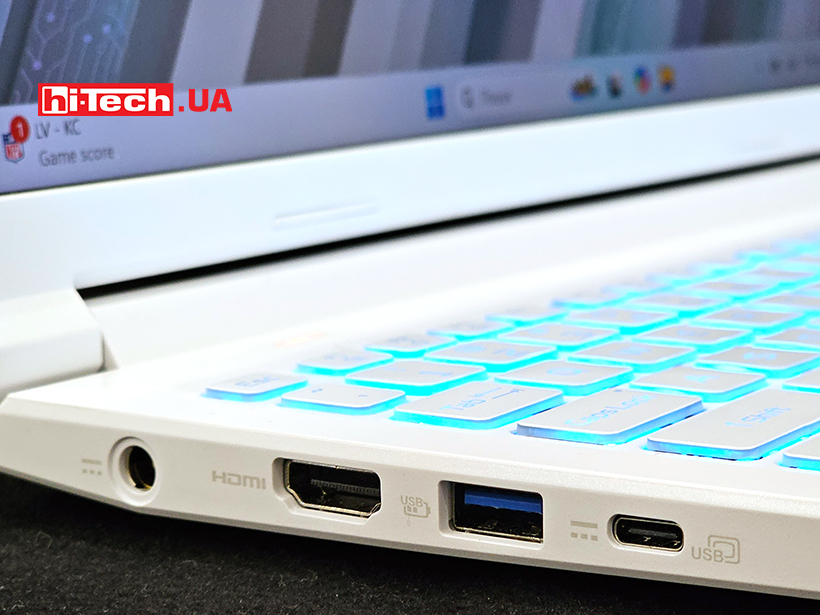
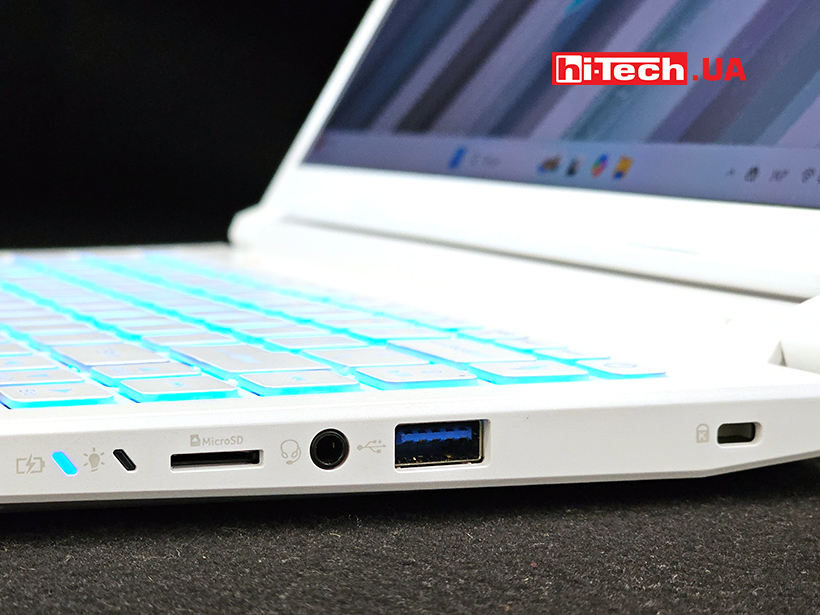
The connectors are distributed on the side edges. On one side there is a power connector, HDMI, USB Type-A and USB Type-C. On the other side there is a Kensington lock, USB Type-A, an audio connector, a MicroSD memory card slot and two indicator LEDs.
Nothing was moved to the back, although the space between the diffusers was left there. We have seen its use in other laptop models of the company.
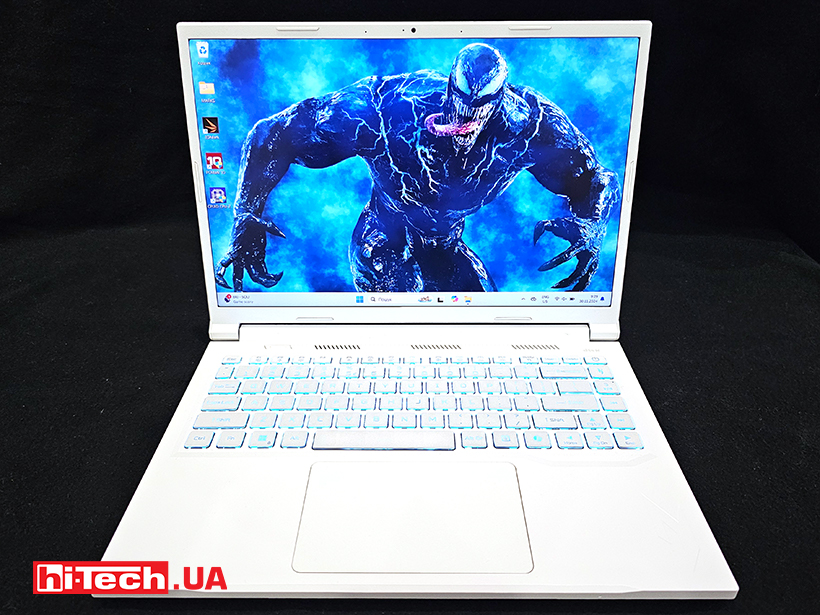
Above the screen is a webcam and a microphone array. They are adapted for online communication, broadcasting and voice work in general. The proprietary Purifiedvoice technology filters out extraneous noise around the speaker and cuts off what it can from the voice of the interlocutor on the other side of the screen.
Equipment
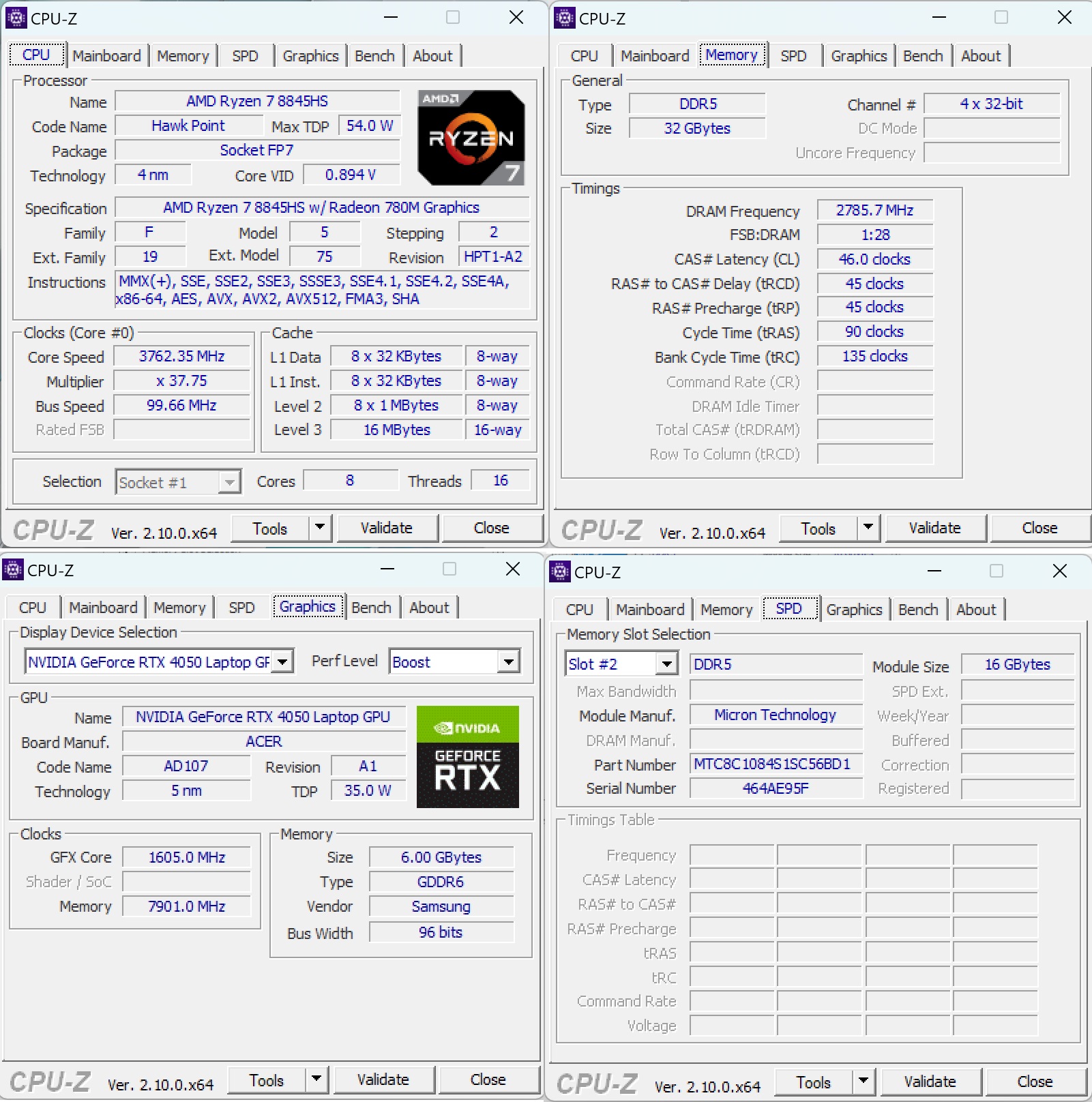
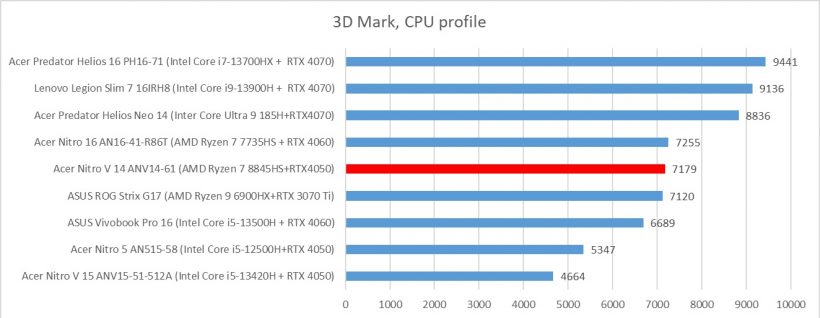
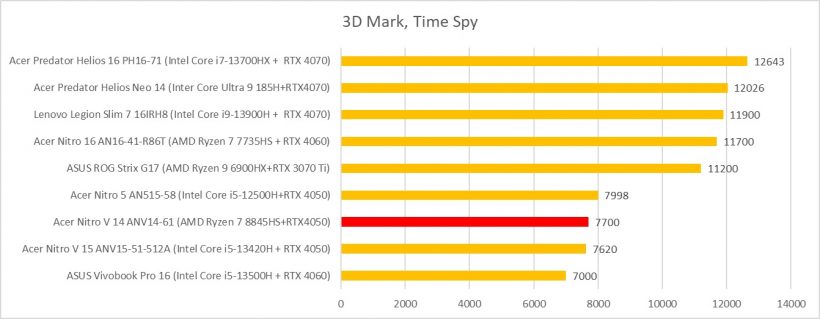
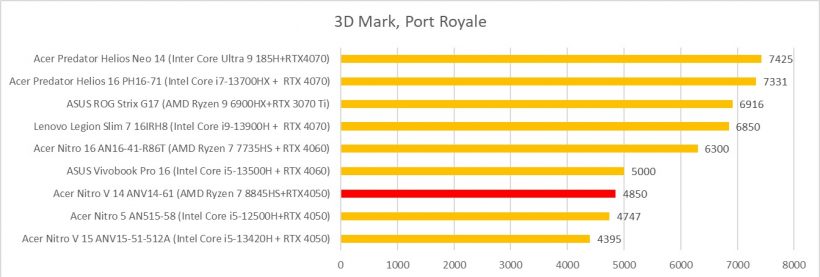
The installed AMD Ryzen 7 8845HS is a Hawk Point chip, which is equipped with 8 cores and supports 16 threads thanks to SMT support. The processor operates at a frequency of up to 5.1 GHz. The APU not only has all the features of the Zen 4 architecture, but also boasts the second-generation Ryzen AI technology. The processor operates at the maximum possible TDP for it – 54 W. As an integrated video processor, it has a Radeon 780M.
The AMD 8845HS has 16 MB of L3 cache and a RAM controller with a frequency of up to LPDDR5x-7500 and up to DDR5-5600. The PCI-Express speed is limited to a lane of 1.97 GB/s, which corresponds to the 4.0 specification. In our case, 32 GB of DDR5-5600 RAM is installed.
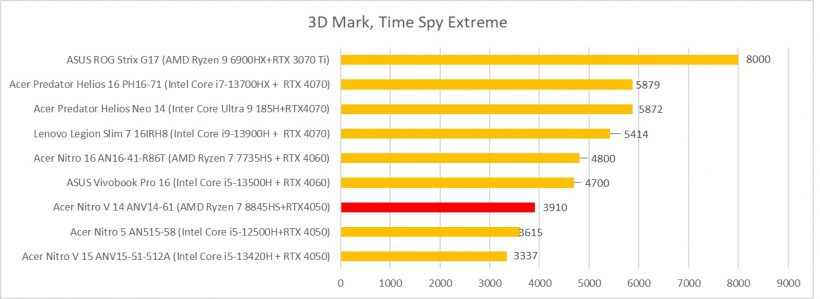
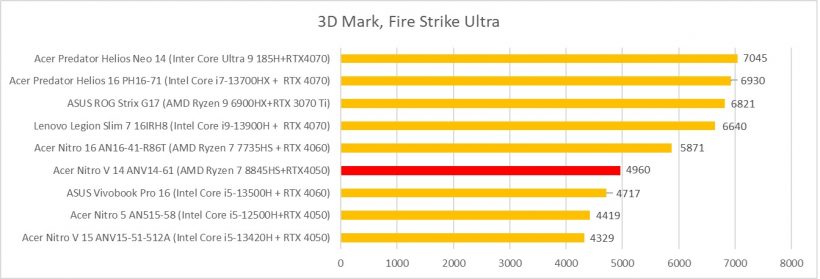
The Nvidia GeForce RTX 4050 is based on the AD107 chip and uses the Ada Lovelace architecture. It provides 2560 shaders and uses 6 GB of dedicated GDDR6 graphics memory with a clock speed of 16 Gbit/s (effective) and a 96-bit memory bus. Performance, as always, depends heavily on the laptop and TDP settings. In this case, it is the maximum possible – 115 W. It is most suitable for games with a resolution of 1920×1080 at high settings, but of course with the caveat that the game is optimized.
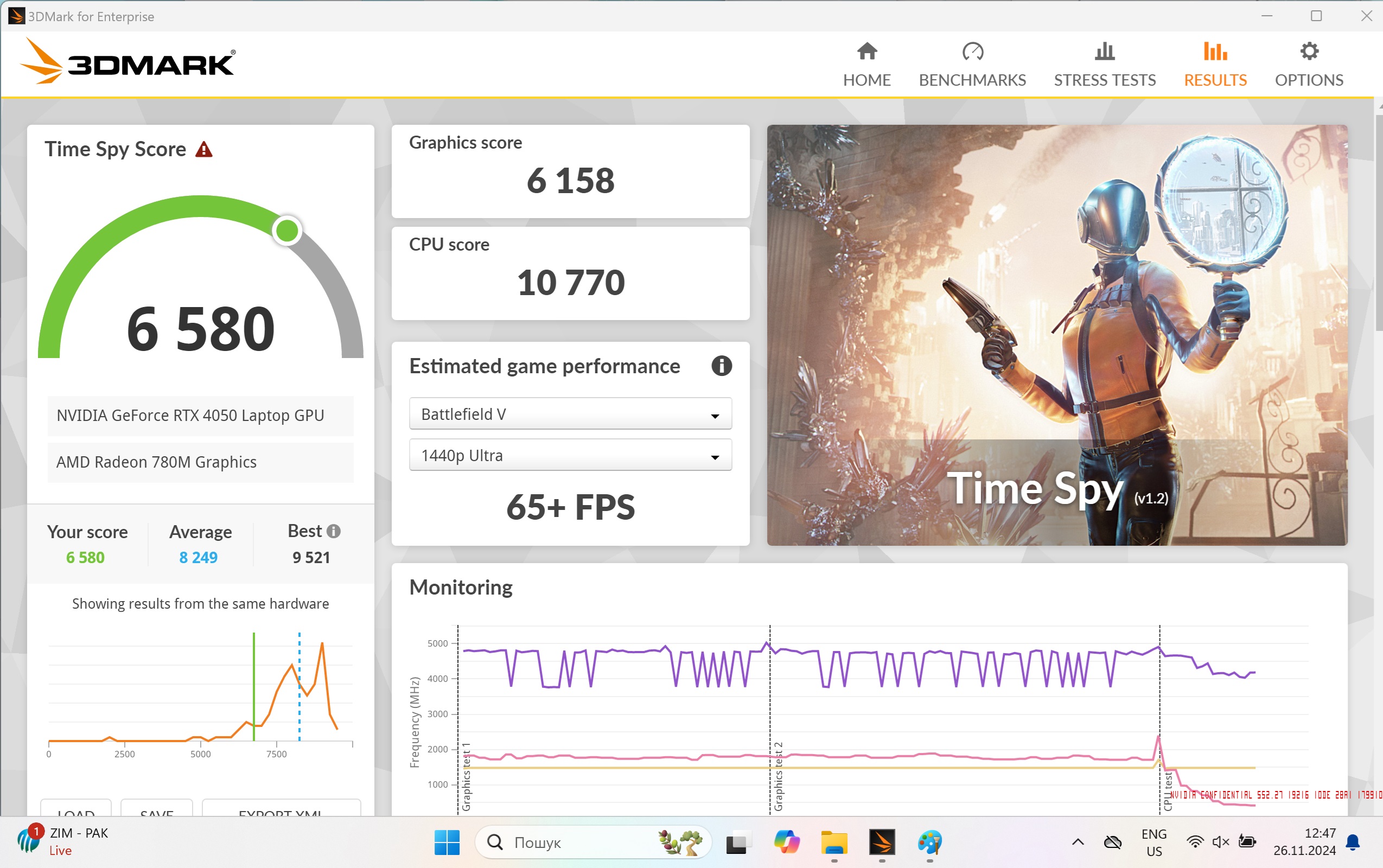
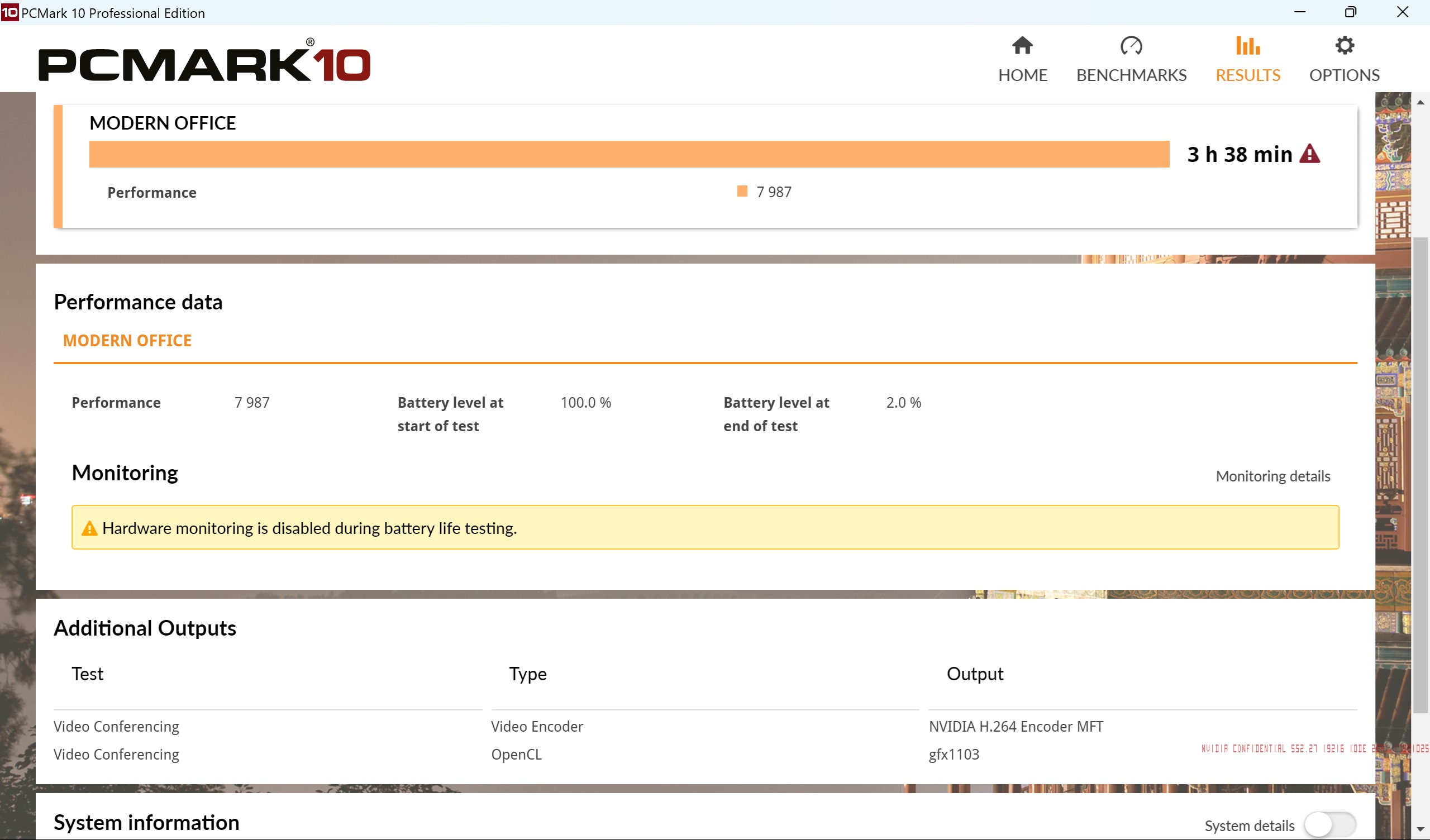
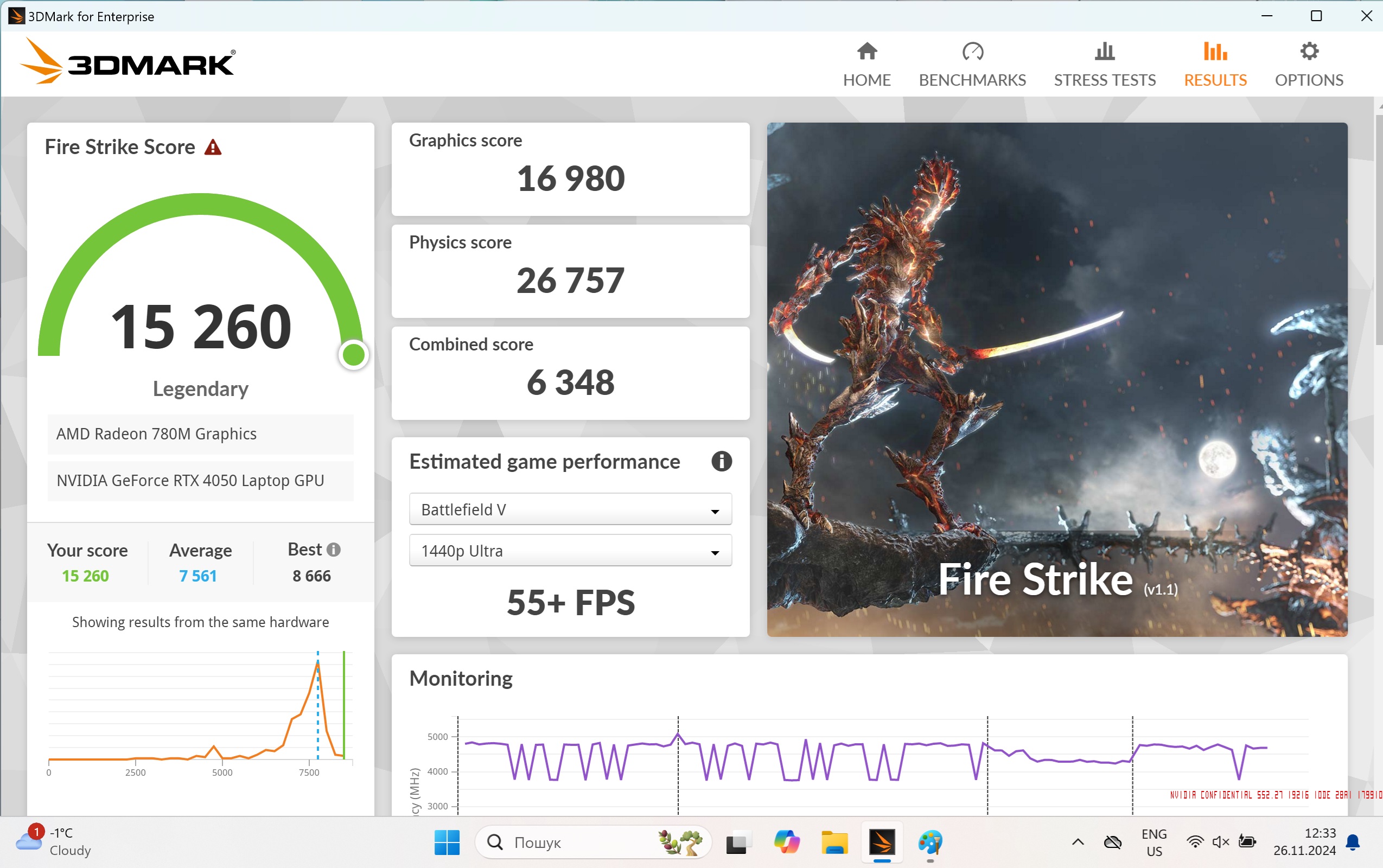
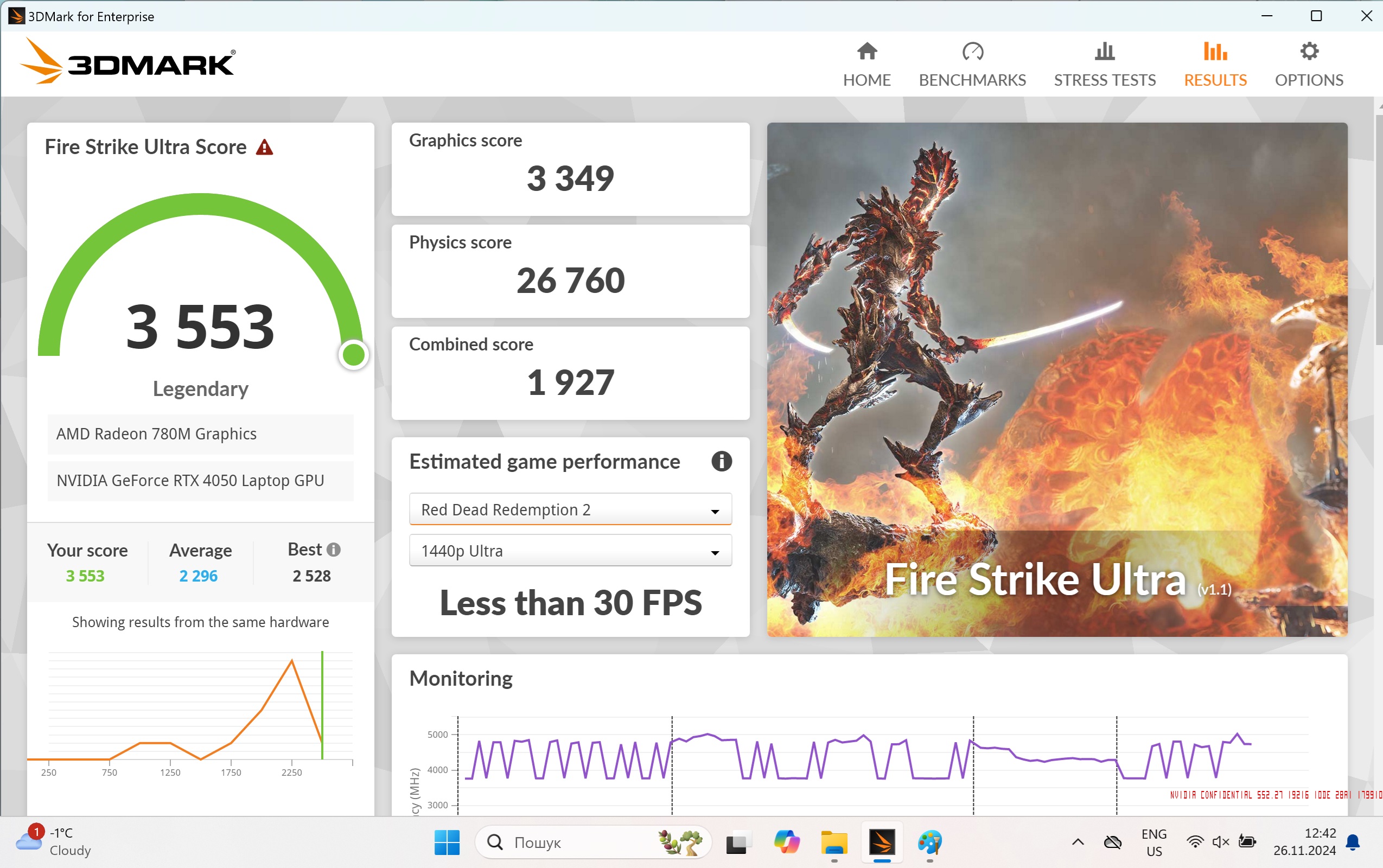
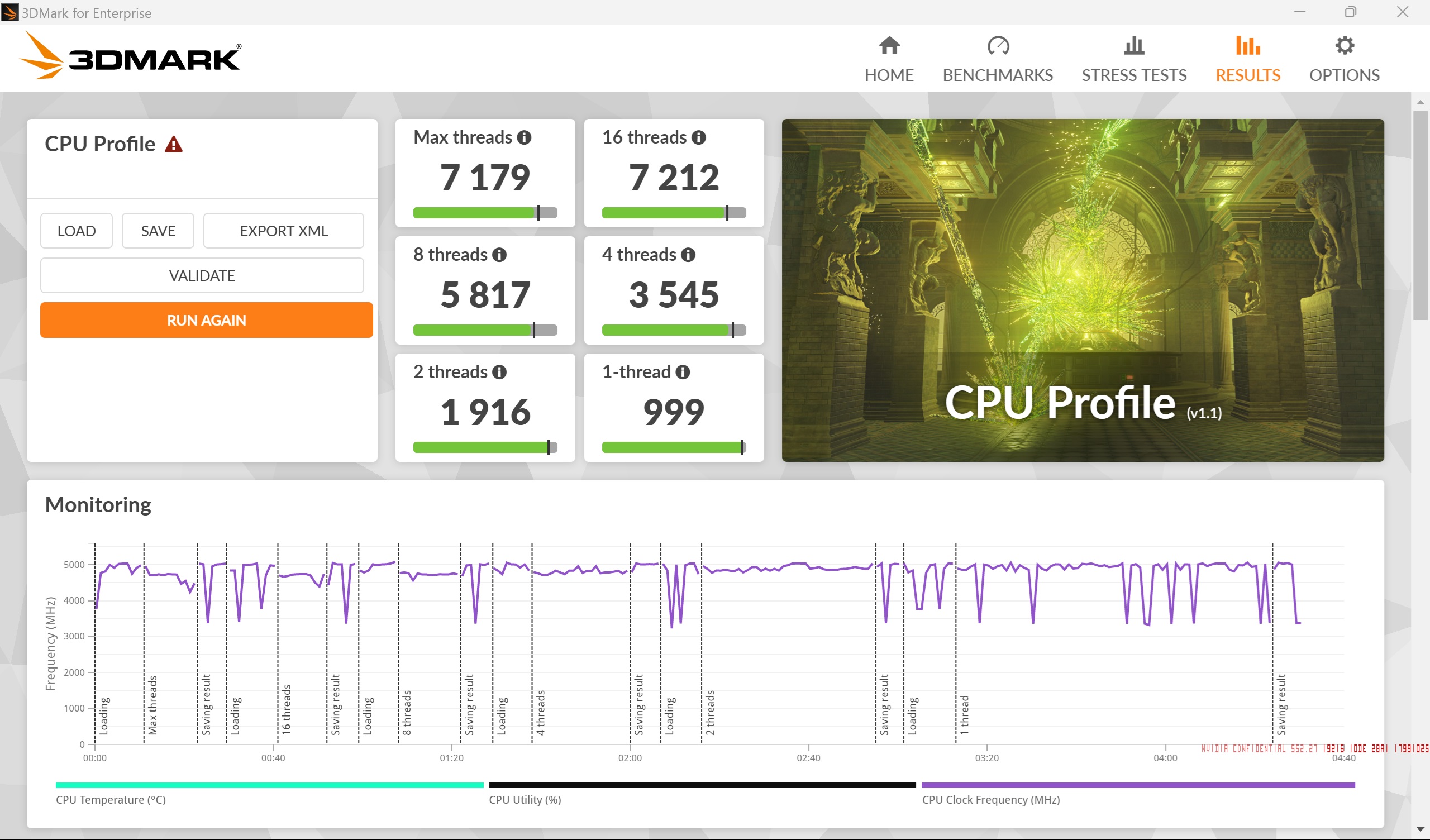
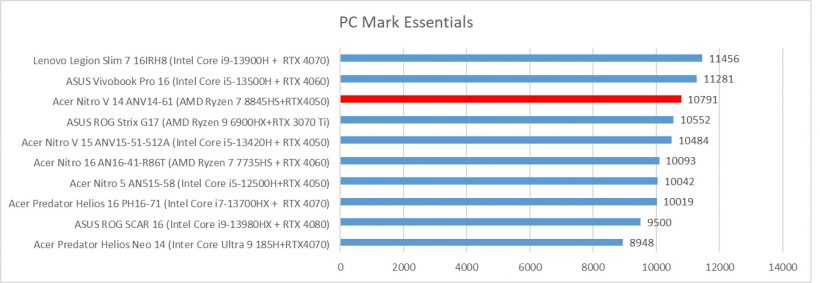
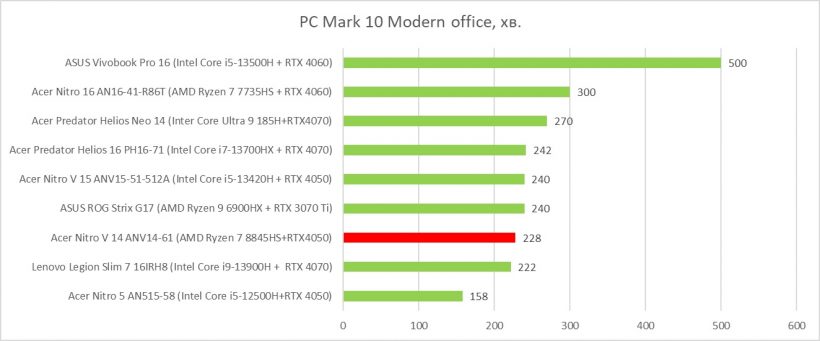
It will cope with rendering video projects and photos. In terms of games, the chip will allow you to play most games in 1080p resolution at medium graphics settings. Not a grail, but given the compactness of the device as a whole, it is a good help. Although we would make a controversial statement that the Acer Nitro V 14 ANV14-61 is more convenient for work than games. A 2 TB SSD is installed for data storage. Together with a sufficient amount of RAM, this is a significant advantage given the comparative affordability of the laptop.
Impressions
Acer Nitro V 14 ANV14-61 can be called elegant, despite its gaming affiliation. It is small in general, has a noticeable thickness for effective cooling of components. White color and design accents generally create a cool image of the device. The case is not branded, and for this model it is produced exclusively in white.
A small screen with a fast matrix will make work and games comfortable, at the rates that the iron will pull out so accurately. The AMD Ryzen 7 8845HS processor will cope with media rendering and will allow you to play at medium graphics settings. We would make a controversial statement that Acer Nitro V 14 ANV14-61 is more convenient for work than games.
In the most expensive configuration, the device will cost about $1600, and the minimum $1300 in official stores. All comments about the markup from official distributors leave in the comments of course, we will definitely consider them. And then do not forget about the official warranty and the opportunity not to rack your brains where to fix the video or motherboard. Although such cases are rare, sleeping peacefully in our time is a luxury.
Acer Nitro V 14 ANV14-61 (N9.QTFWW.001) Laptop Specifications
| Display: | 14.5”, 2560×1600 (16:10), 120 Hz, 0.2 ms |
| Processor: | AMD Ryzen 8845HS (8 cores, 16 threads), 5.1 GHz, 54 W |
| Video adapter: | Nvidia GeForce RTX 4050, 6 GB GDDR6, 2455 MHz, 35 W |
| RAM: | 32 GB DDR5-5600 |
| Storage: | 2048 GB SSD, Samsung, PCIe 4.0 NVMe M.2 |
| Connectors: |
|
| Webcam/IR sensor/microphone/LAN: | 1080p/yes/yes/no |
| Card reader: | MicroSD |
| Fingerprint sensor: | no |
| Communications: | Wi-Fi 6E 802.11ax, Bluetooth 5.3 |
| Keyboard backlight: | yes |
| Sound: | 2×2 W speakers |
| Battery: | 76 Wh, Li-Ion (4-cell) |
| Additional: | Keyboard backlight, lid logo |
| Operating system: | Windows 11 Pro |
| Dimensions: | 324.12×255.35×20.9 mm |
| Weight: | 1.7 kg |
| Supplier: | Company representative office Acer Ukraine |
| Price: | approximately $1600 |
Rating:
+ compactness/performance
+ design
+ ergonomics
+ card reader
Read also:
- Lenovo Legion Pro 7 Gaming Laptop Test: Stratosphere
- ASUS ROG Strix SCAR 18 Laptop Test: More
- Acer Predator Helios Neo 14 Laptop Test: Compact Domination


Don't miss interesting news
Subscribe to our channels and read announcements of high-tech news, tes






Oppo A6 Pro smartphone review: ambitious

 0
0 
Creating new mid-range smartphones is no easy task. Manufacturers have to balance performance, camera capabilities, displays, and the overall cost impact of each component. How the new Oppo A6 Pro balances these factors is discussed in our review.
Oppo Reno16 Pro 5G smartphone review: well-heeled
0 
Oppo Reno16 Pro 5G looks like a balanced smartphone, in which the manufacturer tried not to make a single characteristic the defining one. It has many advantages. Let’s tell you what
Gemini, Keep, and Motion Assist: The New Android Drop Features

Google introduced a fresh package of Android Drop updates for smartphone users, including AI integration in search, new messaging capabilities, and health-related features.
Acer Predator Atlas 7: A New Handheld With 24GB RAM and 1TB SSD

At IFA 2026, Acer introduced the Predator Atlas 7, an updated 7-inch handheld gaming console.