

Review of the Deepcool AK620 processor cooler. Install on LGA 1700 socket
10.12.21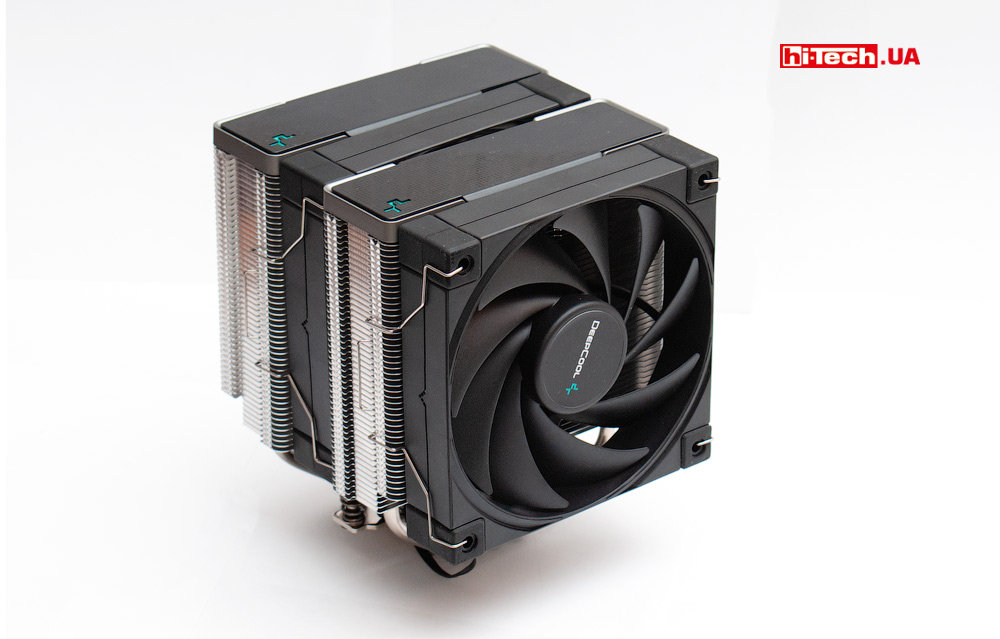
It seems that many users have already begun to become somewhat bored with the topic of RGB backlighting in various computer components, and recently the trend of so-called stealth systems has been developing in parallel.
These are assemblies without backlighting at all or with only some minimal modest highlighting of the necessary elements.
Moreover, this is not an attempt to save money, but a conscious choice.
If we talk about processor air coolers, there are many different top-category models on the market that are quite popular among enthusiasts, but at the same time lack built-in backlighting. As an example, we can cite products from companies such as Noctua, be quiet!.
It seems that Deepcool is also not on the side of these trends.
The new Deepcool AK620 is a high-end non-backlit tower cooler designed to work with powerful processors up to AMD Ryzen 7/9 and Intel Core i7/i9.
The declared “power dissipation level” is up to 260 W.
The AK620 model is about to appear on the Ukrainian market (expected to be on sale from mid-December), and we managed to get a copy for testing even before the start of sales.
Getting acquainted
At the beginning of 2021, Deepcool slightly changed its corporate identity. Judging by the new devices, there is a transition towards greater rigor and solidity in design.
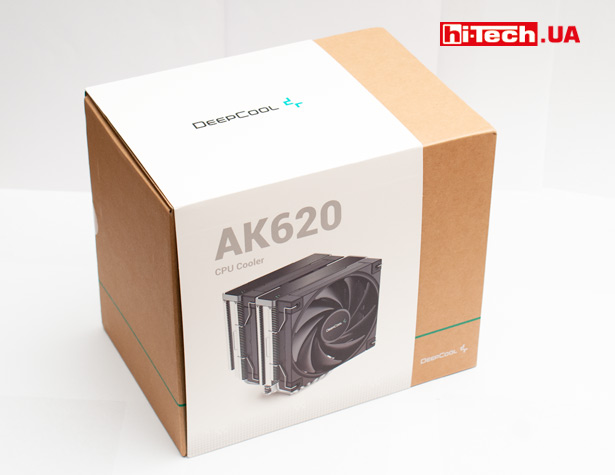
Moreover, this is also reflected in the packaging design.
In the box you can find a set of mounts for platforms with Intel LGA2066/2011-v3/2011/1700/1200/1151/1150/1155 sockets, as well as AMD AM4/AM3+/AM3/AM2+/AM2/FM2+/FM2/FM1.
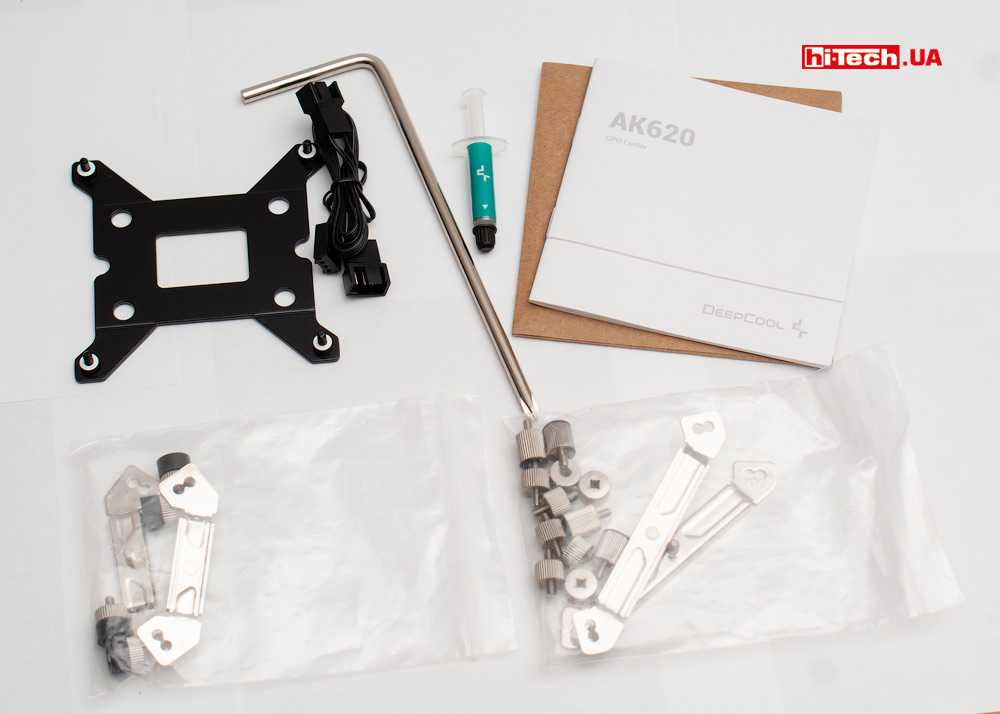
Rear mounting plate – metal
Compatibility is also ensured with the new LGA 1700 socket, but we will talk about this separately.
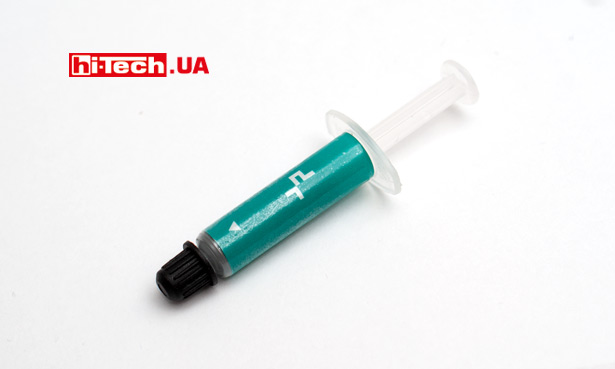
If in lower-level Deepcool coolers, for example GAMMAXX 400 EX, thermal paste is supplied in a small bag, which is enough for only one application, then along with the AK620 there is already a syringe with reserves of thermal paste for several applications.
Additionally, a screwdriver is provided, which will be useful when installing the cooler.
The quality of the cooler components leaves a very pleasant impression.
The design of the radiator provides for the installation of two 120 mm fans at once.
One is placed directly in the center between the cooling plates, and the second is fixed on the outside. Together they “blow” the radiator in the same direction.
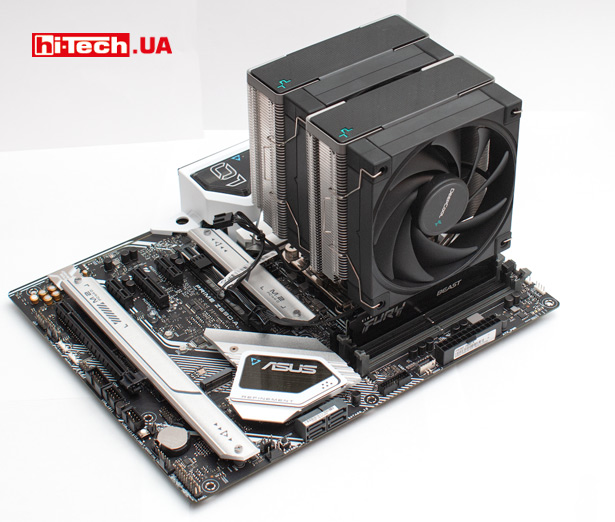
Coolers with 120mm fans are less demanding on case width (they are not as tall) compared to coolers with 140mm fans
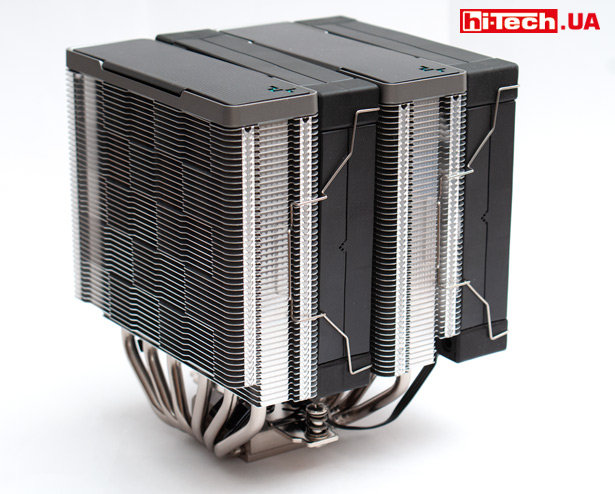
The assembled cooler weighs quite a lot – 1.45 kg
Pay attention to the peculiar checkerboard pattern formed by the plates on the walls of the radiator. Judging by the information on the Deepcool website, this design improves the efficiency of the cooler.
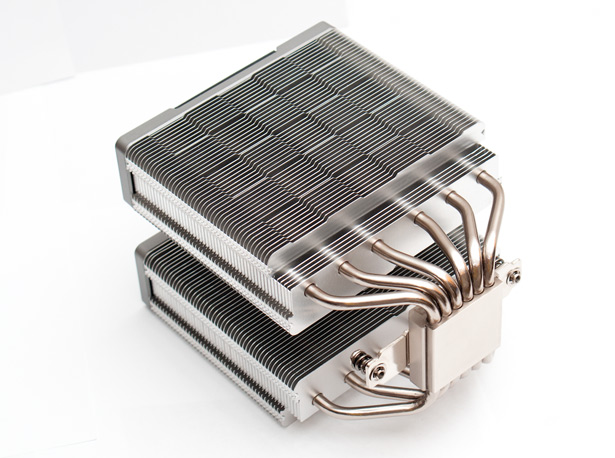
Copper base and heat pipes are nickel plated
The base of the heat receiving plate is made of copper. “Direct contact” technology, when thermal tubes directly touch the processor cover, is not used here.
Oddly enough, “direct contact” is a solution usually used in entry-level and mid-level coolers. And in higher-end models you can see a solid copper plate, as in the Deepcool AK620.
We have no complaints about the quality of processing and the flatness of the base. In the example presented in the test, everything was done at a very high level. Faint concentric marks from milling are noticeable, but one gets the impression that this was even done specifically for an aesthetic effect.

Six 6mm diameter copper heatpipes run through the base and are evenly distributed inside the two “halves” of the heatsink.
You can see that the tubes are soldered to the base (this is good).
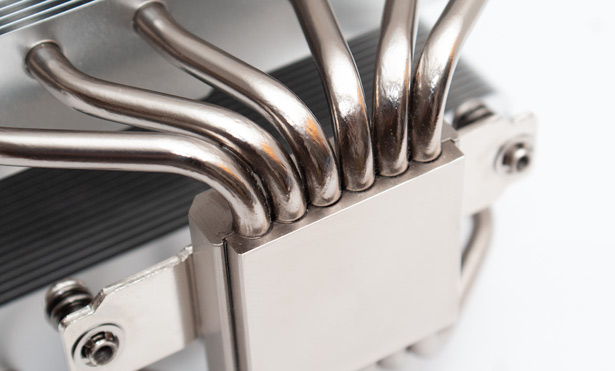
On top, the manufacturer decided to hide the ends of the tubes with decorative plastic covers. This is a fairly common solution in tower coolers.
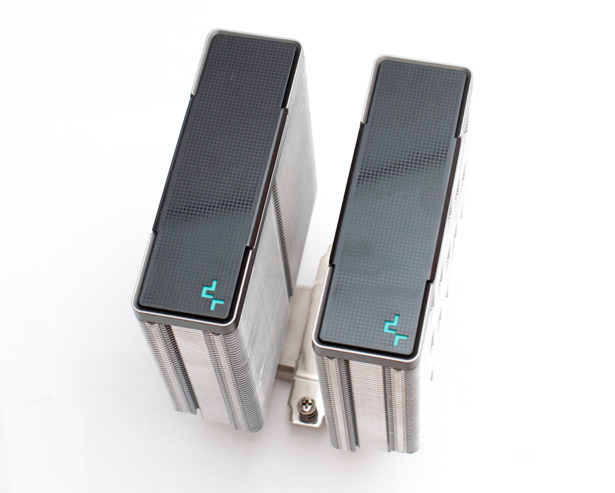
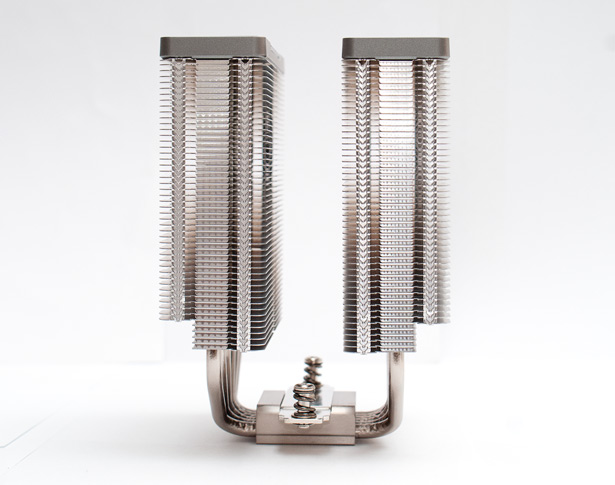
The fans used are another confirmation that the device belongs to a fairly high class.
Their marking is DF1202512CM. They are based on a fluid dynamic bearing design. Simpler coolers usually use “sleeve” fans.
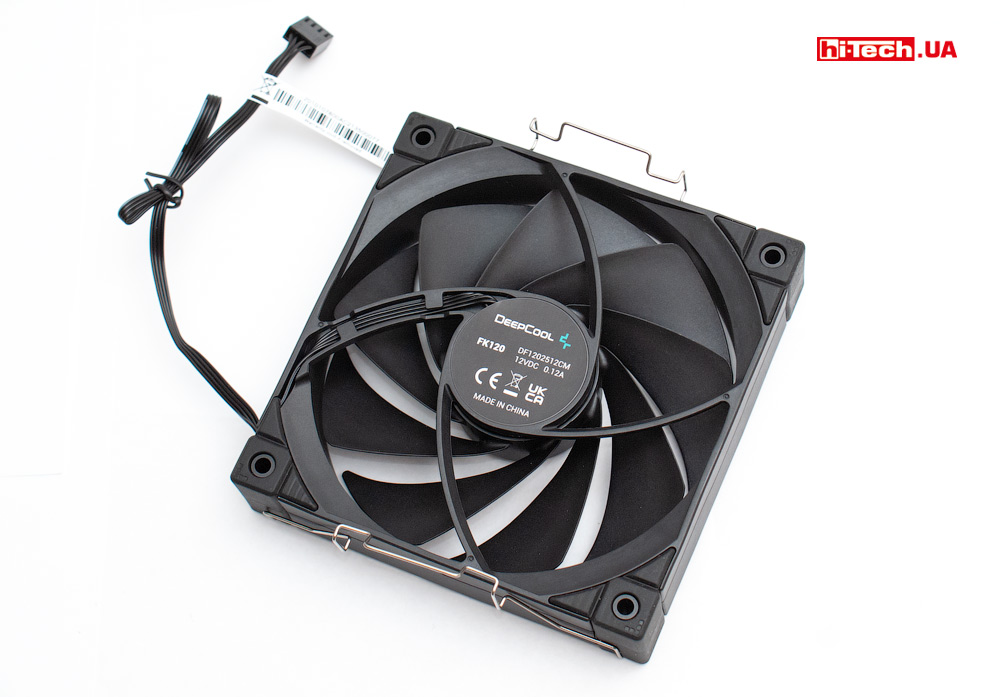
Fan Deepcool DF1202512CM
Supported speed range: 500 – 1850 rpm. Connection – 4Pin.
It is, of course, impossible to verify the reliability of the DF1202512CM during tests, but it is believed that fans on hydrodynamic bearings have a good balance of durability and quiet operation. The declared resource is 50,000 hours.
There are rubberized inserts installed at the corners of the fans. Theoretically, they dampen microvibrations and can have a positive effect on acoustic performance (less noise).
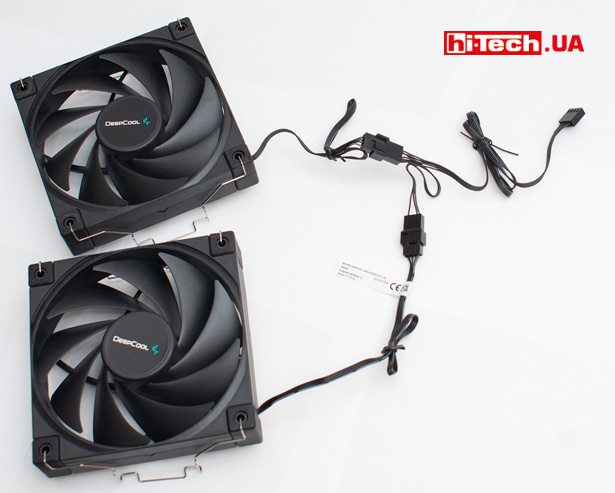
For convenient connection of two fans to one connector on the motherboard, a special adapter is included in the kit.
Intel Alder Lake processors (Intel Core 12 gen) require a new cooler mount for the LGA 1700 socket
Intel Core 12 gen desktop processors, also known as Alder Lake, introduced at the end of October, received a new LGA 1700 socket.
It is important that the cooler mount for the LGA 1700 socket is now new and is not compatible with those that were previously available.
Compared to the mount for Intel 1200/1151/1150/1155/1156, the LGA 1700 has slightly increased the distance between the holes.
But why was this done?
The fact is that in LGA 1700 processors, compared to their predecessors, the “landing height” has changed slightly.
The distance between the surface of the processor cover and the surface of the motherboard has become smaller(less than 1 mm).
It is likely that in order to avoid situations with insufficient clamping in existing cooling systems for processors, Intel had to introduce a new mount.
Some companies have announced that they are ready to provide additional adapters for installation on LGA 1700 free of charge to owners of some of their coolers.
How can owners of Deepcool coolers get a free mount for LGA 1700 in Ukraine?
Judging by the data on the Deepcool website, owners of the following coolers can expect to receive a mount compatible with LGA 1700:
- GAMMAXX 400/GTE/GT Series
- NEPTWIN Series
- AS500 Series/AK620
- ASSASSIN III
- CASTLE/GAMMAXX Liquid Cooler.
Most likely you will need to provide some evidence that you purchased this cooler and motherboard + LGA 1700 processor.
At the Deepcool representative office we learned some details of how this will happen in Ukraine.
First, you need to submit a support request (through the global official website).
If the application is approved, the Ukrainian representative office of DeepCool will send the necessary kit, compatible with LGA 1700, via Novaya Pochta. Delivery is paid by the recipient.
We have received information that mounts for Deepcool AS500 Series/AK620, ASSASSIN III, CASTLE/GAMMAXX Liquid Coolers have already arrived in Ukraine.
Also, LGA 1700 mounts can be provided by the stores themselves when purchasing the corresponding Deepcool cooler, if it is purchased for an LGA 1700 system.
The first batches of Deepcool AK620 coolers are supplied without LGA 1700 mount (you can get it for free). Versions of the Deepcool AK620 released from early 2022 will already have an LGA 1700 compatible mount included
Some sets of adapters for installation on LGA 1700 can be purchased separately (not yet available in stores).
Such an adapter for Deepcool AK620 (EM002-MKNNIN-G-1), for example, will cost 165 UAH.
Mounting for LGA 1700. What has changed?
Along with the Deepcool AK620, we were also provided with a mount kit (EM002-MKNNIN-G-1) compatible with LGA 1700.

For convenient connection of two fans to one connector on the motherboard, a special adapter is included in the kit.
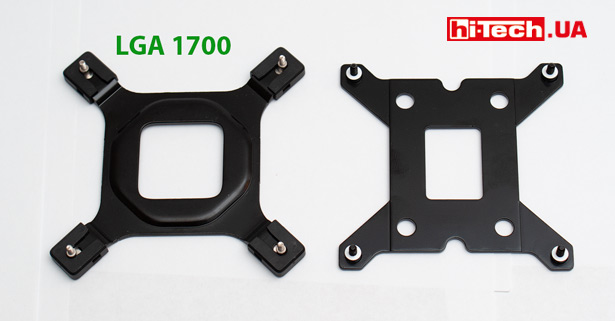
This kit consists of a back metal plate, a set of mounting posts and screws, as well as two brackets on which the cooler is mounted.
Redesigned rear plate. It is somewhat confusing that the diameter of the studs has become smaller. The distance between the studs can be adjusted.
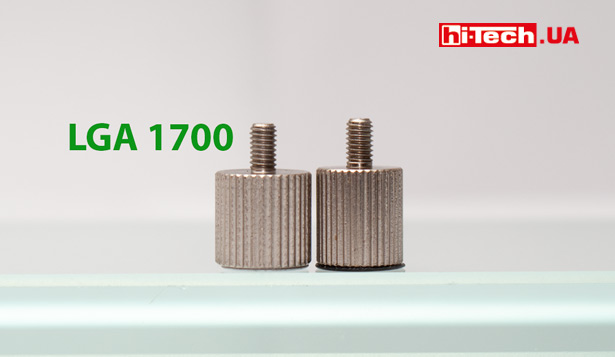
The screw-in racks have become slightly lower, which is logical, given that the surface of the cover of Intel LGA 1700 processors is also lower in relation to the board.
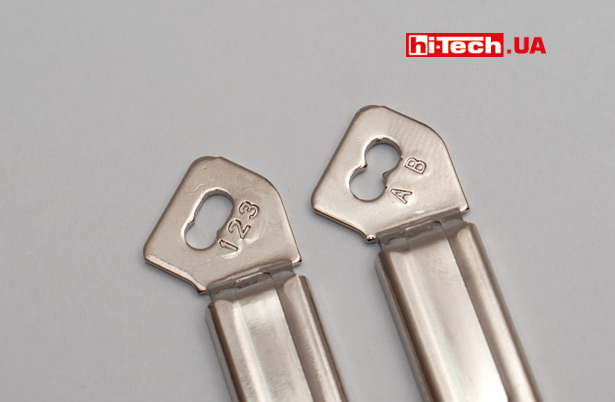
The new mounting strips provide not two, but three options for mounting holes.
Install
The cooler installation process can be called convenient and simple, especially if this is not the first time you have done this.
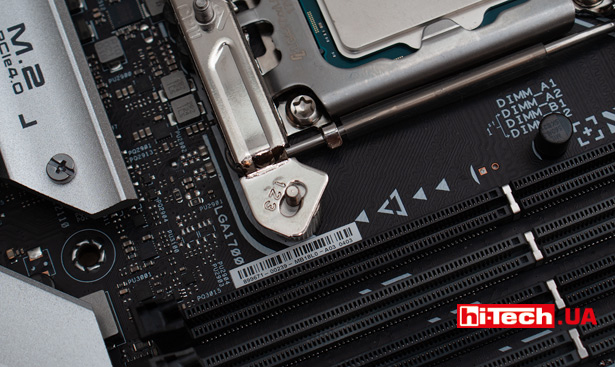
Four barrel stands are screwed onto the back plate studs. Then metal strips are fixed to these racks, to which the cooler is attached.
To attach the cooler, you must remove the internal fan. The staples holding it in place are very soft and the process does not cause any difficulties.
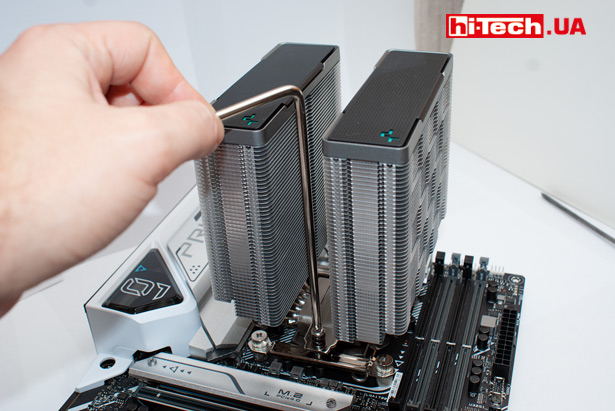
There is no pressure adjustment, the cooler is screwed to the bars all the way
After installation on the ASUS PRIME Z690-A board, it is noticeable that the cooler’s radiator does not come into contact with anything.
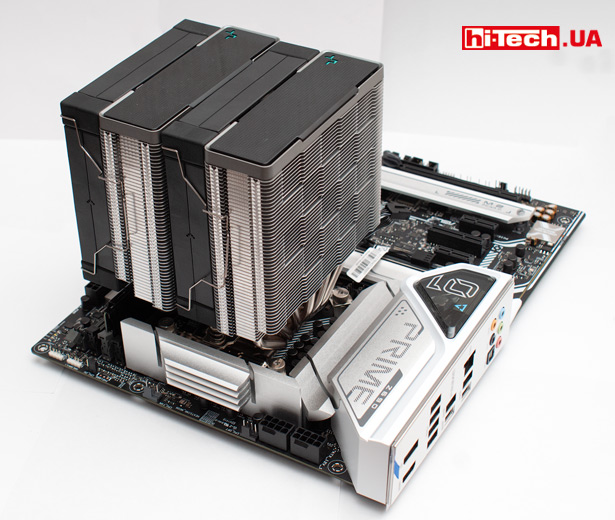
But on the RAM side there are some nuances.
Due to the design features, the fan “hangs” directly above the RAM connectors.
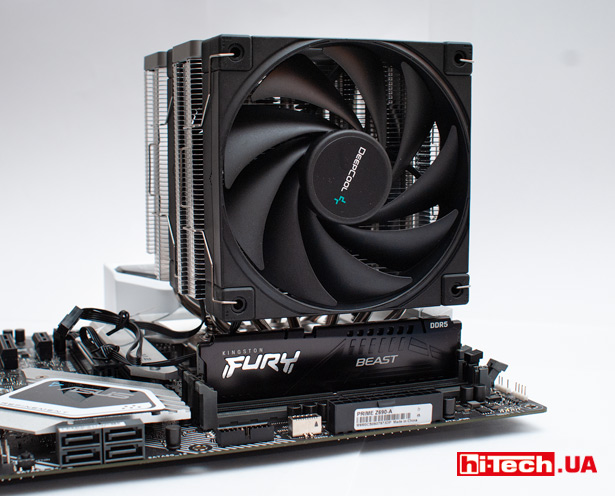
This will create inconvenience when installing or removing memory sticks. Most likely you will have to remove the fan each time.
In most cases, the distance above the memory to the fans will be sufficient. If the radiator of the RAM module is very high, the cooler fan will need to be moved a little higher.

We used 16 GB DDR5 5200 MHz Kingston Fury RAM and, as you can see, there is plenty of space to spare.
Cooling the Intel Core i7-12700K
The capabilities of the Deepcool AK620 cooler were tested when cooling an Intel Core i7-12700K processor.
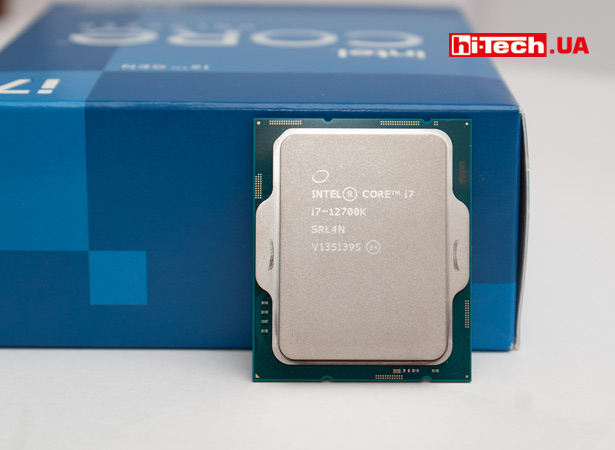
Intel Core i7-12700K
This is the latest Intel processor, which, when restrictions are removed, can have very high power consumption and, accordingly, heat dissipation.
Cooling it under load on all cores is not an easy task.
By the way, with the number of cores Intel has now it’s not so simple. Intel Core i7-12700K contains 8 “large” P-cores, and 4 additional E-cores.
I would like to draw your attention to the fact that the maximum power dissipation in watts declared by cooler manufacturers is a very arbitrary value.
Two different processors operating at the same power consumption using the same cooler can have very different temperatures.
Much depends on the quality of the thermal interface under the cover of the processor itself, on the structure of the processor chip, its size, etc.
In modern processors, the transition to a more “fine” technical process leads to the fact that, as the density of transistors per unit area increases, the “thermal concentration” increases. It becomes more and more difficult to remove heat.
Therefore, say, cooling a modern Intel Core i7-12700K and cooling an Intel Core i7-5960X from 2014, operating with the same consumption of 150 W, are completely different tasks in terms of heat dissipation. Cooling the Intel Core i7-12700K will be more difficult.
Test system configuration:
- Motherboard: ASUS PRIME Z690-A
- Processor: Intel Core i7-12700K
- RAM: 1×16 GB DDR5 5200 MHz (Kingston Fury KF552C40BB-16)
- Storage: Goodram SSD IRDM M.2 1 TB
- Power supply: Enermax Revolution D.F. 650W
Tests were carried out at room temperature at 22 °C on an open bench.
We used the Cinebench R20 application. It puts a good load on all processor cores, forcing it to operate at increased power consumption levels.
When running the Intel Core i7-12700K on the ASUS PRIME Z690-A board in the factory-limited mode for the processor, power consumption in Cinebench R20 was approximately 150 W.
If the restrictions are removed, then power consumption under the same conditions increases to 175 W.
After that, we slightly raised (by 0.05 V) the operating voltage of the processor and “forced” it to work with a power consumption of 200 W.
Parameters were monitored using the HWiNFO application.
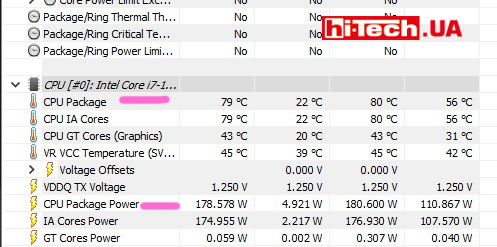
The CPU Package power parameter shows the current processor power consumption.
And CPU Packageindicates the current temperature of the hottest processor core. This is the value we recorded.
Measurements were carried out with the fan speed set manually. Automatic speed control was disabled
The following values were used:
- 550 rpm. – this is almost the minimum rotation speed. The sound of operation can only be heard at a close distance from the cooler.
- 1000 rpm — quiet operation, the sound of operation is difficult to hear against the background of other system components
- 1350 rpm — generally quiet operation, but the sound is noticeable
- 1850 rpm — maximum speed, noise is well felt, but within moderate limits.
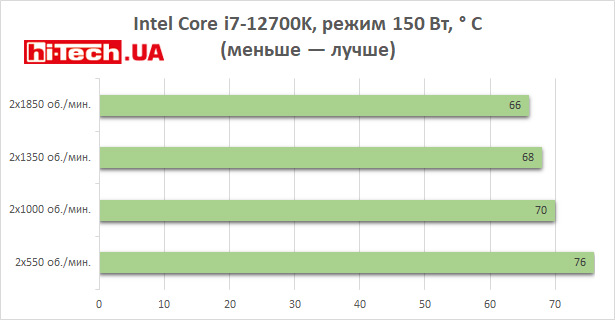
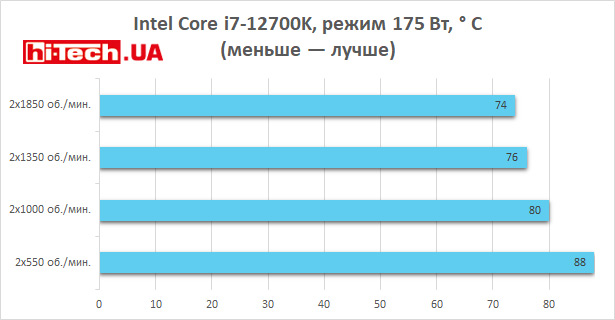
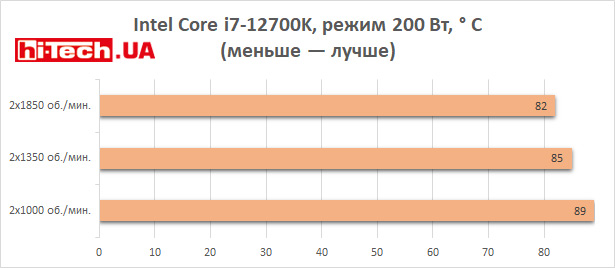
As you can see, even with disabled restrictions and increased power consumption, the Deepcool AK620 cooler very successfully cools such a powerful processor as the Intel Core i7-12700K.
And this is with maximum load on all cores. In real scenarios, you can see this only in some special applications for rendering and modeling. In games, for example, temperatures will be tens of degrees lower.
And if you take some simpler processor, for example, a 6-core Intel K-series (it is also far from weak, but simpler compared to the Core i7-12700K), then “comfortable” temperatures, apparently, can be maintained even at high speed about 1000 rpm and below at maximum load.
Conclusions
Even when examining the Deepcool AK620, details are noticeable that are usually characteristic of high-end coolers.
This includes the overall quality of the external design, a large number of heat pipes, and the copper base of the heat sink.
This is supported by fans on hydrodynamic bearings rather than bushings.
I must admit, I liked the design of the Deepcool AK620. He is non-aggressive, which is trendy today, and strict.
But more importantly, the AK620 provides efficient cooling. It’s a pity we didn’t have anything to compare it with, but the results shown are very good.
Judging by the measurements, the capabilities of the Deepcool AK620 are sufficient for the top processors. And when using a mid-level CPU, the cooler will provide a very decent headroom, ensuring impressively quiet operation even under maximum load.
But all this is supported by a corresponding price.
It is expected that Deepcool AK620 will go on sale with a price of 2350 UAH ($86).
You can’t say that it’s expensive for this model.
It’s just that over the previous years we’ve somehow gotten used to the fact that Deepcool coolers are usually products at more affordable price levels.
Characteristics of Deepcool AK620
| Supported Intel platforms | LGA 2066/ 2011-v3/ 2011/ 1700/ 1200/ 1151/ 1150/ 1155, LGA 1700 |
| AMD platforms supported | AM4/ AM3+/ AM3/ AM2+/ AM2/ FM2+/ FM2/ FM1 |
| Declared maximum TDP for the processor | 260 W |
| Number of cooling system fans | 2 |
| Fan diameter | 120 mm |
| Fan speed range | 500–1850 rpm |
| Connecting fans | 4-pin |
| Fan axis sliding | hydrodynamic bearing |
| Backlight | — |
| Dimensions | 127×110×157 mm |
| Weight | 1.45 kg |
| Additional features | LGA 1700 compatible mount is supplied separately in 2021 models, included in the kit in 2022 models |
| Supplier | Representation of Deepcool |
| Price | $86 |
Rating:
+ high quality components
+ the cooler has enough capabilities even for top processors
+ quiet operation
+ fans on hydrodynamic bearings
+ support for all current platforms
+ nice design
– to install and remove memory modules on the motherboard, you will have to remove the external fan
– for some users the lack of RGB lighting is a drawback

Don't miss interesting news
Subscribe to our channels and read announcements of high-tech news, tes






Oppo A6 Pro smartphone review: ambitious

 0
0 
Creating new mid-range smartphones is no easy task. Manufacturers have to balance performance, camera capabilities, displays, and the overall cost impact of each component. How the new Oppo A6 Pro balances these factors is discussed in our review.
Poco M8 Pro smartphone review: give us more
0 
Poco M8 Pro 5G immediately catches the eye with its size and the manufacturer’s desire to offer more than you’d typically expect from a device in this price range. It’s not just another mid-range device.
Lenovo Legion 5i Gen 11 laptops feature Intel Panther Lake-H processors, RTX 5000, and OLED displays Intel laptop Lenovo NVIDIA

Lenovo has introduced an updated Legion 5i Gen 11 gaming laptop in Europe. The device has received new Intel Panther Lake-H processors, a bright OLED display and Nvidia RTX 5000 series graphics cards
Nova Poshta will help deliver suitcases to the station events in Ukraine service

“Nova Poshta” has launched the “Free Hands” service. Travelers will be able to send luggage directly from the hotel to the desired destination, for example, to a branch or post office near the train station.