

Acer Nitro V 15 ANV15-51-512A laptop test: popular games
26.07.24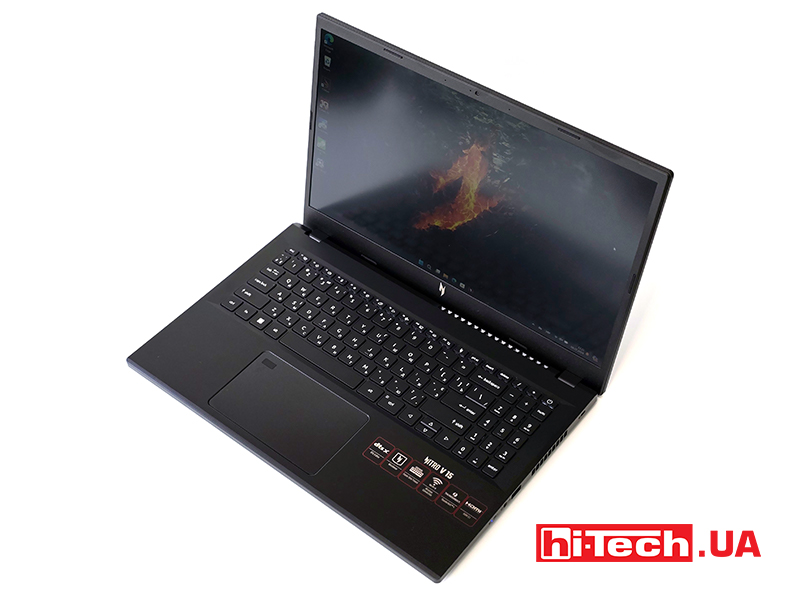
Acer offers two lines of gaming laptops – productive solutions Predator and more available Nitro. Representatives of both were in our tests and our readers are familiar with them. This time we will talk about the Nitro V series laptop. It is an evolution or a remake, who likes the analogy, of the Aspire 7 line. Let’s see how the models for the sports cyber-suit have changed.
Appearance and ergonomics
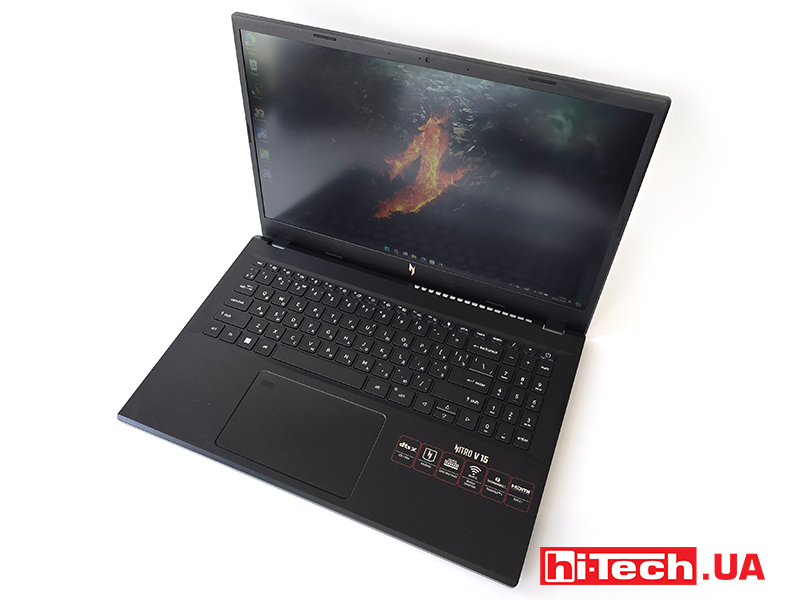
Acer Nitro V 15 ANV15-51-512A is built on the basis of the chassis of the Aspire 7 series, so the shapes seem familiar to you for a reason. The color scheme has changed. The body is made of plastic, to the extent of the brand.
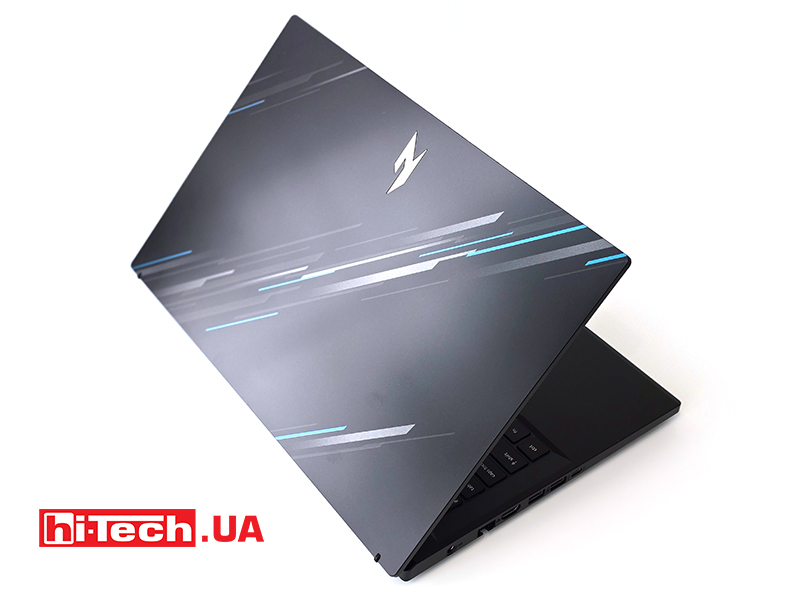
The design of the lid includes the Nitro series logo with a pattern of gray and blue diagonal stripes. The front edge in front of the keyboard has a large chamfer, which reduces discomfort from the sharp corner of the palm during long use. A 720p webcam and a microphone are installed above the screen, and there is also a light indication.

The cover with the screen can be tilted to an angle of about 140 degrees. On the lower end of the cover there are rubber spacers that raise the laptop case above the surface. Due to this, the air flow increases, and the display becomes a little higher.
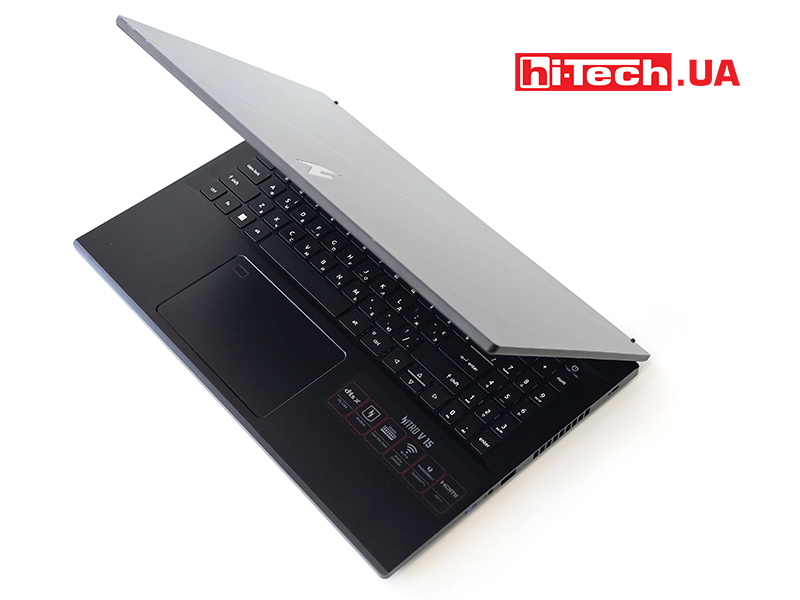
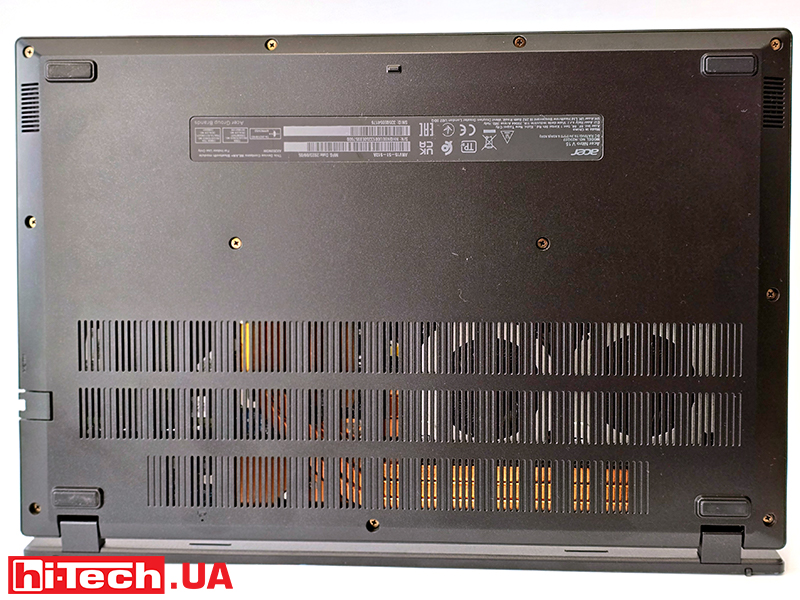
The contours of the lower lid are quite straight. In addition to changing the shape of the bottom cover, the Nitro V received a different location of the rubber feet. But there are still many gaps for air. Grilles for speakers are placed on a beveled edge.
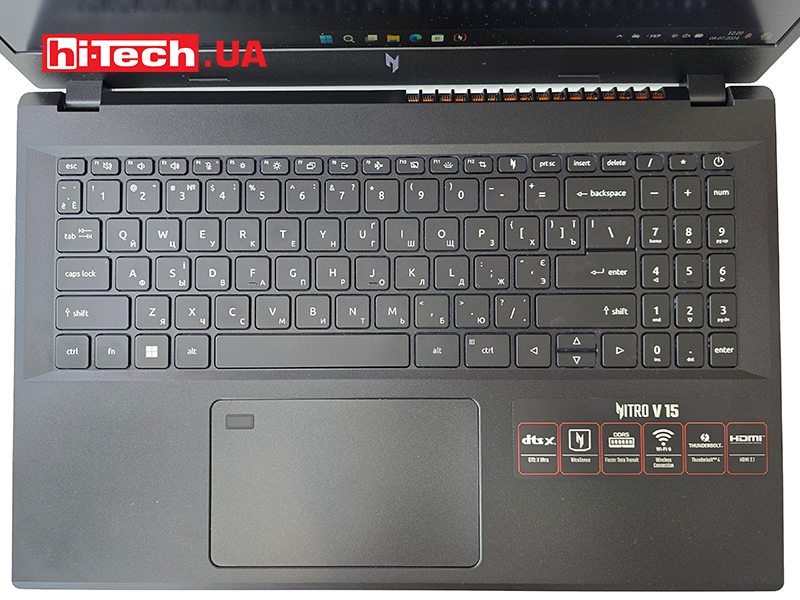
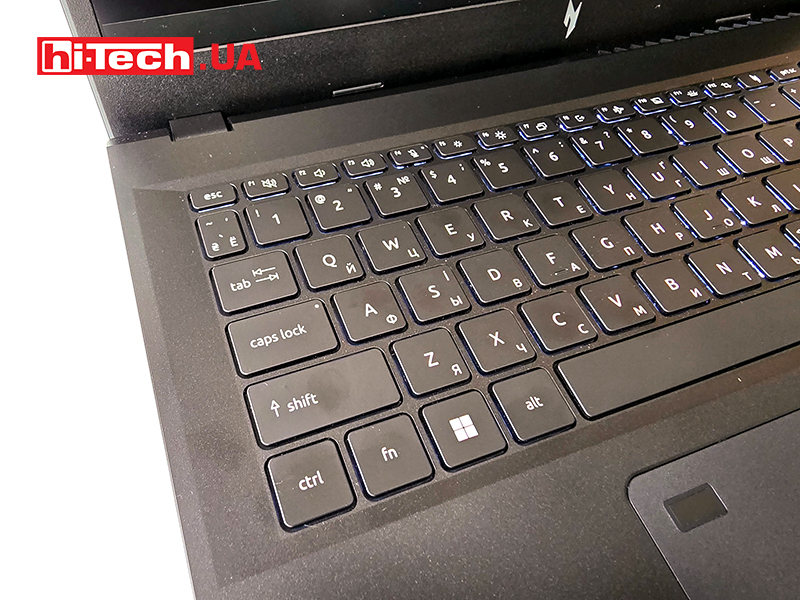
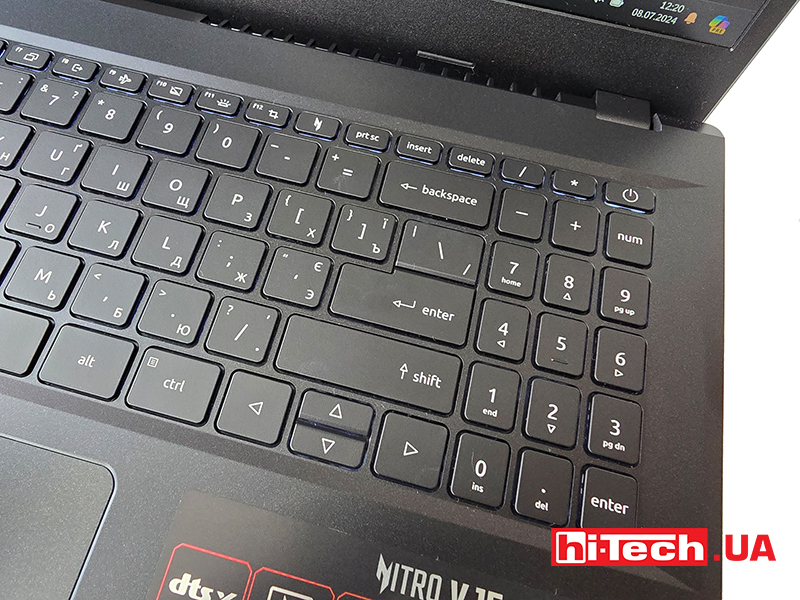
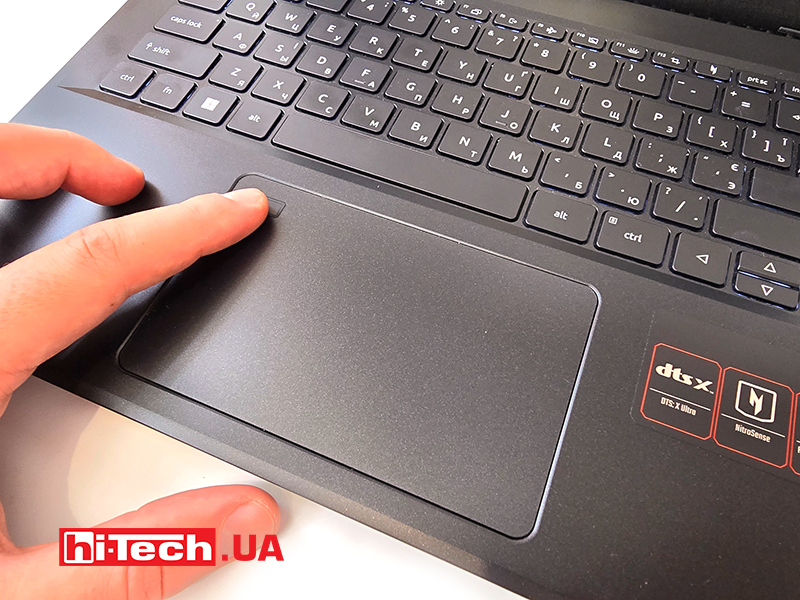
A completely ordinary keyboard received a digital block. The keys have a white backlight with several levels of brightness. The power button is inscribed in it, and the button for calling the proprietary NitroSense application is installed among the keys of the top row. The rather large touchpad got a fingerprint sensor, hello from office life, so to speak.
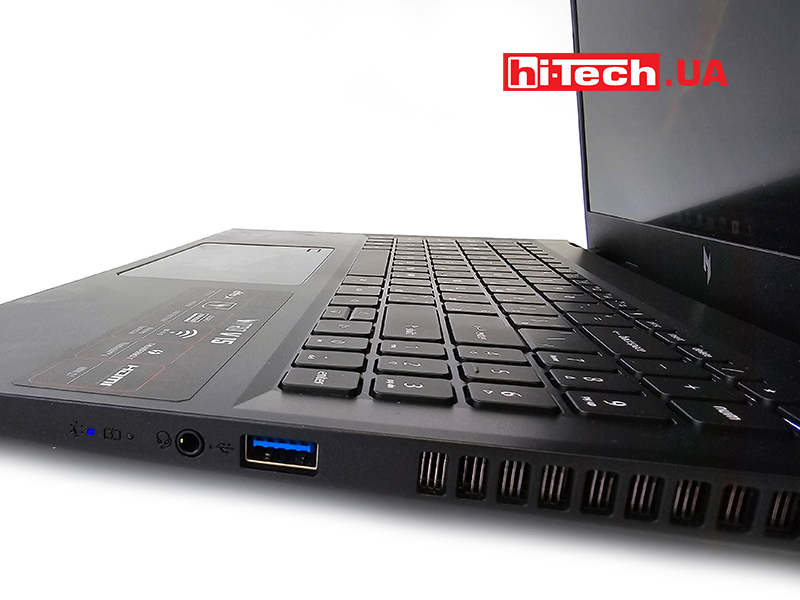
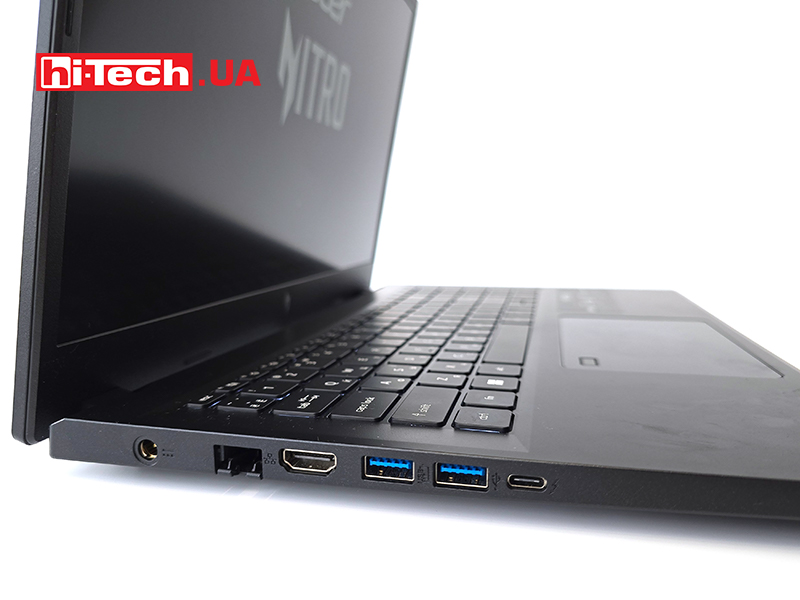
As for ports, the left side has LAN, HDMI 2.1, two USB 3.2 Gen1 Type-A ports and one USB 3.2 Gen2 Type-C 1 with Thunderbolt 4 and charging support. There is also a power supply connector. On the right side there is a combined 3.5 mm audio jack and a USB 3.2 Gen1 Type-A port, as well as power and drive activity indicators with a hole for a Kensington lock. This set matches the “civilian” one in the Aspire 7 series.
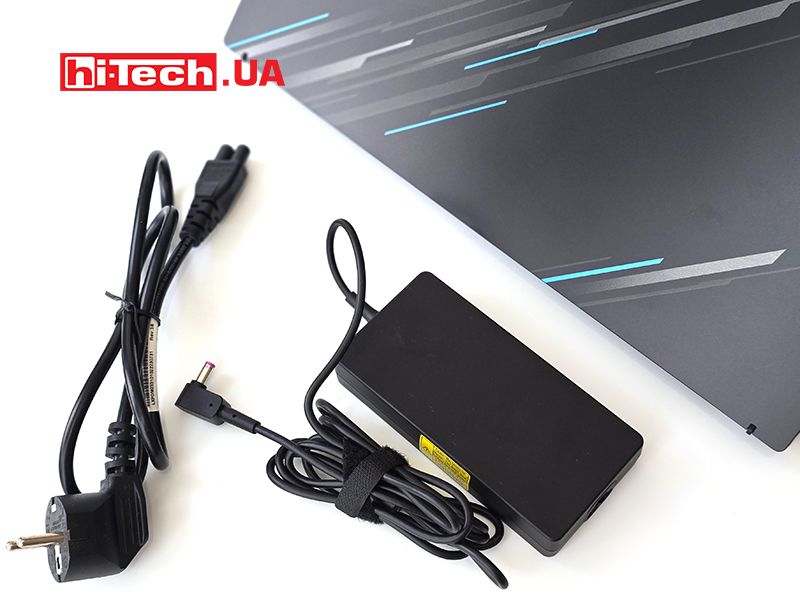
The delivery includes documentation and a 135 W power supply with a network cable.
Hardware
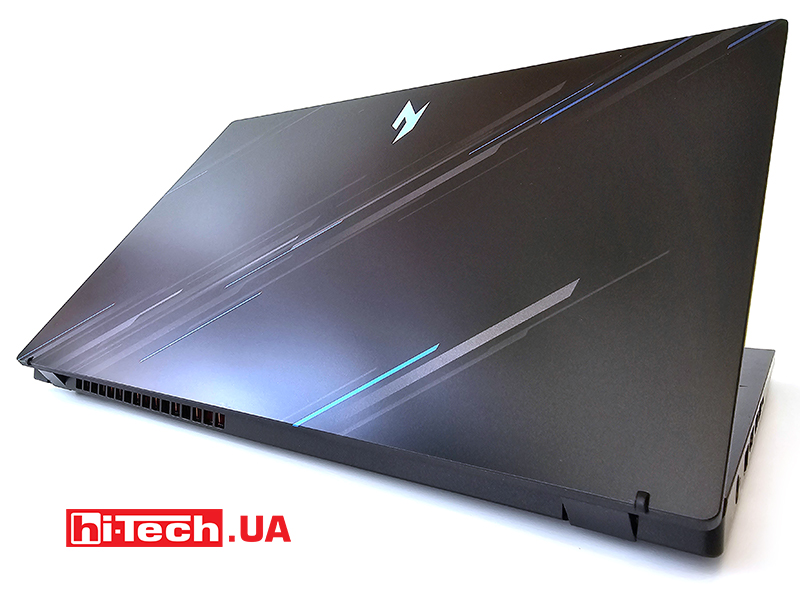
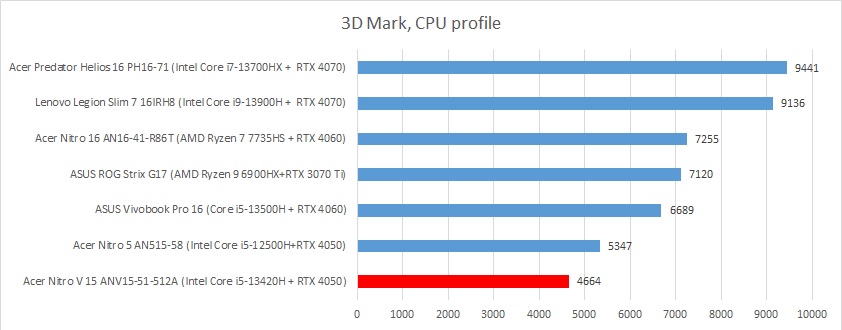
The laptop has an Intel Core i5-13420H processor, capable of processing up to 12 streams, and an NVIDIA GeForce RTX 4050 video card, which allows you to run modern games on a screen with Full HD resolution. Without disassembling the laptop, you can see that the cooling system includes two fans. At maximum speed, the cooling system is quite noisy, but under office load the device works quietly.
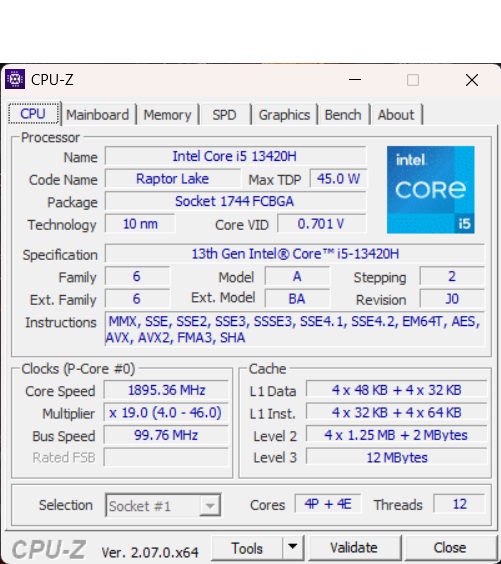
Intel Core i5-13240H has four conventionally powerful cores with support for Hyper-Threading technology and eight energy-efficient cores. The base frequency is 2600 MHz, but can be automatically increased to 4600 MHz on P-cores and up to 3400 MHz on E-cores. The cache memory of the third level is 12 MB. The TDP level is 45W and can reach 95W with automatic acceleration.
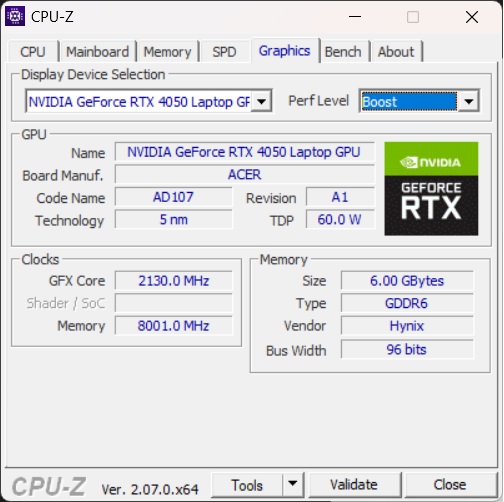
A discrete GeForce RTX 4050 graphics card is installed in the notebook version with 2560 cores, 48 rasterization blocks and 80 texture blocks. The accelerator operates at a base frequency of 1785 MHz with the possibility of overclocking to 2130 MHz. It has only 6 GB of GDDR6 video memory. The standard TGP level is 60W, which can be increased to 75W by software.

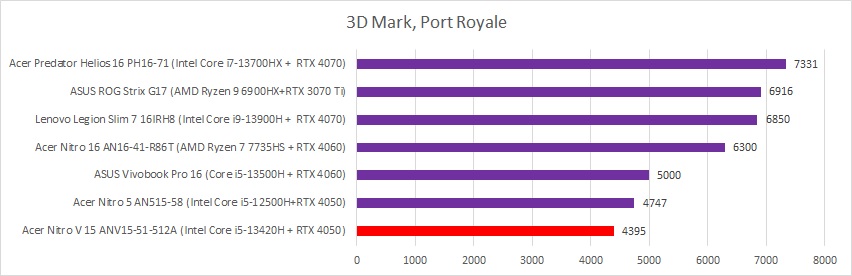
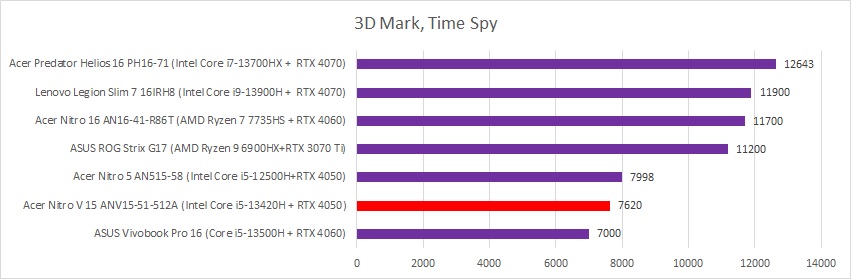
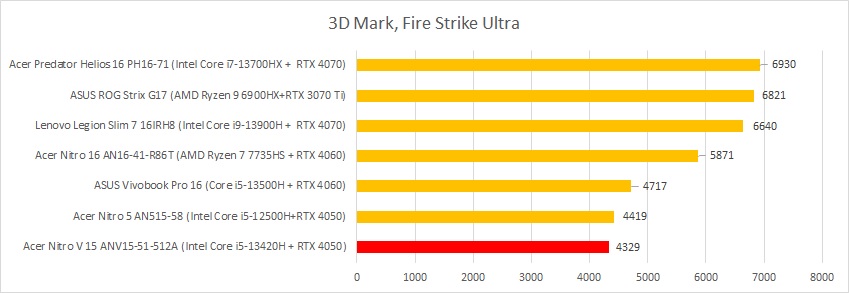
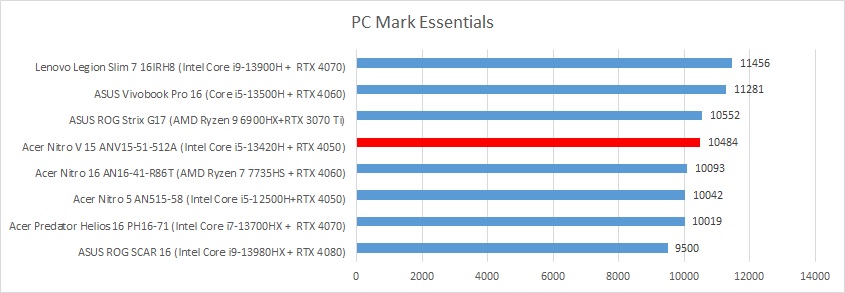
The feature of the screen is its refresh rate of 144 Hz, which ensures a smooth gameplay. The screen is matte and slightly reflects objects in front of it. Color coverage is not enough for working with graphics and video content, but acceptable for games and watching videos. This also applies to brightness. In stationary conditions of the office or home, it is enough, but in sunny weather reading texts will be difficult.
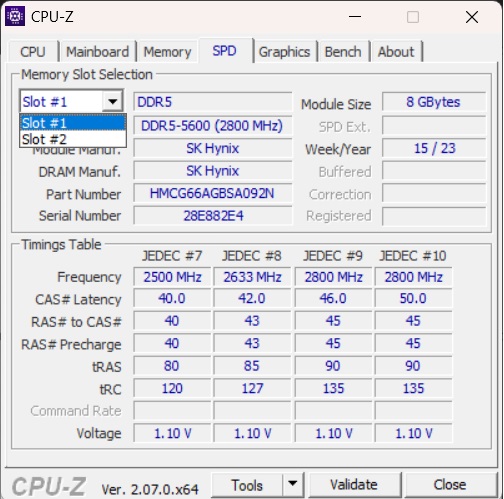
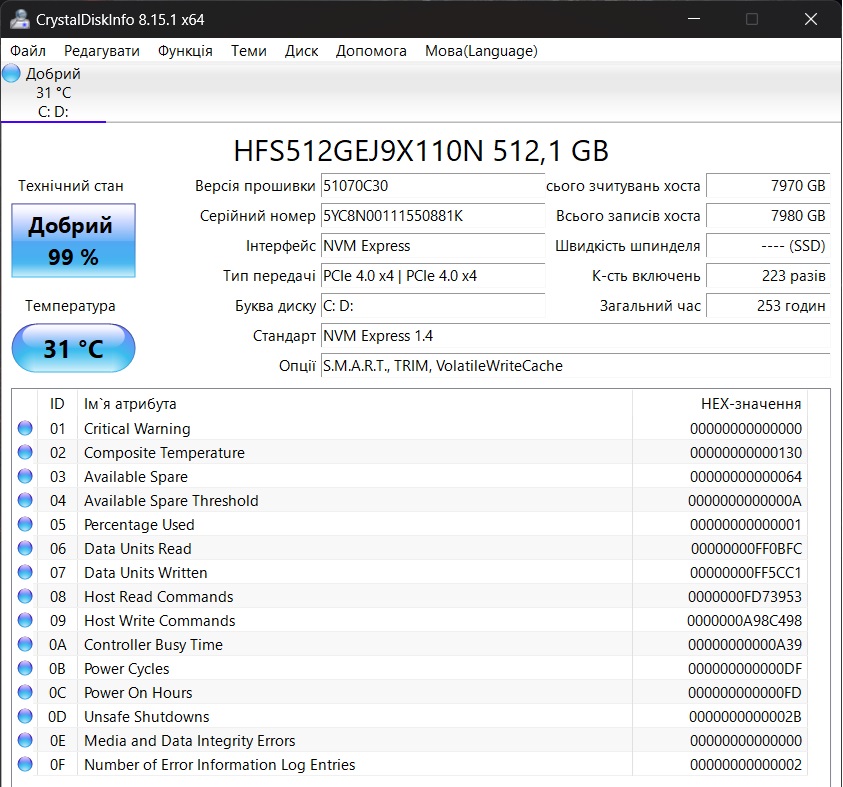
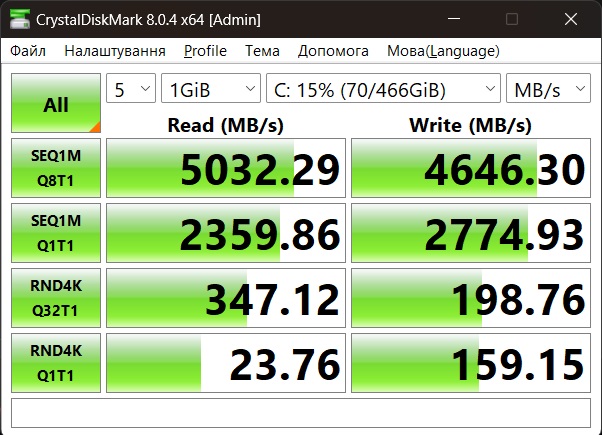
Other specs include 16GB of RAM, 512GB of storage, modern interfaces, a 720p webcam, and a 57W battery. RAM, like SSD, can be upgraded over time. There are free slots for them. The drive is less than a terabyte, rarely enough for more than two or three games.
To control the laptop, there is a branded utility Acer Care Center, which provides the ability to view the characteristics of the device, check it, optimize and update drivers, and also allows you to contact the support service. Separately, it is worth mentioning the NitroSense program, with which you can choose the laptop’s operating mode manually or adjust it to your preferences. NitroSense also offers automatic load-dependent mode selection, cooling system settings, device and application monitoring, and detailed system information viewing.
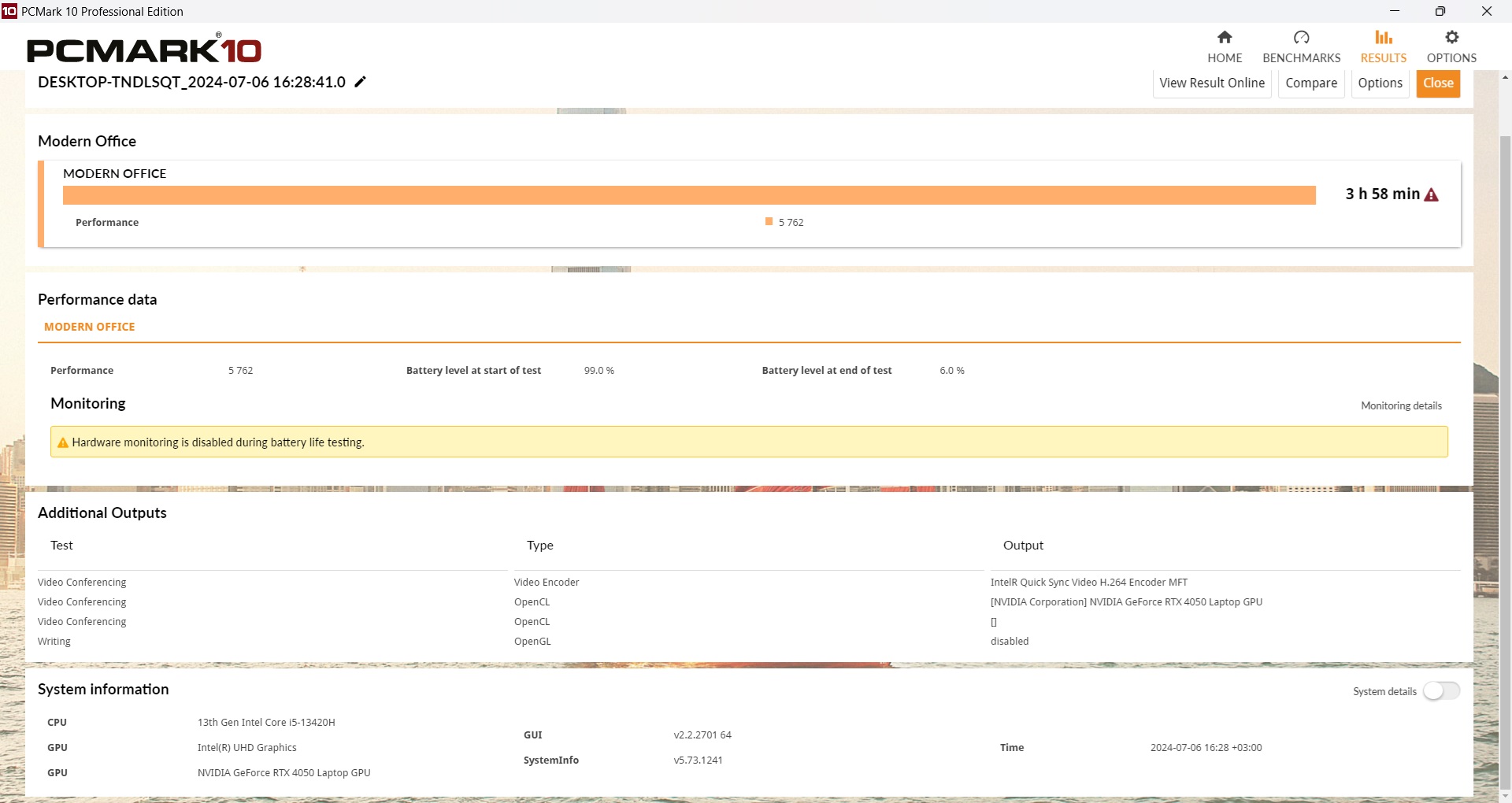
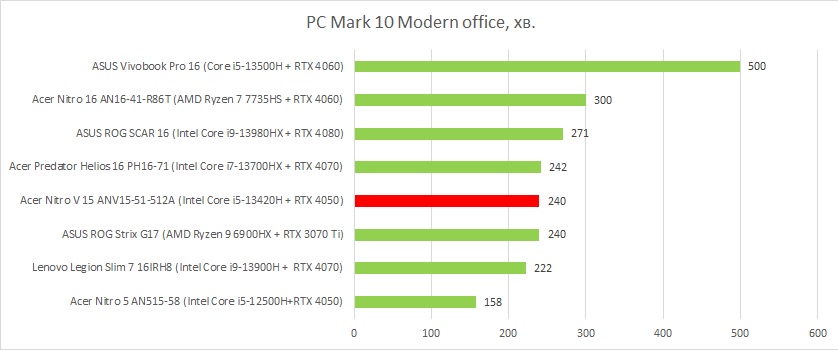
The laptop has good battery life when playing videos, but using office programs requires more energy, which reduces the battery life to 4-5 hours – an acceptable result. The office model would probably provide a little more, but with such components. You can play from the battery for about an hour and a half, which meets the standard of most laptops.
Impressions
The Acer Nitro V 15 laptop is a good compromise between a device for everyday work and entertainment. It is distinguished not only by a stylish design, but also by a discrete video card, which is found in “office” models only in certain cases.
From a technical point of view, the laptop is equipped with a good modern processor and a basic GeForce RTX 4050 graphics card, but it is sufficient for games at medium settings and undemanding projects in editors. A fast screen with a refresh rate of 144 Hz should be noted separately. But its somewhat limited color space can be a disadvantage for those who work with graphic content.
Although 512 GB of storage is not much by modern standards, it can always be supplemented with a more capacious model. The laptop is equipped with modern interfaces and a sufficient number of USB ports for connecting peripheral devices. The battery provides reliable 4-5 hours of autonomous operation at medium brightness and an active wireless connection to the Internet.
Thus, the Acer Nitro V 15 is an excellent choice for those who are looking for a functional gaming laptop with a good price-performance ratio at a compact size.

Features of Acer Nitro V 15 ANV15-51-512A (NH.QNBEU.0001) laptop
| display: | 15.6”, 1920×1080 (16:9), 144 Hz, IPS |
| Processor: | Intel Core i5-13240H, 12 cores, 16 threads, 2.6-4.6 GHz, 45 W |
| Video adapters: | NVIDIA GeForce RTX 4050, 6GB GDDR6, 75W
Intel UHD Graphics |
| RAM: | 16GB DDR5-5200 |
| Accumulator: | 512 GB PCIe 4.0 NVMe M.2 SSD, SK Hynix HFS512GEJ9X110N |
| Connectors: |
|
| Webcam/Microphone: | 720p/yes |
| Dactyloscopic sensor: | yes |
| Communications: | Wi-Fi 6 802.11ax, Bluetooth 5.2 |
| Keyboard lighting: | Yes, white |
| Sound: | 2 speakers |
| Battery, power supply unit: | 57.5 Wh, 4-el. Li-pol |
| Operating system: | Windows 11 |
| Dimensions: | 362×239×26.9mm |
| Weight: | 2.11 kg |
| Provider: | Acer representative office in Ukraine |
| Complete price: | $1140 |
Rating:
+ universal design
+ good display
+ fingerprint sensor
+ matte screen
-insufficient color coverage and maximum brightness
Read also:
- Gaming laptop test Acer Nitro 16 AN16-41-R86T with RTX 4060: new
- Laptop test ASUS Vivobook Pro 16 with GeForce RTX 4060


Don't miss interesting news
Subscribe to our channels and read announcements of high-tech news, tes



Lenovo Legion 5i Gen 11 laptops feature Intel Panther Lake-H processors, RTX 5000, and OLED displays

Oppo A6 Pro smartphone review: ambitious

 0
0 
Creating new mid-range smartphones is no easy task. Manufacturers have to balance performance, camera capabilities, displays, and the overall cost impact of each component. How the new Oppo A6 Pro balances these factors is discussed in our review.
Oppo Reno 15 5G smartphone review: confident
0 
The Oppo Reno15 smartphone emphasizes design, a high-quality display, versatile cameras, and good battery life. Let’s take a closer look.
Asus ProArt GoPro Edition laptop for action camera fans has gone on sale in Ukraine action-camera Asus laptop
One of the key features of the Asus ProArt GoPro Edition is the proprietary StoryCube service – the first solution for Windows with support for GoPro cloud storage and 360-degree video.
Garmin has released a major update for 5 smartwatches Garmin smart watches update

Garmin has announced a major software update for several smartwatch models at once. The update has already started rolling out to the Garmin Venu X1, Garmin vívoactive 6, Garmin fēnix 8 Pro, Garmin Forerunner 570 and Garmin Forerunner 970.