

The Google Chrome browser will be able to close tabs that require too many computer resources.
25.07.24
The Google Chrome browser has received a new feature to solve the problem of tabs that consume a lot of resources. Now, when performance problems are detected, a window will appear with a list of such tabs and a “Fix” button. This window, called “Performance problem stories”, allows you to quickly unload the most resource-intensive tabs, thereby freeing up system resources.
The browser independently determines problematic tabs and forms a list of them. The message will appear only when the tabs begin to use a certain percentage of CPU resources. Clicking the “Fix Now” button will immediately unload all resource-intensive tabs. Their status can be checked in the “Loading Status” section of the chrome://discards page, where they will be marked as “Unloaded”.
Enabling the Performance Intervention demo flag allows you to ignore CPU thresholds and speed limits, making it easy to launch a window through normal browser activity or through chrome://discards. All active tabs offered will meet the normal rejection criteria, except for the requirement to remain in the background for a specified minimum time.
There is also a Process Per Site feature that combines multiple tabs from the same site into a single process for increased efficiency. However, it faces problems when the process is used by many tabs, which require significant amounts of memory. Google is working on a new automatic method of estimating the memory size of tabs that will prevent these errors. The new mode will set limits so that the site does not take up all available memory. The mode does not yet estimate the memory consumption of iframe content, but the company is actively working on it.
Don't miss interesting news
Subscribe to our channels and read announcements of high-tech news, tes

Oppo A6 Pro smartphone review: ambitious

 0
0 
Creating new mid-range smartphones is no easy task. Manufacturers have to balance performance, camera capabilities, displays, and the overall cost impact of each component. How the new Oppo A6 Pro balances these factors is discussed in our review.
Oppo Reno16 Pro 5G smartphone review: well-heeled
0 
Oppo Reno16 Pro 5G looks like a balanced smartphone, in which the manufacturer tried not to make a single characteristic the defining one. It has many advantages. Let’s tell you what
Infinix Xpad 30 Pro Debuts With 11-Inch Display and 2TB Storage Support

Infinix has officially unveiled the Xpad 30 Pro tablet, combining an 11-inch 90Hz screen with an affordable price tag. The device offers support for memory cards up to 2TB and is powered by the MediaTek Helio G200 processor.
Xiaomi Debuts Robot Vacuum with Active Roller Mop and AI Mapping
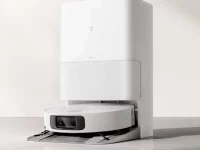
Xiaomi has announced the Mijia 7C robot vacuum, featuring an active scrubbing roller, 30,000 Pa of suction power, and an intelligent obstacle recognition system. The new model aims to revolutionize wet cleaning with its continuous washing system.