

Garmin Lily 2 Active smart watch equipped with GPS and has an autonomy up to 9 days
08.10.24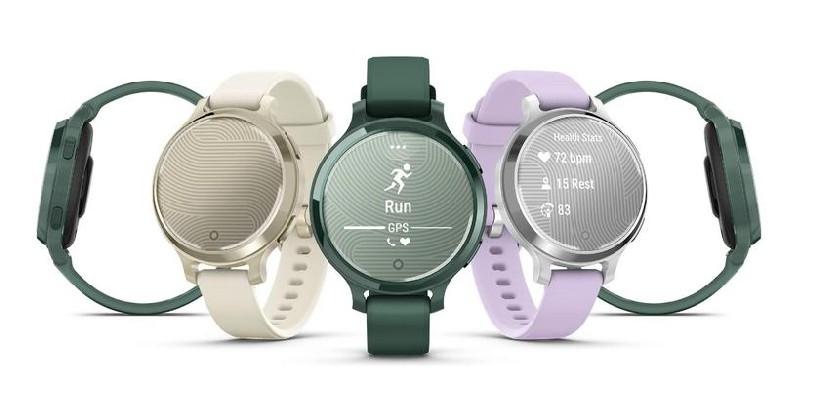
Garmin introduced a new version of its Lily 2 Active smart watch, which received an updated design and built-in GPS. The watch has a stylish metal case and two physical buttons for convenient control.
The device is able to accurately track outdoor activities such as running, walking and cycling without the need to connect to a smartphone. Lily 2 Active is available in three colors: Lunar Gold, Silver, and Jasper Green. Battery life is up to 9 days without GPS and up to 9 hours with GPS enabled.
New features include sports apps for tennis, pinball, indoor cycling and golf, as well as updated health monitoring tools. This includes a sleep coach and a health snapshot that tracks heart rate, blood oxygen levels and respiration. Lily 2 Active costs $299.99.
Don't miss interesting news
Subscribe to our channels and read announcements of high-tech news, tes

Oppo A6 Pro smartphone review: ambitious

 0
0 
Creating new mid-range smartphones is no easy task. Manufacturers have to balance performance, camera capabilities, displays, and the overall cost impact of each component. How the new Oppo A6 Pro balances these factors is discussed in our review.
Oppo Reno 15 5G smartphone review: confident
0 
The Oppo Reno15 smartphone emphasizes design, a high-quality display, versatile cameras, and good battery life. Let’s take a closer look.
WhatsApp will now allow you to send scheduled messages messenger update WhatsApp

To create a scheduled WhatsApp message, the user needs to enter the text, select the date and time of sending, after which the system will automatically deliver it to the recipient.
Microsoft adds image support to Notepad Microsoft update

Microsoft continues to expand the capabilities of the updated Notepad in Windows 11. The next step may be image support