

Microsoft has redesigned the Start menu again in Windows 11
05.02.26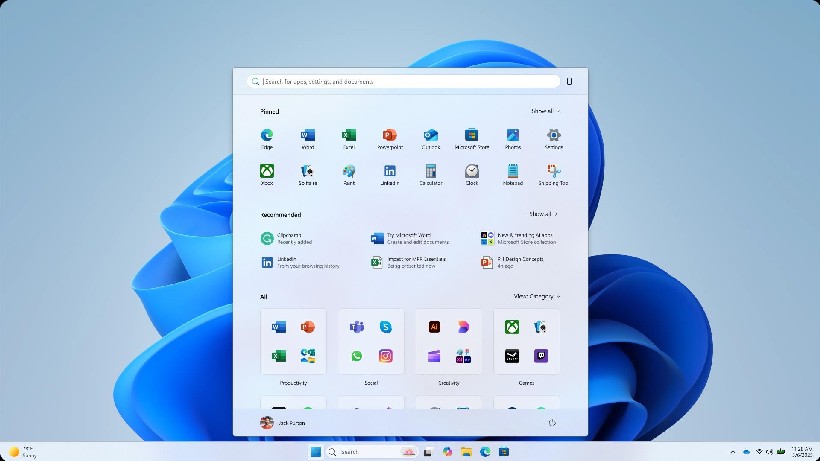
Microsoft is rolling out a new Start menu design in Windows 11. The company is once again introducing familiar changes, but this time for most regular users.
The update is included in the January update KB5074109 (25H2). If it is not installed automatically, you need to check for it manually in Windows Update. In other cases, the update should appear in the coming days or weeks. According to the company, the active deployment phase has been going on for about a week.
What’s new in the Start menu
Now the search bar is located at the top, below are pinned applications, then the “Recommended” block, and below it – everything else. The search has been moved to the top to speed up the launch of programs, files or images. The “Recommended” ribbon remains, but now it is possible to turn it off. However, there are some nuances here: disabling recommendations removes the list of recent files in Explorer and the jump lists in the taskbar menu.
Separately, the “All Apps” list has been moved to the main “Start” screen. Instead of a long scrolling list, categories have appeared that allow you to see all programs at once. Microsoft compares this approach to the design of smartphones, so some users may notice similarities with iOS. The company also made the “Connect to your smartphone” panel additional so that it does not interfere with the main interface.
Microsoft has been working on the new “Start” for almost a year. During this time, the company abandoned dozens of radical options and, as a result, settled on a design that is not very different from the current one.
Don't miss interesting news
Subscribe to our channels and read announcements of high-tech news, tes

Oppo A6 Pro smartphone review: ambitious

 0
0 
Creating new mid-range smartphones is no easy task. Manufacturers have to balance performance, camera capabilities, displays, and the overall cost impact of each component. How the new Oppo A6 Pro balances these factors is discussed in our review.
Oppo Reno 15 5G smartphone review: confident
0 
The Oppo Reno15 smartphone emphasizes design, a high-quality display, versatile cameras, and good battery life. Let’s take a closer look.
Asus ProArt GoPro Edition laptop for action camera fans has gone on sale in Ukraine action-camera Asus laptop
One of the key features of the Asus ProArt GoPro Edition is the proprietary StoryCube service – the first solution for Windows with support for GoPro cloud storage and 360-degree video.
Garmin has released a major update for 5 smartwatches Garmin smart watches update

Garmin has announced a major software update for several smartwatch models at once. The update has already started rolling out to the Garmin Venu X1, Garmin vívoactive 6, Garmin fēnix 8 Pro, Garmin Forerunner 570 and Garmin Forerunner 970.