

For have Diya.Signature you will need passport with an NFC chip
05.02.26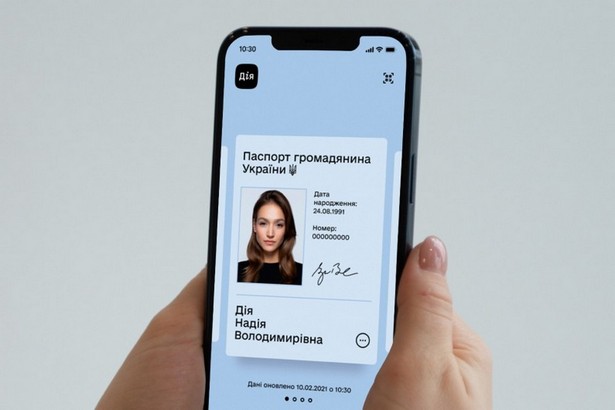
Diia is updating its Diia.Pidpisu mechanism: additional verification via NFC is being introduced for signature creation. Users will need a physical biometric document with a chip, as well as an NFC-enabled smartphone. Signatures created using the old procedure will remain valid until their expiration date or until they log out of the app.
Why do I need a passport with an NFC chip for Diia.Pidpisu?
The reason for the changes is cited as the rise in digital risks, specifically the development of deepfake tools and social engineering schemes. The new security model is based on the principle of additional identity verification via a physical document, which must be present near the user when creating the signature. This is achieved using NFC, a near-field communication technology that operates over a very short range of a few centimeters. This range is considered a separate security element, as reading is only possible through direct contact between the document and the smartphone.
Checking the document’s chip should confirm that the signature was created by the owner holding the document, and not by an unauthorized person who has remotely accessed the phone or is attempting to use photographs and other data to impersonate the user. This logic is described as a combination of two factors: knowledge of the PIN code and the presence of a physical document, without which the signature cannot be recreated.
Since NFC is becoming a requirement for the new format, users are advised to check the module’s presence in the phone and whether it is enabled in the settings. On iPhones, the reading area is located at the top of the case near the camera. On Android smartphones, the sensor can be located at the top or center of the back panel. However, the module can sometimes be manually disabled, so it must be enabled before the procedure. During the reading process, the document is held firmly against the back panel of the smartphone and held still for several seconds. If the document is not read, it is recommended to slowly change its position or remove any case that could block the signal, especially if it contains metal elements.
How to verify your identity in Diya from a smartphone
It is emphasized that tapping your passport to your phone is considered secure: the data is read through an encrypted channel and is not stored in the device’s memory, and the procedure itself is used to confirm the authenticity of the document and your identity at the time the signature is created. It is also noted that having a digital document in the app is not sufficient if the physical document is not available: this is done to prevent remote signature creation, even when an unauthorized person has access to an unlocked smartphone.
A transition period is provided for users who already have Diya.Pidpis. Signatures created under the old rules remain valid for the validity period, which is one year, or until you exit the app. The transition to the new format will occur automatically when the old signature expires and needs to be recreated, or after logging into Diya again. It is emphasized that NFC verification is only required during signature creation; subsequently, entering a PIN is sufficient to sign documents.
Don't miss interesting news
Subscribe to our channels and read announcements of high-tech news, tes

Oppo A6 Pro smartphone review: ambitious

 0
0 
Creating new mid-range smartphones is no easy task. Manufacturers have to balance performance, camera capabilities, displays, and the overall cost impact of each component. How the new Oppo A6 Pro balances these factors is discussed in our review.
Oppo Reno16 Pro 5G smartphone review: well-heeled
0 
Oppo Reno16 Pro 5G looks like a balanced smartphone, in which the manufacturer tried not to make a single characteristic the defining one. It has many advantages. Let’s tell you what
Samsung Galaxy S27 Ultra Camera Design Surfaces

A potential camera design for the Samsung Galaxy S27 Ultra has surfaced. The smartphone may adopt a protruding platform module, similar to Apple’s design language.
Garmin Fenix 9 Surface: Everything We Know Before the Official Launch

A Czech retailer has accidentally revealed the full Garmin Fenix 9 lineup, consisting of 18 different variants. The new models feature various case sizes, integrated satellite connectivity, and an official launch scheduled for August 25.