

Adobe apps will appear directly in ChatGPT
12.12.25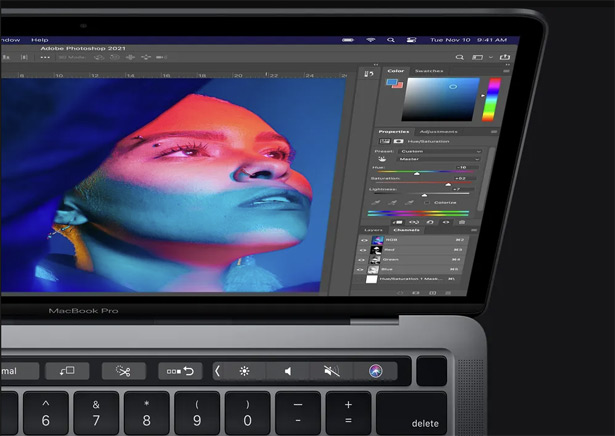
Adobe has started integrating Photoshop, Acrobat and Express applications into ChatGPT, which gives users the opportunity to perform basic tasks right in the chat window for free. Now you can edit photos, create invitations or work with documents by simply describing the desired result in text.
To use Adobe applications in ChatGPT, just specify the name of the desired service, for example, Adobe Photoshop, upload the file and describe the action to be performed. This can be blurring the background, applying a filter or changing the brightness settings. After activating the tool, you do not need to re-enter its name until the user switches to another.
Despite the fact that the built-in versions of the programs have limited functions, their capabilities are enough to perform common tasks. In Photoshop inside ChatGPT, you can edit selected fragments of the image, change the brightness, contrast or exposure, as well as apply various visual effects.
In Adobe Express, users have access to a wide collection of ready-made designs, among which you can choose the desired template. After selecting the layout, you can edit text elements, replace images, and add animation.
Working with PDF is implemented through Adobe Acrobat. In the chatbot, you can edit documents, extract text and tables, merge and organize files, reduce their size, or convert without losing quality. If necessary, sensitive data can be deleted.
Photoshop, Express, and Acrobat for ChatGPT are already available to users around the world in the web version, as well as on PC and iOS. Adobe Express also works on Android, and Photoshop and Acrobat support for this system should appear later.
Previously, it was reported that OpenAI began connecting third-party applications to the chatbot in early October 2025. Among the first integrations were Booking.com, Expedia, Spotify, Figma, Coursera, Zillow, and Canva.
Don't miss interesting news
Subscribe to our channels and read announcements of high-tech news, tes

Oppo A6 Pro smartphone review: ambitious

 0
0 
Creating new mid-range smartphones is no easy task. Manufacturers have to balance performance, camera capabilities, displays, and the overall cost impact of each component. How the new Oppo A6 Pro balances these factors is discussed in our review.
Oppo Reno16 Pro 5G smartphone review: well-heeled
0 
Oppo Reno16 Pro 5G looks like a balanced smartphone, in which the manufacturer tried not to make a single characteristic the defining one. It has many advantages. Let’s tell you what
Danger in the Driver’s Seat: Waymo and Zoox Robotaxis Surface with Brake-Related Injuries

Dozens of robotaxi test drivers have been injured due to flaws in autonomous driving systems. The primary culprit is erratic emergency braking, which has led to significant neck and back injuries.
Samsung Galaxy Book6: An Affordable Laptop With 25-Hour Battery Life

Samsung has introduced a new affordable version of the Galaxy Book6. The device features Intel Core 3 or Core 5 processors, up to 16GB of RAM, up to 1TB of storage, and a rated battery life of up to 25 hours.