

Notepad in Windows 11 will start supporting tables
26.11.25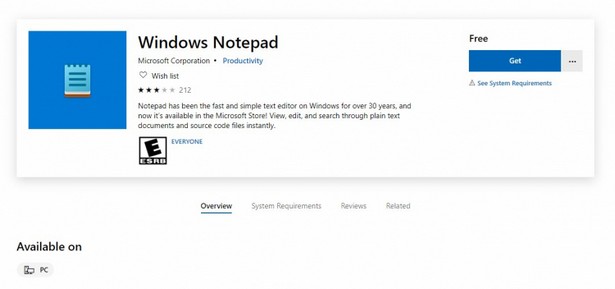
In the latest Windows 11 beta, Microsoft has begun rolling out an updated version of Notepad, which introduces support for tables for the first time. The feature is part of a broader change.
Microsoft says it wanted to make it easier to format data without having to use more complex programs. Tables can now be added directly to a document using the new Table button on the toolbar or by manually entering them using Markdown syntax. You can change the structure of tables on the fly: you can add or remove rows and columns using the context menu or the corresponding section in the top panel.
The Notepad update also includes AI-powered tools. Notepad now features streaming responses, which let you see the results of Write, Rewrite, and Summarize commands as you type. This speeds up work with large notes and drafts. Meanwhile, streaming for the Rewrite command is currently only available on Copilot+ PCs, where the response processing is done locally. All AI features require a Microsoft account to be signed in.
Notepad version 11.2510.6.0 is currently rolling out to Windows Insiders in the Dev and Canary channels. Other channels will receive the update in the coming weeks, after which the new features will be available to all Windows 11 users outside the Insider program.
Don't miss interesting news
Subscribe to our channels and read announcements of high-tech news, tes

Oppo A6 Pro smartphone review: ambitious

 0
0 
Creating new mid-range smartphones is no easy task. Manufacturers have to balance performance, camera capabilities, displays, and the overall cost impact of each component. How the new Oppo A6 Pro balances these factors is discussed in our review.
In-Ear headphones Active Noise Cancellation: how Oppo eliminate noise
0 
In-ear headphones remain one of the most popular form factors due to their lightweight design. However, this design is considered one of the most challenging to implement active noise cancellation (ANC). We’ll explain how Oppo solved this problem.
Ninkear L20: A Compact Intel Lunar Lake Mini PC With Copilot+ Support
Ninkear L20 is a new mini PC based on the Intel Lunar Lake architecture with 40 TOPS NPU support and official Copilot+ PC compliance.
Samsung Wallet Adds Digital Key Support for Volkswagen EVs
Samsung Wallet is adding support for digital car keys for Volkswagen ID series electric vehicles, allowing Galaxy smartphone users to unlock and start their cars key-free.