

Android will soon have the ability to mark call as important
08.12.25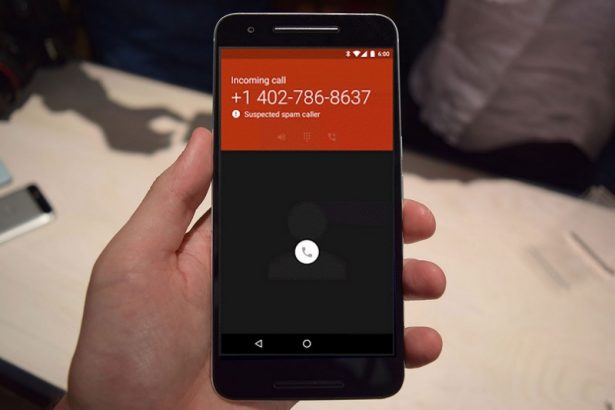
Google has started testing a new Call Reason option in the standard “Phone” application for Android. It allows the subscriber to pre-mark their call as “urgent”, after which this mark is displayed on the screen of the incoming call to the recipient, as well as in the call log if he did not pick up.
The function works only between contacts saved in each other’s phone, and when using the system application Phone by Google. Such a mark can prompt that the call should be answered immediately or, in the case of a missed call, remind you of the need to call back for a specific reason.
So far, only one type of status is available – “Urgent”, but Google does not exclude the appearance of additional options or the ability to leave your own short comment.
Call Reason is gradually spreading within the test beta. Availability depends on the smartphone manufacturer. You can check for updates in Google Play in the application management section, as well as in the settings, make sure that Phone by Google is set as the main application for calls.
Don't miss interesting news
Subscribe to our channels and read announcements of high-tech news, tes

Oppo A6 Pro smartphone review: ambitious

 0
0 
Creating new mid-range smartphones is no easy task. Manufacturers have to balance performance, camera capabilities, displays, and the overall cost impact of each component. How the new Oppo A6 Pro balances these factors is discussed in our review.
Oppo Reno 15 5G smartphone review: confident
0 
The Oppo Reno15 smartphone emphasizes design, a high-quality display, versatile cameras, and good battery life. Let’s take a closer look.
monobank will make payments by IBAN free of charge bank events in Ukraine

Experts associate the decision with increased competition in the Ukrainian fintech sector. Users expect transparent conditions and the absence of additional fees
WhatsApp will now allow you to send scheduled messages messenger update WhatsApp

To create a scheduled WhatsApp message, the user needs to enter the text, select the date and time of sending, after which the system will automatically deliver it to the recipient.