

Experimenting with NVIDIA Battery Boost technology. Let’s gaming laptop work longer
28.04.17
MSI GE72 7RE APACHE PRO
NVIDIA Battery Boost technology appeared back in the days of NVIDIA GTX 800 series mobile video cards. Now we have the opportunity to test the operation of this technology in a modern MSI laptop based on a discrete NVIDIA GeForce GTX 1050 Ti video card.
NVIDIA Battery Boost is designed to increase laptop battery life when using games. The essence of the technology is that you can force the video card to work at less than full capacity by limiting the maximum FPS value in games.
For example, a laptop is capable of delivering an FPS value of 120 in some games, but a much lower value of 30 FPS may suit you. By setting this level, the system will automatically adjust (lower) the performance of the video card in order to ensure the selected value.
Considering that a gaming video card makes a very significant contribution to the final power consumption of a laptop, by reducing its power, it is possible, in theory, to significantly extend the battery life of the device when powered by batteries.
What is needed for NVIDIA Battery Boost?
- Laptop with GTX 800, 900 series graphics cards and new models based on the GTX 10 series based on Pascal architecture.
- Operating system Windows 7/8/10.
- Modern driver for NVIDIA mobile video cards with the GeForce Experience application installed.
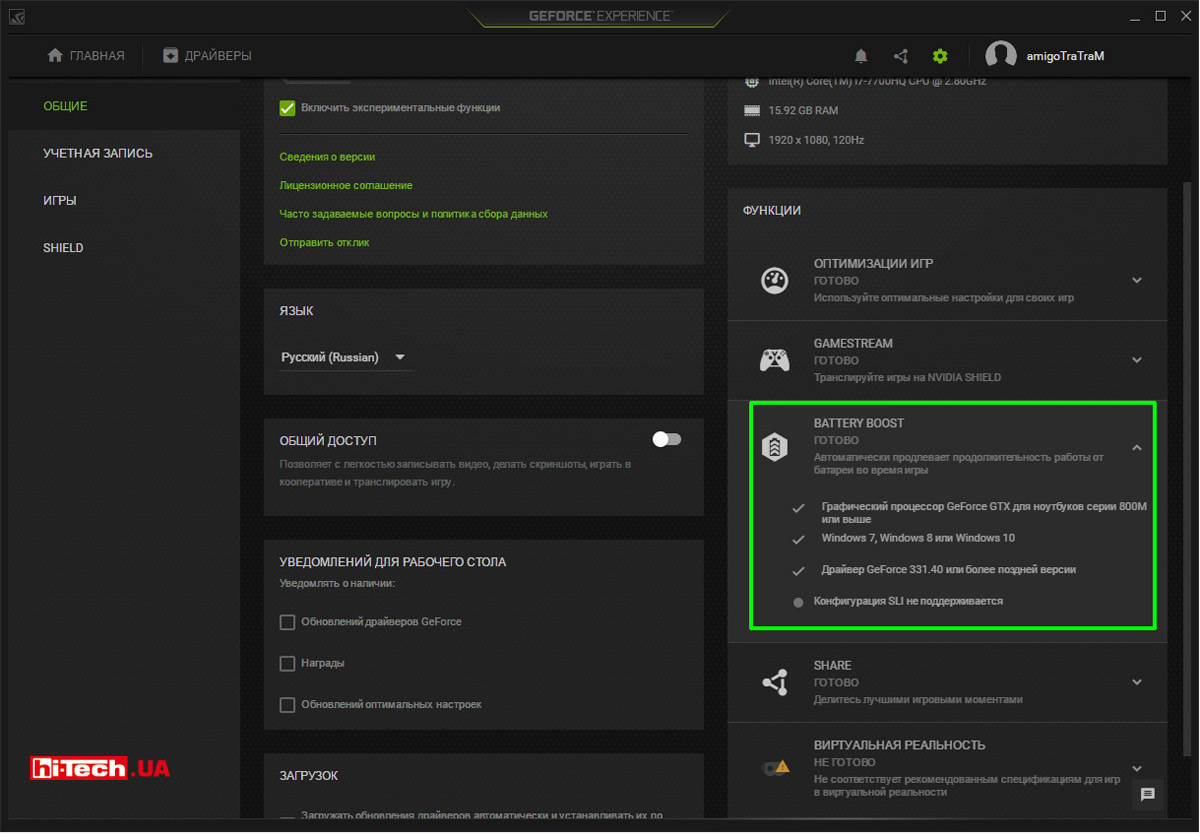
In the GeForce Experience settings you can see a message that the system can work with the NVIDIA Battery Boost feature
We just happened to have a suitable model at our disposal. We conducted experiments with NVIDIA Battery Boost technology using an MSI GE72 7RE APACHE PRO laptop. This laptop is built on the latest seventh generation Intel Core platform (Kaby Lake) and is complemented by a modern Nvidia GeForce GTX 1050 Ti video card (by the way, a joint review of four gaming laptops based on Intel Kaby Lake + NVIDIA Pascal will appear on the site soon).
In the benchmark for the game Metro Last Light Redux, we selected such graphics settings with which the laptop, when running on battery power, provided a fairly high level of FPS. In our particular case, the FPS value was approximately in the range of 70–110 FPS.
In this mode, the MSI worked for 35 minutes from full charge to 10% remaining.
Enabling and managing Battery Boost technology occurs in the proprietary GeForce Experience application. The maximum FPS can be adjusted in the range from 30 to 60.
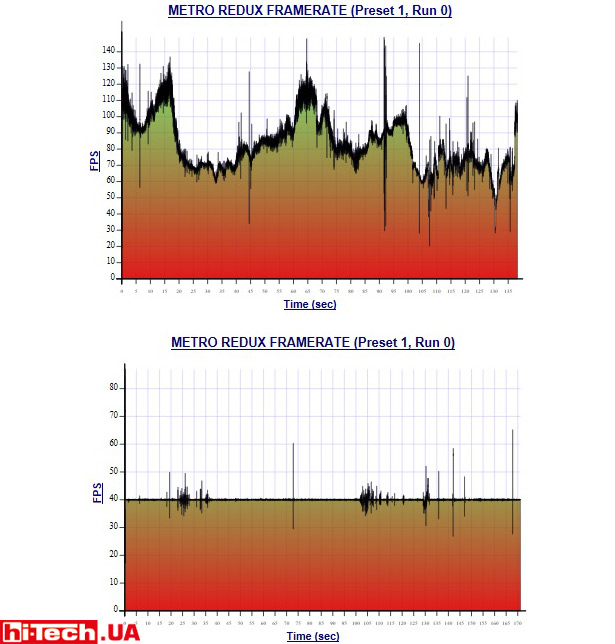
FPS level with specified graphics settings in the Metro Last Light Redux benchmark when the laptop is running on battery power (top). And the FPS level when NVIDIA Battery Boost is activated with the maximum value set to 40 FPS
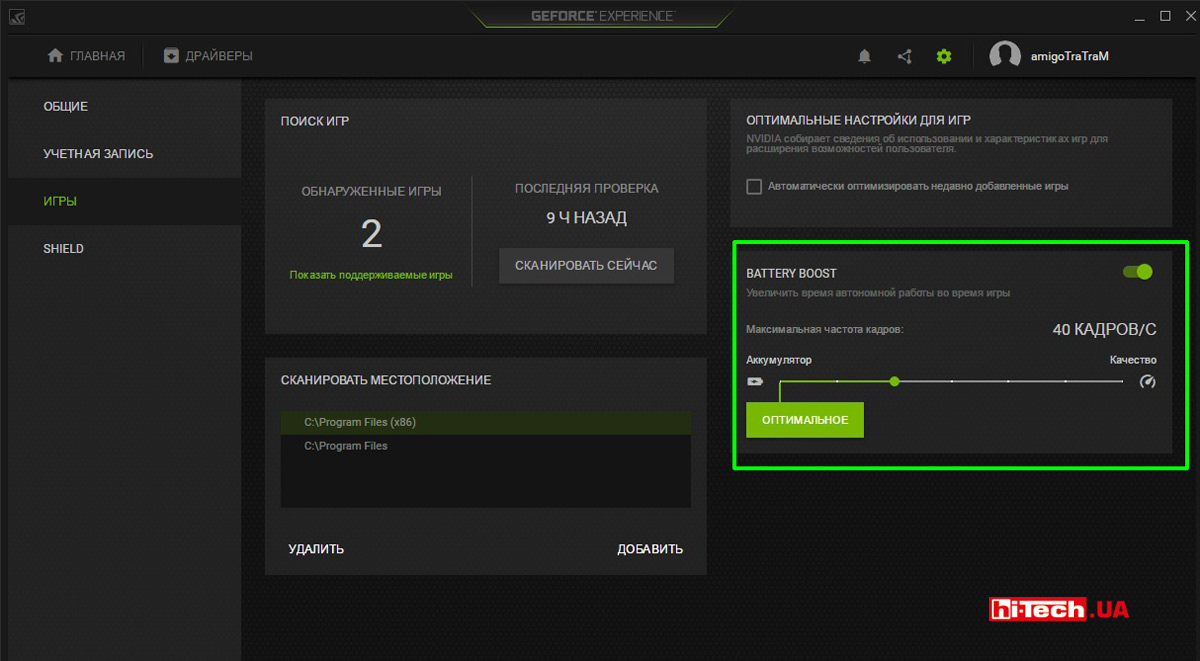
Enabling NVIDIA Battery Boost and setting the maximum FPS level in the GeForce Experience application
We set the limit to 40 FPS, charged the laptop again, and ran the Metro Last Light Redux test with the same graphics settings. At the same time, the battery life up to 10% remaining battery charge increased by 1.6 times and amounted to 56 minutes. The increase is really very noticeable.
Just for fun, we analyzed how the GPU frequency, temperature, and voltage behaved by monitoring the parameters in the GPU-Z application.
| The MSI GE72 7RE APACHE PRO laptop runs on batteries | The MSI GE72 7RE APACHE PRO laptop runs on batteries with NVIDIA Battery Boost technology enabled | |
| GPU frequency, MHz | 1733 | 708 |
| Video memory frequency, MHz | 5000 | 5000 |
| GPU voltage, V | 1,062 | 0.681 |
| GPU temperature, °C | 60 | 51 |
When using NVIDIA Battery Boost, the GPU frequency and voltage are significantly reduced. It is noteworthy that the video memory frequency remained unchanged. Apparently this Battery Boost does not control this parameter.
It is worth noting that we have deliberately chosen modes that allow us to fully unleash the potential of NVIDIA Battery Boost technology. With more “heavy” graphics settings in Metro Last Light Redux, for example, if the average FPS was about 50, then limiting the maximum FPS to 40 would not allow the video card to work much more economically. Accordingly, the increase in laptop battery life would not be so noticeable.
If the system cannot produce the specified FPS level at all, then there will be no benefit from enabling NVIDIA Battery Boost.
In general,the more the average FPS delivered by the system in a game exceeds the specified maximum FPS value, the greater the benefit in battery life you can get from using NVIDIA Battery Boost.
It is also worth understanding that the effectiveness of NVIDIA Battery Boost also depends on the share of the video card in the total power consumption of the laptop. Roughly speaking, the more powerful the video card, the greater the gain in operating time (in percentage terms) NVIDIA Battery Boost technology can provide.
Some thoughts on the relevance of NVIDIA Battery Boost
Yes, as it turns out, NVIDIA Battery Boost technology is indeed capable of significantly increasing the battery life of a laptop in games, but for how many will this be important?
The fact is that gaming laptops, due to their large dimensions and short battery life (especially in games), are almost always used with mains power. They are a good modern replacement for a powerful desktop PC, and the battery in such devices often acts as a UPS and can sometimes help if you need to move a laptop from one room to another without turning off the system.
Oddly enough, but NVIDIA Battery Boost technology could be very useful just when powering the laptop from the network, because reducing the power consumption of the video card also leads to a decrease in the noise of the cooling system fans.
If you play some old or simply undemanding games, then even by significantly reducing the performance, you will still get a high level of FPS and the laptop will work quietly without straining the fans.
It would be nice if NVIDIA added Battery Boost technology functionality for running the laptop from the network.

Don't miss interesting news
Subscribe to our channels and read announcements of high-tech news, tes




Oppo A6 Pro smartphone review: ambitious

 0
0 
Creating new mid-range smartphones is no easy task. Manufacturers have to balance performance, camera capabilities, displays, and the overall cost impact of each component. How the new Oppo A6 Pro balances these factors is discussed in our review.
Oppo Reno16 Pro 5G smartphone review: well-heeled
0 
Oppo Reno16 Pro 5G looks like a balanced smartphone, in which the manufacturer tried not to make a single characteristic the defining one. It has many advantages. Let’s tell you what
Tesla Cybertruck Prices Hike Again as Artificial Hype Continues

Tesla has once again raised the price of its Cybertruck electric pickup by $5,000. We explore the reasons behind the price hike and the company’s strategy for managing demand.
OpenAI Uncovers Secret Scheme: ChatGPT Used as Disinformation Tool

OpenAI has identified a network of accounts that used ChatGPT to promote the fake “International Burke Institute.”