

Google Drive now has a dark interface mode
17.04.24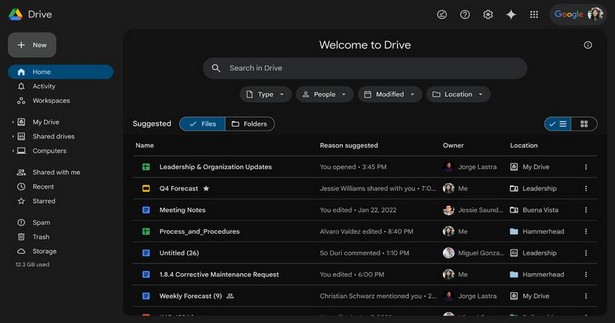
Google has announced additional interface improvements for its cloud storage service. Dark mode is now available on the web version of Google Drive.
Users can enable dark mode by going to the View section in Settings. The update is available to all Google Workspace customers, Google Workspace Individual subscribers, and users with personal Google accounts.
Let us remind you that recently users received ability to classify files into various groups, such as “Auto”, “Banking”, “Expenses”, “Home”, “Identification Documents”, “Insurance”, “Medical”, “Pets”, “School”, “Taxes” “, “Travel”, “Work”, which will make organizing files more convenient. The feature will be available in the Home tab of the Android app, where users can select categories for their files.
Don't miss interesting news
Subscribe to our channels and read announcements of high-tech news, tes

Oppo A6 Pro smartphone review: ambitious

 0
0 
Creating new mid-range smartphones is no easy task. Manufacturers have to balance performance, camera capabilities, displays, and the overall cost impact of each component. How the new Oppo A6 Pro balances these factors is discussed in our review.
Oppo Reno 15 5G smartphone review: confident
0 
The Oppo Reno15 smartphone emphasizes design, a high-quality display, versatile cameras, and good battery life. Let’s take a closer look.
Oppo Enco Air 5 Pro headphones have IP55 protection and price $50 Bluetooth earphones Oppo

Oppo launches a new generation of fully wireless headphones – Oppo Enco Air 5 Pro with IP55 protection
Hyundai will add Pokémon to its cars car Hyundai

Users will be able to change the graphics of Hyundai’s digital instrument panel and central display, activate thematic navigation, as well as animations.