

Copilot for Microsoft 365 just got faster, smarter, and less intrusive
30.05.26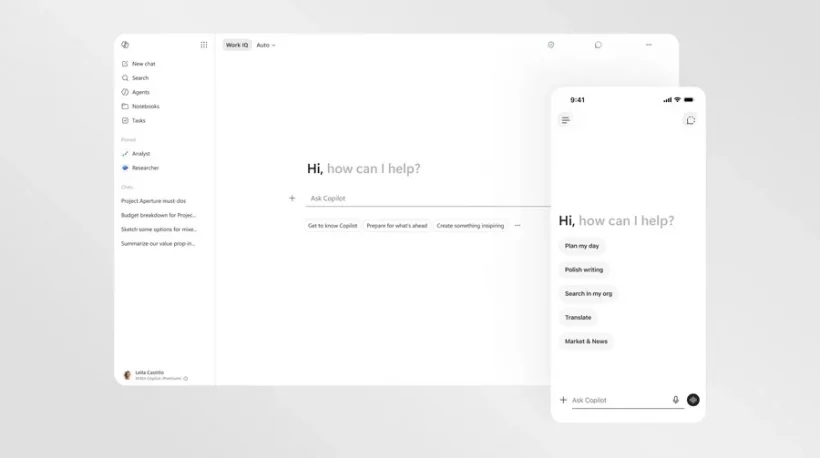
Microsoft has started a phased launch of a major update for its AI assistant Copilot, integrated into the Microsoft 365 ecosystem. The developers have significantly redesigned both the performance of the service and its visual component. According to the company, the updated Copilot now starts twice as fast, and the interface has become noticeably cleaner and easier to perceive information.
What’s changed in Copilot for Microsoft 365
The new version of Copilot is focused on more natural user interaction with artificial intelligence inside Microsoft office applications. The main emphasis in the update is on the speed of work, simplified navigation and increased convenience during everyday tasks. The update applies to both desktop versions of services and mobile devices.
Updated interface and new operating principles
One of the key changes was the implementation of the concept of progressive disclosure — a system of gradual display of control elements. Now Copilot does not display all functions and tools at once, but only those options that the user needs at a particular moment. Thanks to this, the workspace has become less congested, and the interaction with the assistant has become more intuitive.
Serious changes also affected the request window. Users got the opportunity to format the text right inside the input line, and the field itself automatically expands when typing long messages or inserting large fragments of text.
How Copilot works inside Office applications
In Microsoft 365 applications, the AI assistant is still available through a compact sidebar, but its functionality has become more flexible. Copilot is able to analyze the content of documents, answer questions about the text, offer stylistic corrections, correct errors and completely rework individual fragments of materials.
In addition, Microsoft has expanded the integration capabilities of the AI point. Now you can activate Copilot directly in certain elements of the document – for example, in a selected paragraph in Word, a separate cell in Excel or directly on a PowerPoint slide.
For users who prefer a minimalist interface with no extra elements, the company will also add the ability to hide Copilot’s floating buttons in Word, Excel and PowerPoint.
When the update becomes available
The official launch of the new version of Copilot started on May 28, 2026. The update is gradually rolling out to enterprise and personal users of Microsoft 365 on computers and mobile devices.
Don't miss interesting news
Subscribe to our channels and read announcements of high-tech news, tes

Oppo A6 Pro smartphone review: ambitious

 0
0 
Creating new mid-range smartphones is no easy task. Manufacturers have to balance performance, camera capabilities, displays, and the overall cost impact of each component. How the new Oppo A6 Pro balances these factors is discussed in our review.
Oppo Reno16 Pro 5G smartphone review: well-heeled
0 
Oppo Reno16 Pro 5G looks like a balanced smartphone, in which the manufacturer tried not to make a single characteristic the defining one. It has many advantages. Let’s tell you what
Signia Unveils MaX Platform With Quad-Neural Engine for Hearing Aids

Signia Pure CG MaX is the first hearing aid based on the new MaX platform, utilizing four specialized neural networks.
Samsung Galaxy S26 FE: Everything We Know Before the Launch

Samsung is gearing up for the Galaxy S26 FE launch scheduled for this week. Anatel certification confirms the smartphone retains its predecessor’s battery capacity while adding support for up to 45W fast charging.