

PS5 False Storage Error: The Fix
06.09.26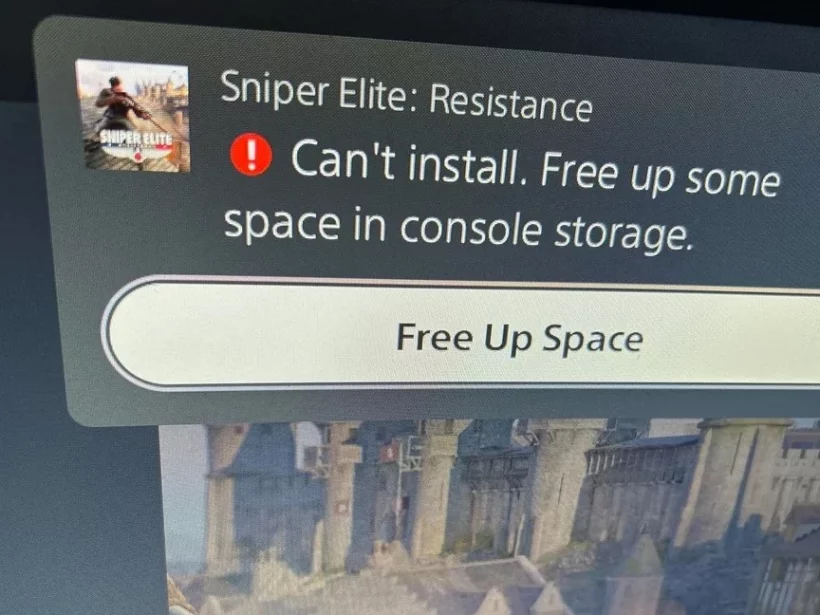
Many PlayStation 5 console owners are encountering a recurring system error: when attempting to download or update a game, the device reports insufficient free space, even though hundreds of gigabytes are actually available on the drive. Users are reporting the issue en masse, describing situations where the system demands more space for updates as small as 10 GB, despite having, for example, 350 GB of free space.
Why the ‘Not Enough Space’ Error Occurs
According to available data, the problem is usually unrelated to the actual storage capacity. The root cause lies in glitches triggered by improper console shutdowns. This software bug has proven quite widespread, and it is surprising that Sony has yet to release an automatic system update to fix the error without user intervention.
How to Fix the Storage Error via Safe Mode
There is a reliable workaround to restore proper storage functionality. Since standard storage management tools are ineffective, you must use the built-in system diagnostic tool:
- Turn off the console completely.
- Press and hold the power button until you hear two beeps (the first at startup, the second a few seconds later).
- Once the image appears on the screen, connect the DualSense controller using a USB cable.
- In the ‘Safe Mode’ menu, select the ‘Repair console storage’ option.
After selecting this option, the system will perform diagnostics and resolve the software glitch. Pending downloads should then resume automatically.
What to Do if the Error Returns
Because the problem is linked to system glitches during improper shutdowns, this bug may reappear in the future. The good news is that the recovery method described can be used again whenever the error returns. While it requires accessing a hidden menu, it is currently the fastest way to solve the problem.
. Information is current as of September 6, 2026.
Don't miss interesting news
Subscribe to our channels and read announcements of high-tech news, tes

Oppo A6 Pro smartphone review: ambitious

 0
0 
Creating new mid-range smartphones is no easy task. Manufacturers have to balance performance, camera capabilities, displays, and the overall cost impact of each component. How the new Oppo A6 Pro balances these factors is discussed in our review.
Oppo Reno16 Pro 5G smartphone review: well-heeled
0 
Oppo Reno16 Pro 5G looks like a balanced smartphone, in which the manufacturer tried not to make a single characteristic the defining one. It has many advantages. Let’s tell you what
PS5 False Storage Error: The Fix
PS5 owners are reporting false ‘not enough space’ errors. Learn how to use the ‘Repair console storage’ feature in Safe Mode to fix this software bug in minutes.
Xiaomi Mijia Rich Mineral Water Purifier 2 Brings ‘Longevity Water’ to Your Tap
Xiaomi has launched the updated Mijia Rich Mineral Water Purifier 2, which promises “longevity mineralization.” The new model features improved filtration, a longer membrane lifespan, and a higher flow rate.