

Lenovo Yoga Book tablet, laptop, and a notepad review
10.02.17
Lenovo Yoga Book (Windows)
At first glance, it may seem that this is another two-in-one hybrid device, combining the capabilities of a tablet and a laptop.
But opening the Lenovo Yoga Book, you immediately understand that this time the manufacturer has prepared something new. Summing up Based on the results of what we saw at IFA 2016, we even noted Yoga Book as one of the most unusual new products.
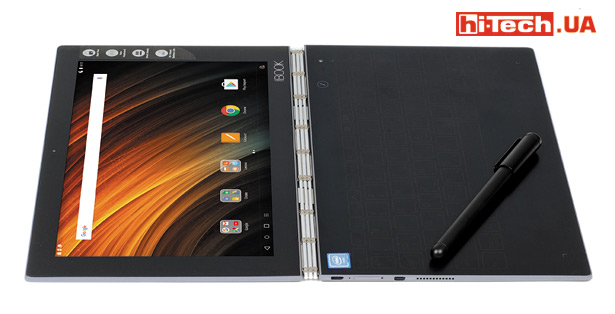
Lenovo Yoga Book (Android)
Where you would normally see a keyboard, the Yoga Book has a dark surface. This is a special touch surface designed for drawing or handwriting using a special Real Pen. One has only to press a special button – and this surface turns into a keyboard (the outlines of buttons appear on the surface).
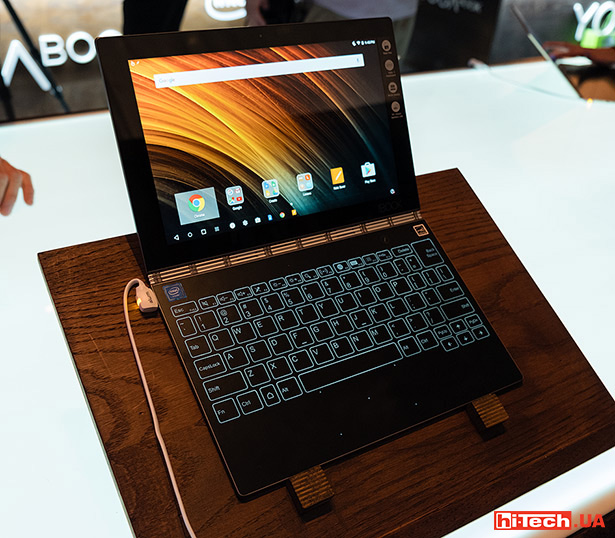
Lenovo Yoga Book at IFA 2016
It turns out that in the case of the Lenovo Yoga Book, a “notepad” mode has been added to the standard “tablet” and “laptop” modes.
Appearance and design
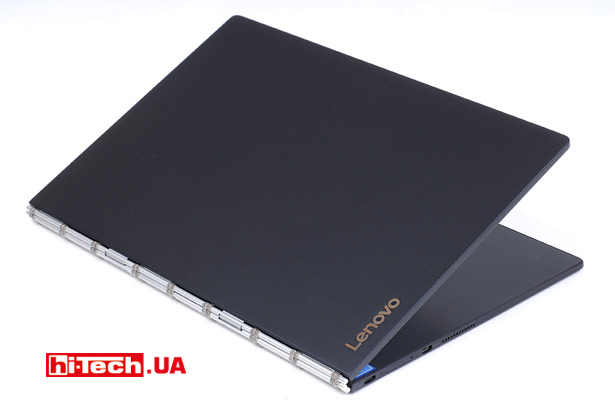
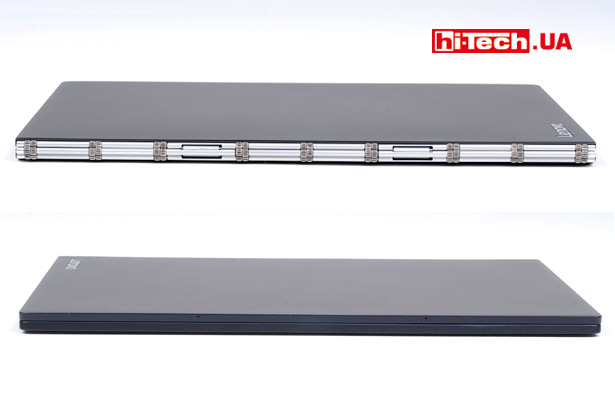
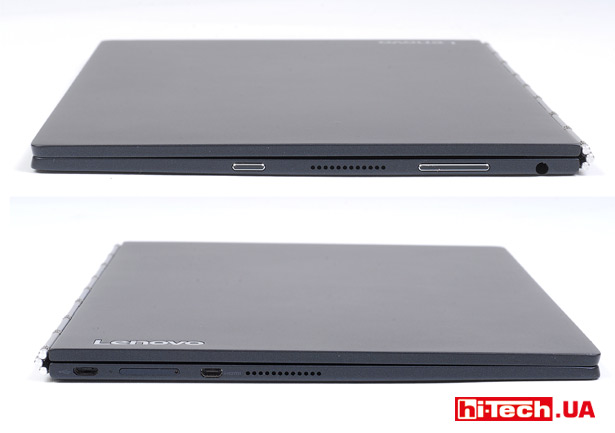
When folded, the thickness of the Lenovo Yoga Book is less than 1 cm. The manufacturer managed to make the device very elegant. Frankly, the Lenovo Yoga Book looks just great.
If we compare the Yoga Book, for example, with 10-inch Windows tablets-laptops, then in terms of external performance this is the coolest and highest quality device that we had to deal with during tests.
Usually 10-inch laptop tablets are made with a detachable keyboard, but in this case it is non-removable. The design of the Yoga Book is typical for many devices in the Lenovo Yoga series and allows for a whole range of operating modes. By opening the Yoga Book’s screen 360°, you get a tablet mode; in intermediate positions you can get a tent, stand, and laptop mode.
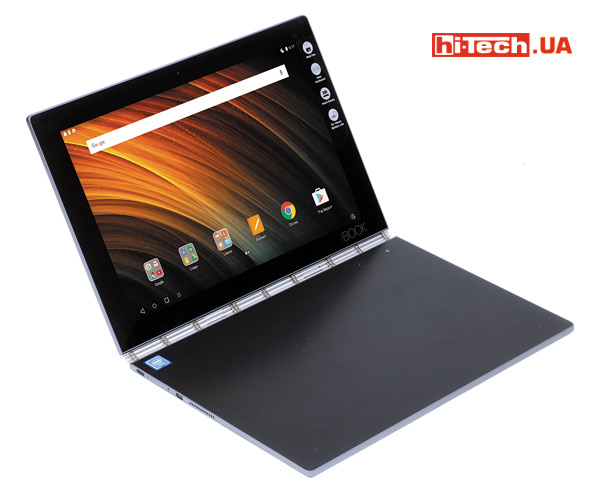
Lenovo Yoga Book (Android).Laptop mode
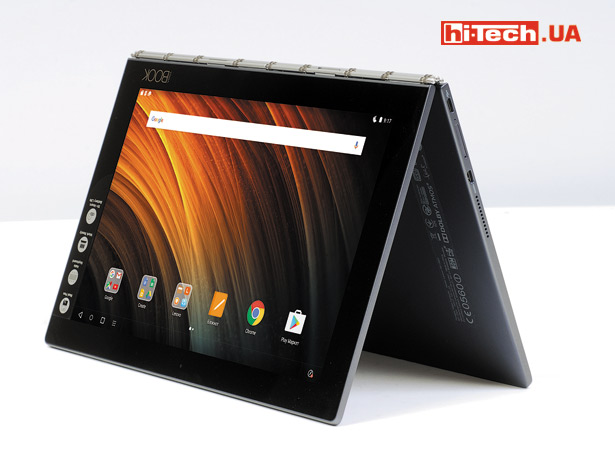
Lenovo Yoga Book (Android). Tent mode
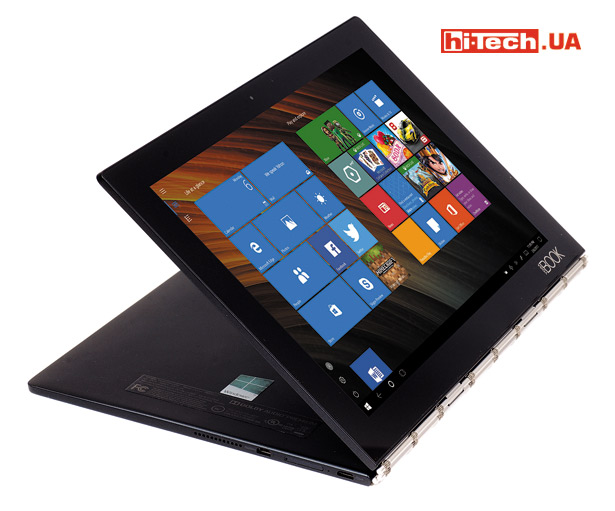
Lenovo Yoga Book (Windows). Stand mode
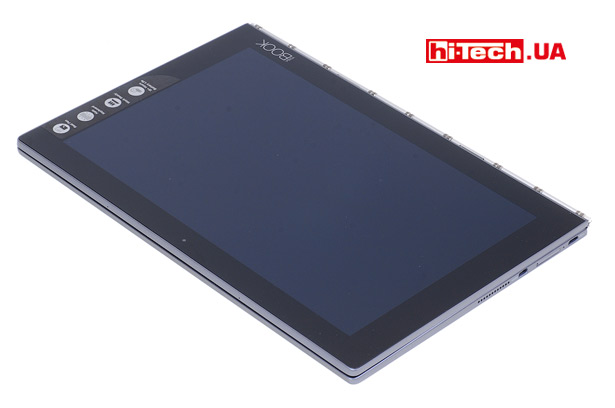
Lenovo Yoga Book (Windows). Tablet mode
The hinge, in other words, securely fixes the screen at any angle. The screen will not change tilt due to shaking or vibration when using the Yoga Book in a car or other transport. But, on the other hand, opening a laptop is not so easy; it requires some effort. The situation is further complicated by the fact that there are no finger grooves on the case.

Lenovo’s proprietary hinge is traditional for many models of the Yoga line
Against the background of a futuristic keyboard and thin panels, rather thick frames around the device are striking. This happens very often on Windows tablets with a diagonal of 10”, but for Android devices this is already rare, if we talk about modern devices.
Lenovo Yoga Book onWindows andonAndroid
Lenovo Yoga Book is available in versions with different operating systems. In the first case, this is an option based on Windows 10 Home, and in the second – based on Android 6. The Windows version is slightly more expensive.
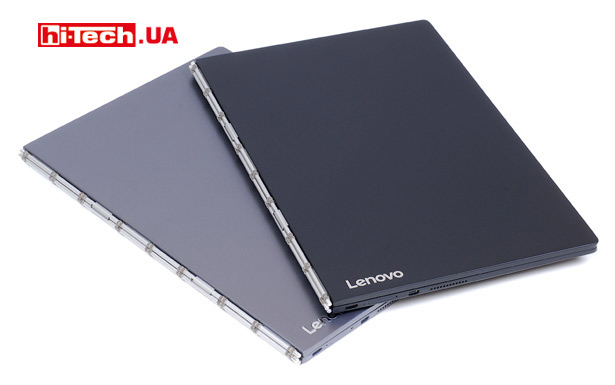
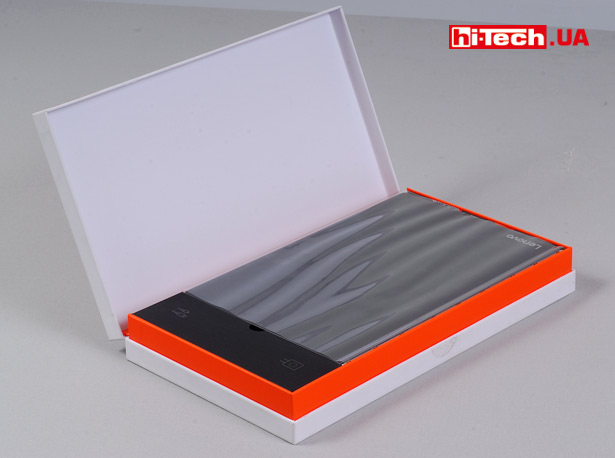
Lenovo Yoga Book Android (Grey) and Windows (Black)
By the way, we tested two Lenovo Yoga Books at once, with different OSes, so it was an excellent opportunity to compare them with each other.
There are no technical differences between the modifications. The only difference is in different color options (the Windows version of the Yoga Book can be black, and the Android version can be gray or gold) and slight differences in the keyboards. In place of the Start button in the Android version of the device there is a Home button. There are also differences in the assignment of the keyboard function buttons.
On a Windows device, you will get the standard Windows 10 Home operating system. This environment is typical for transformable devices (tablet + laptop), but to optimize the Yoga Book’s performance in the Android environment, the manufacturer has used several interesting solutions in the interface.
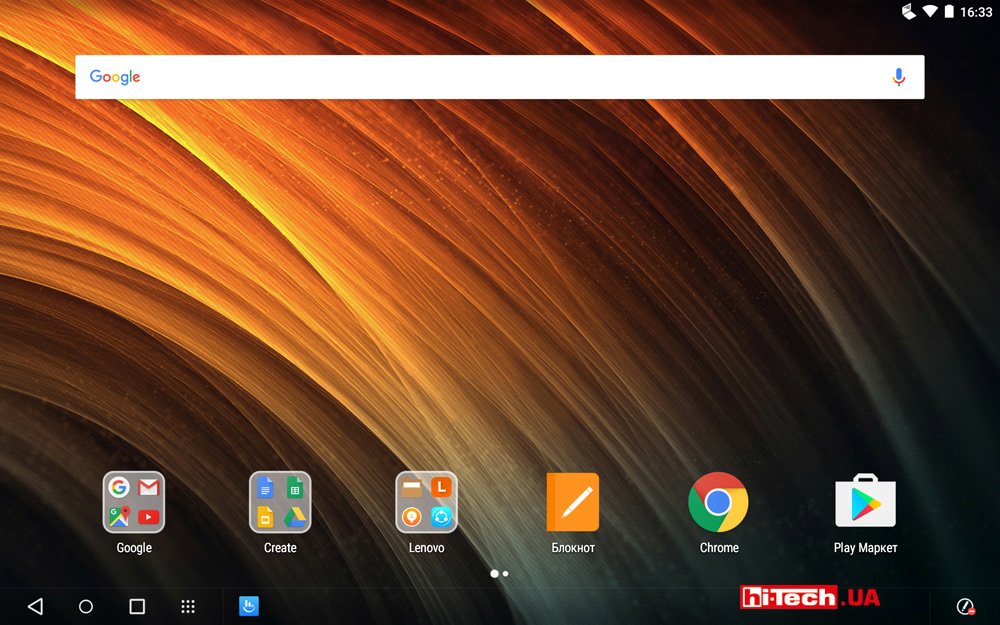
Lenovo Yoga Book Android Interface
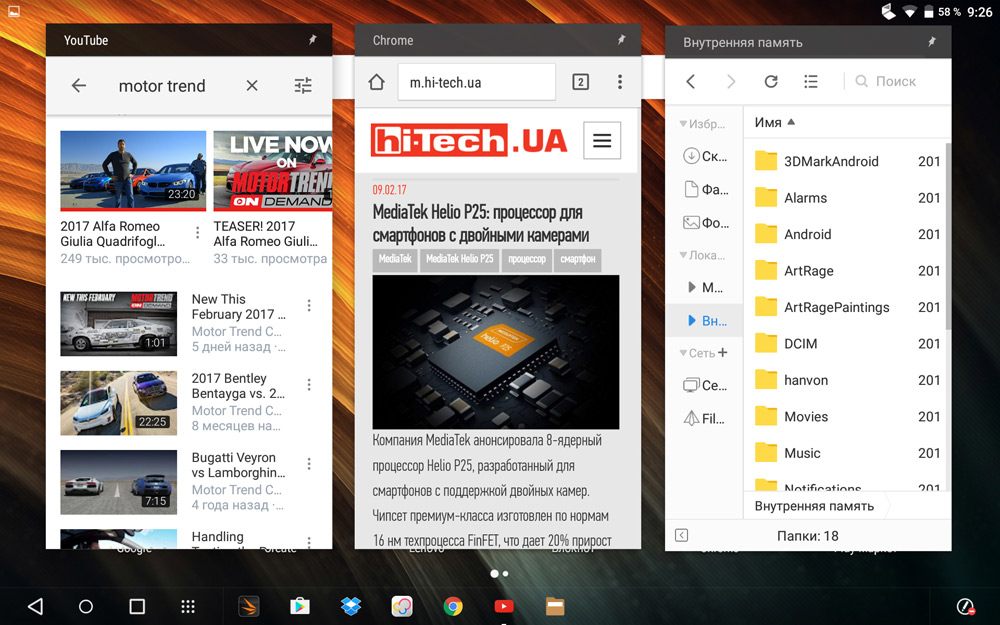
Minimize applications to windows
Similar to Windows, Android places icons for open applications in the bottom bar. Applications can be minimized to windows, allowing you to display multiple active applications on the screen at once. An application window can be pinned and displayed on top of another application. It should be noted that not all applications support windowing.
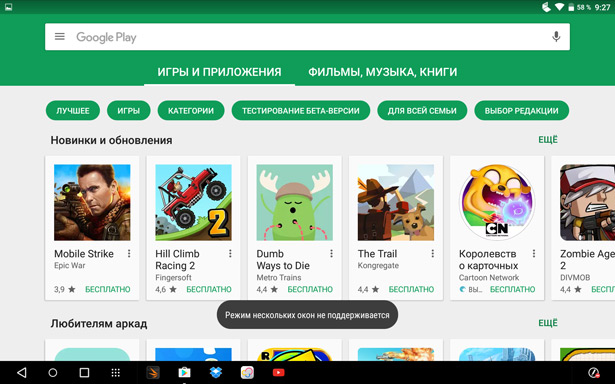
Not all applications can run in windowed mode
Using the Real Pen and Touch Keyboard
It’s the touch-sensitive drawing surface that also doubles as a keyboard that makes the Lenovo Yoga Book a truly unique device.
Please note that when you turn on the keyboard mode, the positions of the buttons and their sizes cannot be adjusted. Their placement is rigidly fixed.
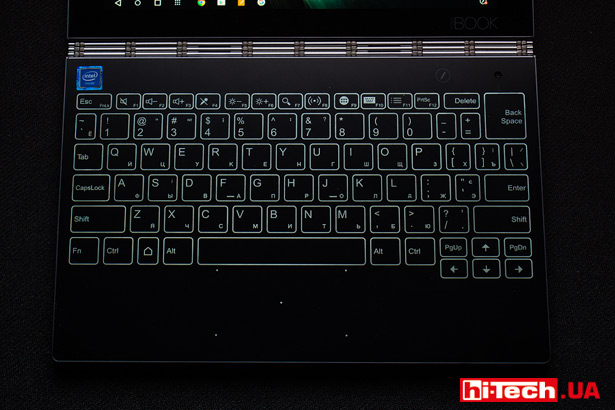
Keyboard Lenovo Yoga Book (Android)
The manufacturer calls this keyboard optical. How convenient is it to use?

It will definitely take some time to get used to. This keyboard is more convenient than an on-screen one, but those who have speed typing skills will definitely miss the tactile feedback. Yes, there is vibration feedback and sound when pressed, but input performance will most likely be lower compared to conventional keyboards.
If you plan to use your laptop to frequently enter large amounts of text, this option will not be the most optimal.
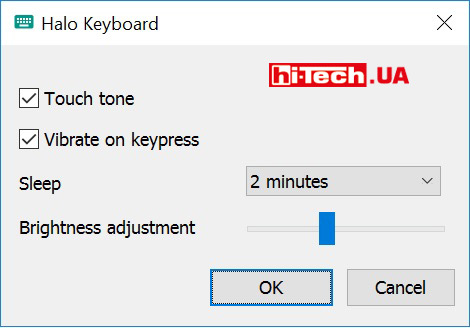
Touch keyboard settings in Windows. Approximately the same settings can be changed in the Android version of Lenovo Yoga Book
When using an external (non-screen) keyboard on an Android device, I unexpectedly encountered the inconvenience of switching the input language. To change the language, you had to go to the input section through the main settings menu, select an external keyboard there, and then set the required language. There may be a better way, but we haven’t found it.
Lenovo Yoga Book is very compact, so there is very little area left for the touchpad. For the Android version of the Yoga Book, this isn’t as important, since you’ll likely be using the tablet’s touchscreen itself. But on a Windows device, where the touchpad is very important, its small size can create some discomfort. Frequent touching of the space button is very likely.
Now we come to the fun part – using the Real Pen.
The drawing surface was developed in collaboration with Wacom, which specializes in graphics tablets.
A Real Pen is provided for drawing on the touchpad. You won’t be able to draw on this panel with a regular stylus or finger. The system recognizes about 2000 degrees of pressure, as well as the tilt of the “pen”. By adjusting the pressure, you can, for example, create lines of different widths. The rendering lag is almost unnoticeable. The tool is quite convenient to use.
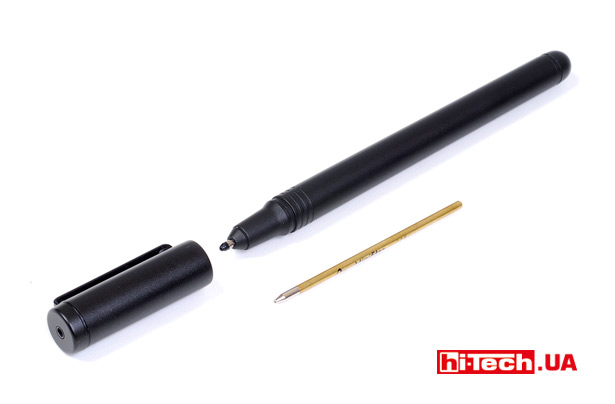
Real Pen
Is the Yoga Book suitable for drawing for those who work professionally in graphics? Most likely no. This is more of an entertainment feature that will appeal to children and those who like to draw, or may be useful for some educational or business use.
By the way, you can also draw on the tablet screen with a pen. True, in this case there will be no recognition of the degree of pressure.
The Lenovo Yoga Book variants for different operating systems come pre-installed with some applications that allow you to immediately try out the Real Pen in use.
The Lenovo Yoga Book can be connected to an external monitor/projector (via HDMI or wireless) and you’ll get a larger screen to display what you’re typing or drawing.
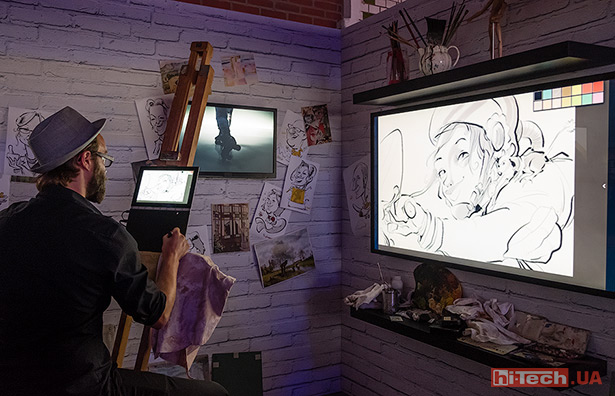
But the interesting possibilities associated with drawing do not end there. Yoga Book automatically produces digital versions of what you draw or write on pieces of paper on your screen.
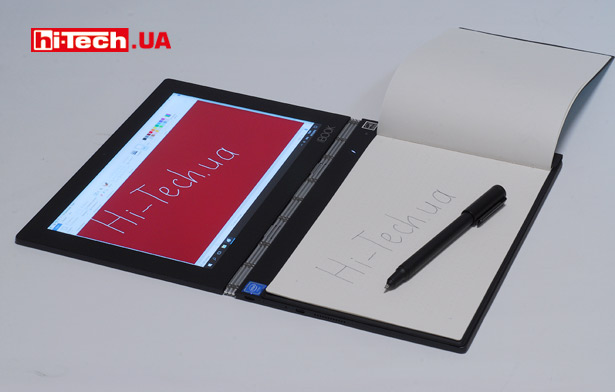
To do this, you need to replace the Real Pen stylus with an ink refill (supplied) and place a piece of paper on the Yoga Book touchpad. You can use any paper up to 5 mm thick, but for convenience, the manufacturer has included a paper notebook in the kit, optimized in size for use with the Lenovo Yoga Book. This notepad also has a convenient magnetic mount for securing sheets to the touch surface.

Apparently, to enable the Real Pen to work on the tablet screen, the manufacturer used AnyPen technology. As a result, the screen became sensitive to the touch of any conductive objects. This could be an ordinary pencil (the lead conducts current), something made of metal (if you are not afraid of scratching the screen), or, as the manufacturer showed in the tablet menu, a carrot.
Screen
As for a 10-inch diagonal, the resolution of the Lenovo Yoga Book screen is quite optimal and is 1920×1200 pixels. We would also like to note that the vertical resolution is slightly higher than Full HD (1920×1200 versus 1920×1080 for Full HD).
The aspect ratio is 16:10, not 16:9. This can be considered some advantage, because with the same diagonal you get a slightly larger screen area.
The screen itself is high quality. The use of an IPS matrix is declared. There really are no complaints about the viewing angles.
According to measurements, the screen brightness was 346 cd/m2. This is a very respectable indicator. In modern smartphones this value is usually higher, but in laptops, as a rule, the screen brightness is much lower.
As usual, we note that in Windows there is a possibility of encountering applications that are not optimized for high DPI screens. As a result, elements on the screen in such applications may appear small.
Equipment, performance, heating
The use of a processor from Intel, in this case the Intel Atom x5-Z8550, made it possible to make separate versions of the Lenovo Yoga Book both based on Windows and based on Android.
It uses 4 GB of RAM and a 64 GB built-in storage. You need to understand that the “filling” of the Lenovo Yoga Book is more typical for mobile devices (tablets), rather than laptops. Therefore, although a flash memory drive is used here, it is not an SSD drive, but eMMC memory with noticeably less performance.
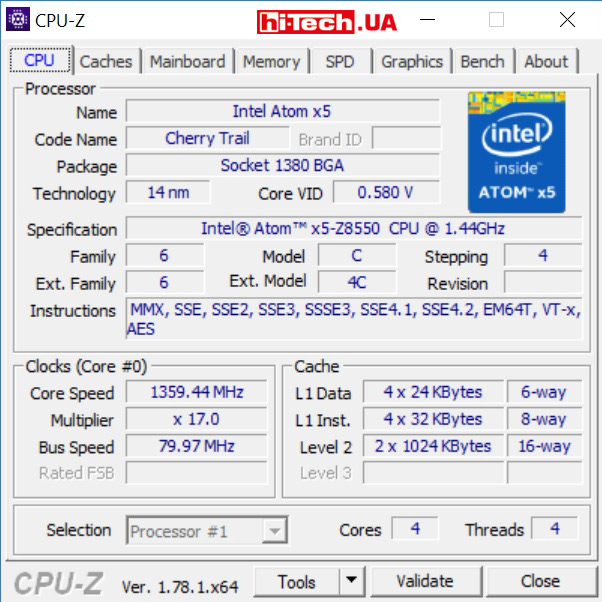
Characteristics of the processor used in the Lenovo Yoga Book according to the CPU-Z application
As a Windows system, the capabilities of the Lenovo Yoga Book can be called modest. The device can cope with basic tasks, such as watching videos, Internet browsing, and regular office applications, without any problems, but if you load it with work in a graphics editor, run a large number of applications at the same time, etc., you will immediately experience discomfort from the lack of performance.
Games designed for Windows tablets will work fine, but you won’t be able to fully play demanding games.
However, if we talk about the Android version of the Lenovo Yoga Book, the exact same hardware here provides very good performance, including in games.
We compared the Lenovo Yoga Book to some of the 10-inch Windows tablet-laptops we’ve reviewed previously. They are also based on Intel Atom processors, but of the previous generation.

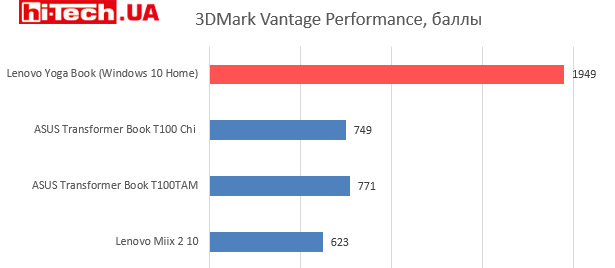
As you can see, there are not many changes in terms of processor power, but the built-in graphics core has become much more advanced. This applies to both performance and functionality. The Intel HD Graphics 400 GPU is capable of playing 4K video and has hardware decoding of H.265 codecs.
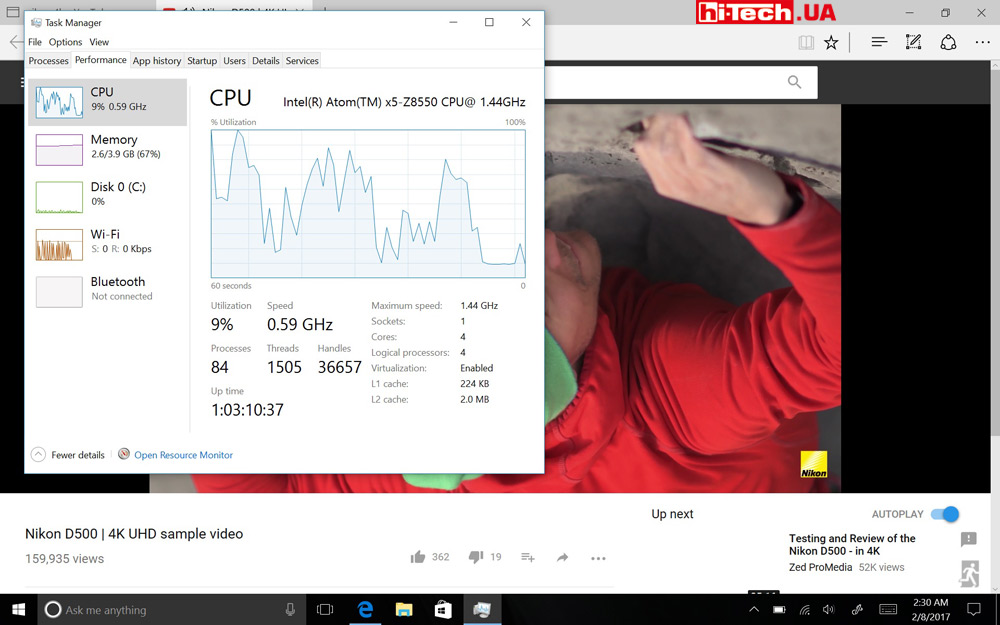
CPU usage when playing a 4K video on YouTube. As you can see, the device (in this case, Lenovo Yoga Book on Windows) copes with the task quite successfully
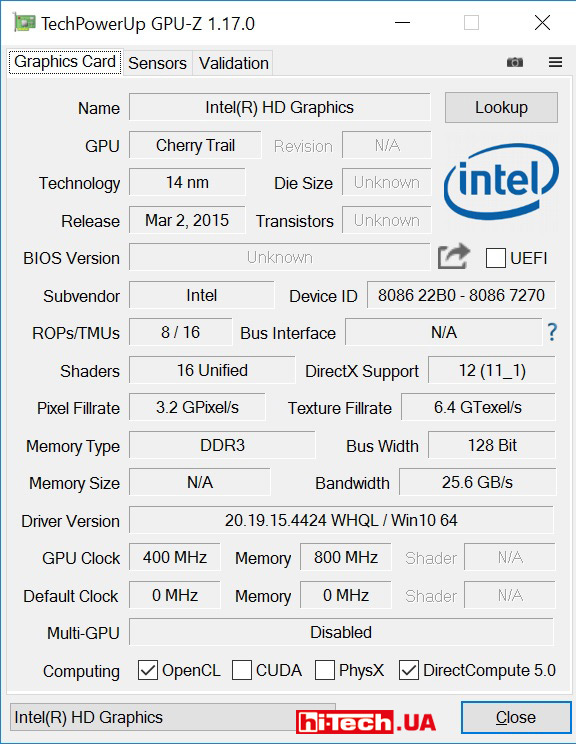
Specifications of the integrated graphics used in Lenovo Yoga Book (GPU-Z application data) processor to CPU-Z application data
The Yoga Book’s cooling is passive. Accordingly, the laptop operates silently. Under high load in games, the processor temperature rose to 67 °C. This is an absolutely safe value. We did not notice any excessive heating of the surface during operation.
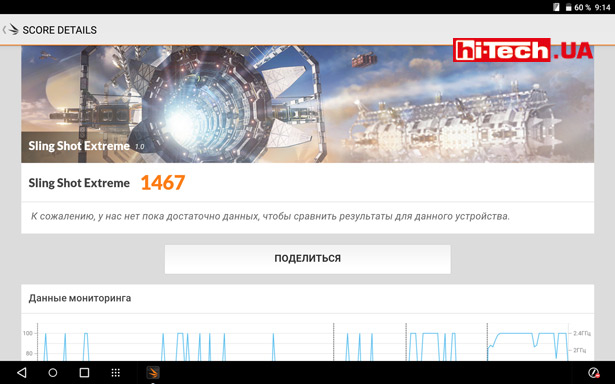
Lenovo Yoga Book Android Performance Benchmark in 3DMark (Sling Shot Extreme Test)
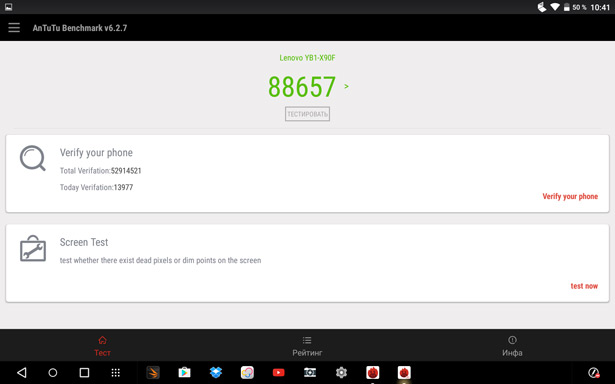
Performance evaluation of the Android version of Lenovo Yoga Book in the AnTuTu application
It’s strange that in such a modern and advanced device the manufacturer decided to use an obsolete microUSB port rather than USB Type-C. By the way, this is the only USB port on the device. In the case of the Android version of the Lenovo Yoga Book, this is quite normal, but in the Windows version, more USB connectors would be nice. It would also be advisable to get a USB-OTG cable, because sooner or later you will want to connect a flash drive, mouse, digital camera, etc. to a Windows device.
Stereo speakers are located on the side panels of the keyboard. The volume level and sound quality are quite good considering the size of the device. The only main thing is not to disable the Dolby Atmos settings.
The device has two cameras: a two-megapixel front camera for video communication and an eight-megapixel external one. Yoga Book cannot boast of a high level of shooting.
Examples of shooting with the 8-megapixel camera of the Lenovo Yoga Book

Autonomy and power supply
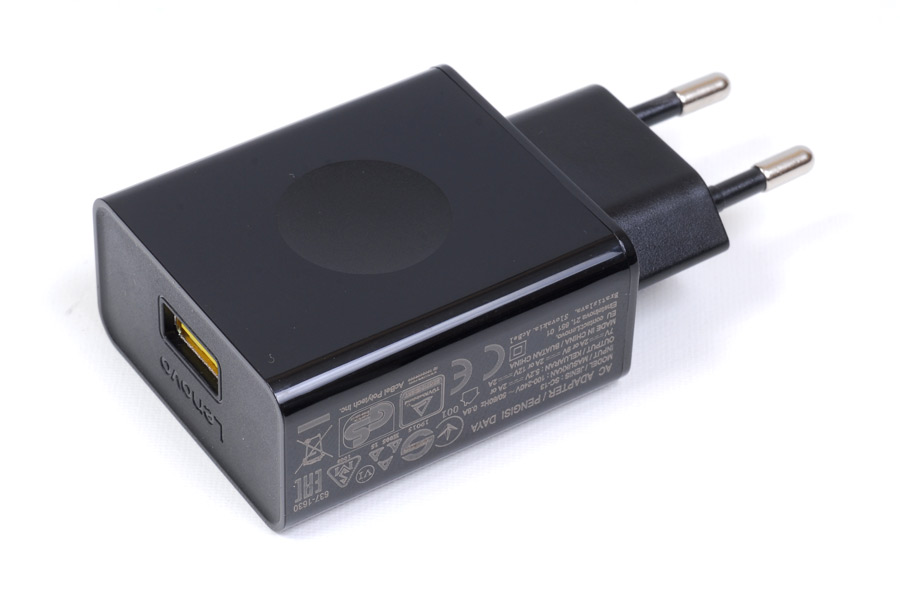
The Lenovo Yoga Book’s power supply looks like a regular smartphone charger, except it’s a little larger and more powerful. High-speed charging technology is supported. If you use a non-native charger, the charging time of the Yoga Book may increase significantly.
The combination of an economical processor (the typical power consumption of the Intel Atom x5-Z8550 is only 2 W) and a fairly high-capacity 8500 mAh battery made it possible to achieve excellent battery life. The manufacturer claims up to 15 hours of battery life.
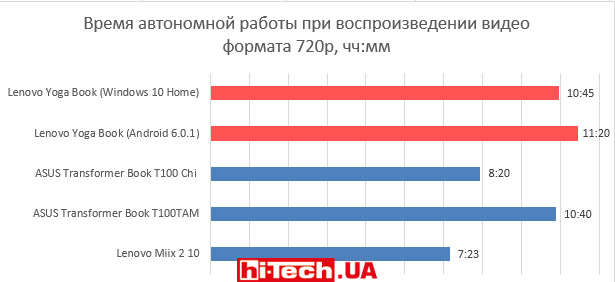
Operating time without recharging was measured during continuous playback of an HD video. The screen brightness was set to about 40%, Wi-Fi was turned off, and the sound was played through headphones.
In this mode, the Lenovo Yoga Book on Android worked for more than 11 hours, and its Windows counterpart worked for more than 10 hours. These are very good results. You can count on a whole day of battery life under moderate load.
Conclusions
The Lenovo Yoga Book is one of the most interesting 10-inch tablet-laptop hybrids on the market. Its functionality, with the ability to work as a graphics tablet, is truly unique. Our competitors don’t have anything similar yet. We warmly welcome Lenovo for its experiments and attempts to create something new.
The device attracts with its high quality, light weight, excellent appearance with its unusual keyboard, as if from the future.
Unfortunately, such a keyboard is still inferior to a traditional one in terms of convenience. Another significant drawback of the Yoga Book is its rather high cost, which can scare away many potential buyers.
You need to understand that the Lenovo Yoga Book will be good as an entertainment device, but it will not be able to replace a full-fledged graphics tablet if serious work with graphics is needed.
The hardware base used is better matched with the Android version of the Lenovo Yoga Book. But if you need to run Windows applications, then Yoga Book on Windows will not disappoint. You just need to be aware of the limitations of the device.
Characteristics of Lenovo Yoga Book on Windows (YB1-X91F) and Android (YB1-X90F)
| Screen | 10″, IPS, 1920×1200 pixels |
| Processor | 4-core Intel Atom x5-Z8550 |
| Video | Intel HD Graphics 400 (built-in processor) |
| RAM amount | 4 GB |
| Storage | 64 GB eMMC |
| Wireless interfaces | Wi-Fi 802.11 ac, Bluetooth V4.0+HS |
| Miracast support | yes |
| Video inputs | micro HDMI |
| Connectors | 1xmicroUSB 2.0, 1xmicroHDMI |
| Card reader | microSD (up to 2 TB) |
| Audio jacks | combined 3.5 mm Audio Jack microphone input/headphone output |
| Built-in microphone | yes |
| Built-in navigation receiver | yes |
| Cameras | front 2 megapixels, main 8 megapixels. |
| Built-in columns | stereo |
| Dimensions | 256.6×9.6×170.8 mm |
| Weight | 0.69 kg |
| Additional features | built-in graphics tablet, Real Pen included, touch keyboard |
| Operating system | Windows 10 (YB1-X91F) or Android 6.0.1 (YB1-X90F) |
| Supplier | Lenovo representative |
| Price | $720 (Windows version), $610 (Android version) |
Rating:
+ advanced screen characteristics
+ two cameras
+ design and construction
+ good battery life
+ interesting functionality related to graphics tablet mode
+ low heat level
+ magnetic notepad included
+ light weight and compact dimensions
– only one USB port
– no USB OTG cable included
– modest shooting capabilities
– the external touch keyboard is inferior in convenience to the regular one
– high price
Lenovo Yoga Book on Android (YB1-X90F) rating:
+ advanced screen characteristics
+ two cameras
+ design and construction
+ good battery life
+ interesting functionality related to graphics tablet mode
+ low heat level
+ magnetic notepad included
+ good level of performance
+ light weight and compact dimensions
– modest shooting capabilities
– the external touch keyboard is inferior in convenience to the regular one
– high price
Read also:
- Review of the Lenovo Yoga 900S laptop. Take it on the road
- Tablet-laptop ASUS Transformer Book T100 Chi on Windows. What has changed compared to its predecessor?
- Comparison of ASUS Transformer Book T100TAM and Lenovo Miix 2 10. What is good about a Windows tablet?

Don't miss interesting news
Subscribe to our channels and read announcements of high-tech news, tes


Oppo A6 Pro smartphone review: ambitious

 0
0 
Creating new mid-range smartphones is no easy task. Manufacturers have to balance performance, camera capabilities, displays, and the overall cost impact of each component. How the new Oppo A6 Pro balances these factors is discussed in our review.
In-Ear headphones Active Noise Cancellation: how Oppo eliminate noise
0 
In-ear headphones remain one of the most popular form factors due to their lightweight design. However, this design is considered one of the most challenging to implement active noise cancellation (ANC). We’ll explain how Oppo solved this problem.
Apple Music to Introduce AI Music Labels

Apple Music will introduce special Made With AI labels for songs created with generative artificial intelligence by the end of 2026.
Windows 11 Update Breaks Games: The RGB Fix
The latest cumulative Windows 11 update has caused issues with game performance and stability. Microsoft confirmed the conflict is triggered by RGB peripheral software.