

Chrome for Android has learned to hide your address from sites – approximate geolocation
08.05.26
Have you ever wondered why an ordinary news portal or food blog needs to know the street and number of your house? In the modern digital environment, Internet services often delve into the privacy of users much deeper than common sense requires. For a long time, the choice was binary: either you allow the browser to see you as if under a microscope, or you block access to geolocation, risking being left without the correct weather forecast or relevant results.
The mobile version of Google Chrome for Android finally gets out of this dilemma by introducing a flexible privacy protection tool. Now the user can decide for himself whether to share exact coordinates or send only “blurry” data to the site. The move is part of Google’s global strategy to change how data is collected and used online.
Blurred geolocation: from precision to fog
The Chrome update brings an important switch to the Android interface. When a site requests geolocation, the user now sees the options “Exactly” or “Approximately.” Previously, redundant location information was transmitted automatically, even if the resource only needed to know your city or area.
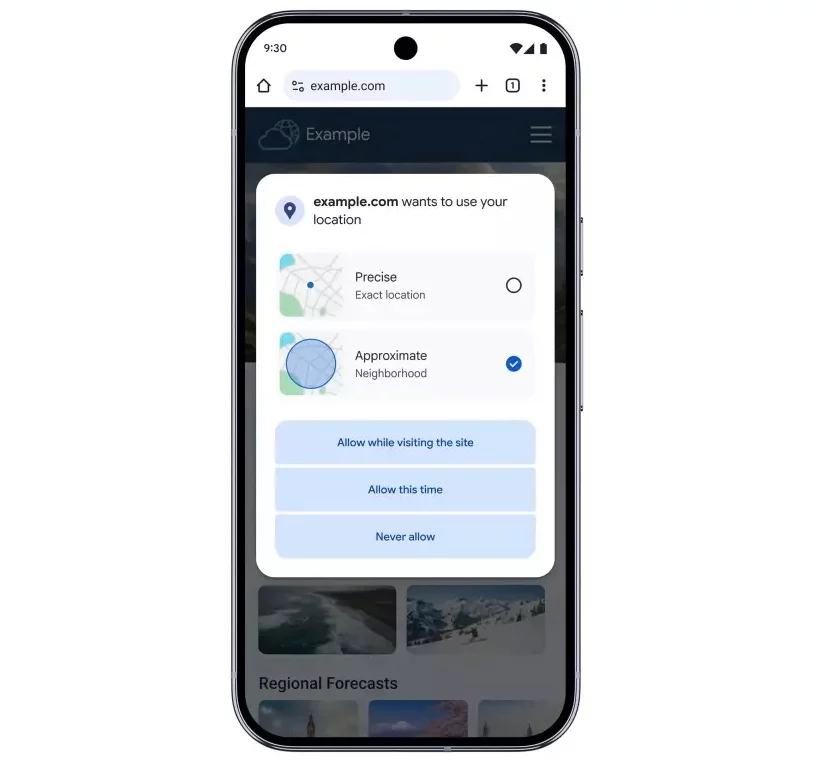
The technical side of the issue falls on the shoulders of content developers through the new API. The Google team gives site creators the opportunity to immediately request approximate data without overloading the system with unnecessary requests. At the same time, it remains possible to ask for clarification of coordinates if this is really critical for the functionality of the service. This flexibility is designed to minimize conflicts between privacy and resource performance.
The dangers of approximate geolocation
The appearance of the approximate coordinates function is, in essence, a voluntary agreement to lie for the sake of maintaining privacy. Experts note an interesting psychological and marketing paradox of this decision. On the one hand, the user feels safe by hiding the exact address, street, or house number. On the other hand, such a “legalized zone of uncertainty” can be beneficial to advertising networks even more than strict data blocking. Sites can obtain huge amounts of data about users who previously remained in the shadows. This creates an ideal targeting landscape: AIs can indirectly identify us even within this blurred circle, without facing the legal risks of European or American data laws.
Users, on the contrary, calm down. After all, when we feel protected through blurred coordinates, the sense of danger decreases. People who previously blocked access to GPS entirely will now be more willing to share their “estimated” location.
The realities of using approximate geolocation for business
In the context of business services that use geolocation, the use of “nearness” has its own peculiarities. For the media and weather informers, the transition to approximate geolocation will be almost unnoticeable – they correctly pull up regional content and approximate geolocation is enough for them. However, the situation becomes more complicated for services with strict logistics. Large marketplaces, mapping services and delivery services, when receiving inaccurate data, may make mistakes when determining the nearest pick-up point or warehouse. In such scenarios, it is better for users to manually switch to precise mode to avoid any delivery issues.
Privacy Sandbox
The new location blur feature in Chrome is not a local development, but part of the global Privacy Sandbox trend aimed at phasing out third-party cookies. The world’s leading platforms are already adapting their scripts to new APIs to meet strict privacy requirements. In the US and Europe, the accuracy of “estimated” data is usually limited to a neighborhood or city, which is considered the sweet spot for digital hygiene.
Blurred geolocation for the average user
For the average Android smartphone owner, the new Chrome feature is a kind of matte film on the window. You see the light and the outlines of the street, but passers-by cannot see your life. This is a great tool for daily surfing on unfamiliar resources: you retain access to the site’s functionality without sharing your home address. However, this comfort comes at the cost of having to click on the screen again if you suddenly need to call a taxi or find your way through web maps.
Pros and cons of the solution
- Pros: reduced redundant data collection by trackers, flexible management via API and preservation of local functions without complete de-anonymization.
- Disadvantages: risk of errors on sites with critical dependence on coordinates, the need for manual configuration for navigation and limitation of functionality only to the mobile version on Android.
Is this feature worth using? Definitely yes, if you value digital hygiene and frequently visit new sites. You should only give it up if you prefer extreme automation and work with highly specialized logistics tools directly in your browser.
FAQ
How to enable approximate location in Chrome?
The feature is activated automatically when a site requests access to the location – the options “Exact” or “Approximate” will appear in the pop-up window.
Will the weather work if you hide the exact coordinates in Google Chrome?
Yes, approximate data is quite enough to determine the city and display the weather forecast.
Why is Chrome’s geolocation blurring feature only available on Android?
Google primarily implements its Privacy Sandbox developments into its own ecosystem, integration on other platforms such as Windows or iOS usually comes later.
Does approximate geolocation in Chromt interfere with the operation of marketplaces or postal services?
It may interfere at the stage of selecting a specific pick-up point or arranging a courier delivery, then you will need to switch to the exact mode.
Can advertisers see my IP when using Chrome’s approximate geolocation feature?
The feature blurs only the GPS coordinates sent through the browser API and does not affect the visibility of your IP address.
Don't miss interesting news
Subscribe to our channels and read announcements of high-tech news, tes

Oppo A6 Pro smartphone review: ambitious

 0
0 
Creating new mid-range smartphones is no easy task. Manufacturers have to balance performance, camera capabilities, displays, and the overall cost impact of each component. How the new Oppo A6 Pro balances these factors is discussed in our review.
Oppo Reno16 Pro 5G smartphone review: well-heeled
0 
Oppo Reno16 Pro 5G looks like a balanced smartphone, in which the manufacturer tried not to make a single characteristic the defining one. It has many advantages. Let’s tell you what
Hugging Face Reveals Microduck: An AI-Powered Robot Duck

Hugging Face has introduced Microduck, a compact robot designed for AI-driven skill learning.
Cheaper Than Diesel: VW Debuts ID. California Cruise With 2kW V2L and Folding Bed

Volkswagen has unveiled the ID. California Cruise, the company’s first fully electric camper van. The newcomer offers impressive range, advanced power systems for external devices, and a relatively accessible price, aiming to transform the mobile travel market in 2027.