

WhatsApp launches a bubble interface — a new way of communication
27.04.26
For a long time, WhatsApp remained a conservative tool: in order to reply to a message, the user had to pause the video or switch between windows completely. Meta Corporation decided to fix this limitation. There will be a large-scale use of the system of pop-up bubbles (Chat Bubbles) – a technology that Google laid in the basis of Android with the release of the tenth version, but which the messenger bypassed until the last moment.
Experts from the community WABetaInfo were the first to discover the testing of “floating” dialogues in the latest beta builds. This mechanic has been running on Facebook Messenger for a long time and is now migrating to WhatsApp. How will it work? When receiving a text, a dynamic round icon with the sender’s avatar or community logo appears on the screen. It hangs on top of all active programs — whether it’s YouTube, a bank client, or a navigator map.
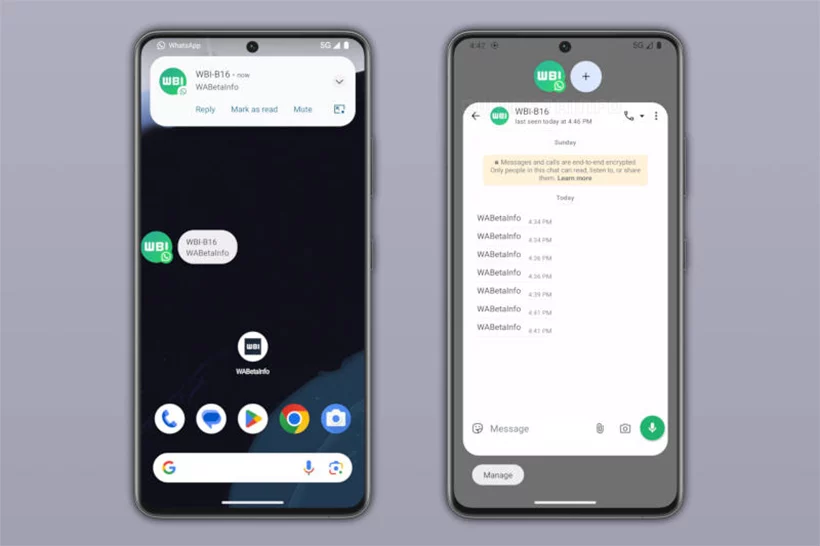
Interaction mechanics and multitasking
The system is designed to minimize friction between tasks. Clicking on the icon opens a miniature copy of the chat, where you can quickly type a reply or view the history without leaving the main application. This makes smartphone-on-the-fly scenarios tremendously easier.
WABetaInfo notes that the novelty is aimed at transforming the messenger into a full-fledged operating environment within the system. Users will be able to conduct several dialogues at once without closing the current player or document. However, there is more to the external convenience than just UI optimization.
Criticism: Digital prison in a bubble
Skeptics see the introduction of pop-up windows not only as a convenience, but also as an attack on personal boundaries. If before the messenger was a closed room you enter, now it will colonize the screen. The floating avatar becomes a visual reminder of the need to respond, effectively breaking the structure of the phone’s interface. “We cease to be viewers of content and become operators of traffic processing,” is how the effect of attention fragmentation in new conditions is described.
Pros of the new function:
- Instant response without closing other applications;
- Clear visual identification of the interlocutor through an icon;
- Less RAM consumption (the mini-interface is lighter than the full version);
- Convenient switching between several active correspondence at the same time.
Risks and disadvantages:
- Worlds become too intrusive and can be distracting;
- Risk of privacy leakage (someone can see part of the message in a floating window);
- Increased load on the smartphone battery due to rendering on top of the system;
- Possible conflicts with navigation gestures and touch buttons in games.
Impact on the average user
For the average owner of a smartphone on Android 10 and above, the WhatsApp update will turn communication into a background process. On the one hand, it is convenient for those who are constantly in touch and appreciate the ability to answer “on the run” without stopping to watch the series. On the other hand, users will have to learn to tightly configure messages so as not to become hostage to endless floating circles that will interfere with work and entertainment.
FAQ
Is it possible to completely disable pop-ups?
Yes, this will be a system setting. In the Android or WhatsApp message menu, you can choose the standard display mode without bubbles.
Will bubbles work in WhatsApp on iOS?
The technology is implemented differently due to the closed nature of iOS, but Meta is developing a similar solution within the framework of Apple’s messaging API, available in new versions of the system.
Which versions of Android support this feature?
The feature is based on the Google API implemented starting with Android 10, so it will not work on older devices.
Will this work in games?
Technically yes, but during active gaming sessions bubbles can interfere with controls, so most Android gaming skins automatically hide them when running heavy apps.
Don't miss interesting news
Subscribe to our channels and read announcements of high-tech news, tes

Oppo A6 Pro smartphone review: ambitious

 0
0 
Creating new mid-range smartphones is no easy task. Manufacturers have to balance performance, camera capabilities, displays, and the overall cost impact of each component. How the new Oppo A6 Pro balances these factors is discussed in our review.
Oppo Reno16 Pro 5G smartphone review: well-heeled
0 
Oppo Reno16 Pro 5G looks like a balanced smartphone, in which the manufacturer tried not to make a single characteristic the defining one. It has many advantages. Let’s tell you what
Garmin Beta 18.27 Rolls Out With Over 12 Fixes
Garmin has released a new beta firmware version, 18.27, for five popular smartwatch models. The update focuses on resolving software bugs and improving overall system stability.
Ugreen MagFlow Debuts: 25W Qi2.2 Foldable Charger for iPhone

Ugreen is readying a compact 2-in-1 foldable wireless charger with Qi2.2 support. The 25W device efficiently powers the latest iPhone models and AirPods accessories.